![1024px_Zyda_Mainlogo_Black-8-1.png]](https://help.zyda.com/hs-fs/hubfs/1024px_Zyda_Mainlogo_Black-8-1.png?height=40&name=1024px_Zyda_Mainlogo_Black-8-1.png)
To make bulk changes to your delivery zones, follow the steps on this article.
User Authority
The following roles can bulk edit delivery zones:
-
Owner ✅
-
Manager ✅
-
Operator ❌
Steps to Make a Bulk Edits to your Delivery Zones
1- Go to Setup and choose Delivery.
2- Choose the Branch.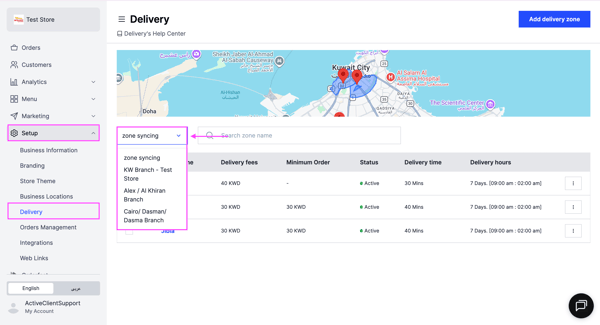
3- Select the checkbox next to Zone Name to choose all zones, or select specific zones you want to edit.
Click Bulk Edit and choose the action you want to apply: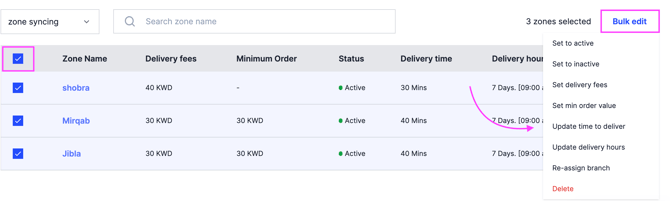
-
Set to active
-
Set to inactive
-
Set delivery fees
-
Set minimum order value
-
Update delivery time
-
Update delivery hours
-
Reassign branch
- Delete