For: Owners, Operations
Where: Setup > Integrations > Delivery
Available: Web dashboard · All countries
If you have your own contract with a courier company, connect it to Zyda. Then you can send orders to it from the order, or let Zyda send them for you.
How it works
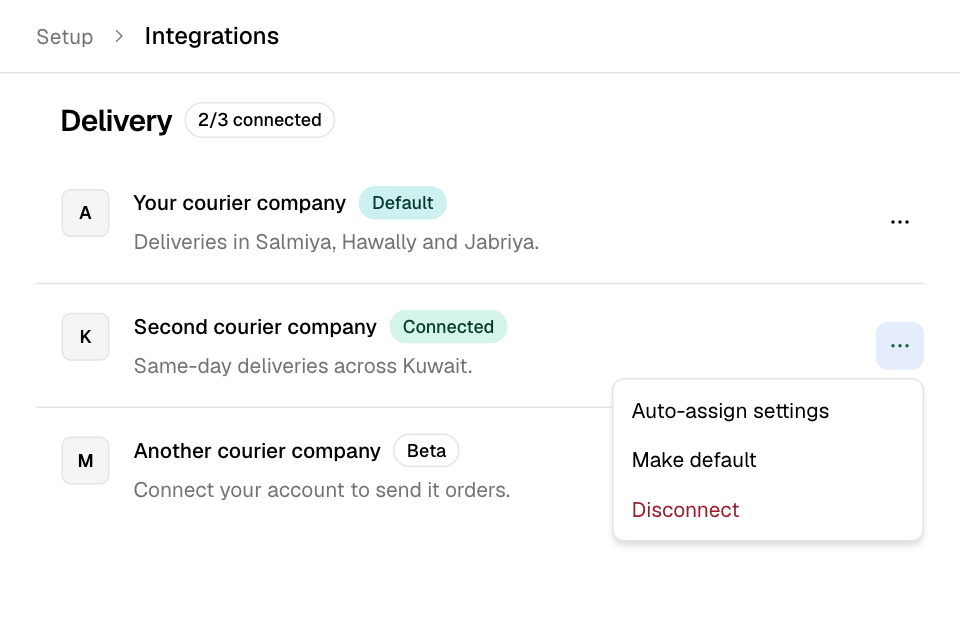
The Delivery section lists the courier companies that work in your country. Each one asks for the keys from your account with that company.
Once connected, the company shows in the order's courier choices. Your Default courier is the one Zyda uses to work out delivery fees and times.
This is different from the Zyda delivery network, where Zyda finds the courier for you. See Use the delivery network.
Connect a courier company
- Go to Setup > Integrations.
- Under Delivery, select the company. The row says Connect.
- Enter what the sheet asks for. It is one of these:
- one API Key for your account;
- a key for each branch;
- your merchant API key, then the company's branch ID for each of your branches, in two steps.
- If the sheet shows Deliver Within, choose Same Day or Next Day.
- Select Connect now. In the two-step form, select Next, then Finish.
Some companies ask for no key. Connect now then takes you to the company to sign in.
Make it your default courier
- On the company's row, select More (the three dots).
- Select Make default.
- Confirm. Orders' delivery fees and times are then worked out from this company.
The row then shows Default.
Let Zyda assign orders to it
- Select More on the row, then Auto-assign settings.
- Turn it on.
- Under Select branches, choose All, or the branches that should use it.
- Select Save.
When you turn it on for a company, that company also becomes your Default courier. Only one company can assign orders automatically at a time. Automatic assignment on the delivery network turns off.
Disconnect a courier company
- Select More on the row.
- Select Disconnect and confirm.
Rules and limits
- Auto-assign settings shows only for companies you connected yourself, not for network couriers.
- If Zyda manages the company's key for your store, there is no Disconnect.
- Turning on automatic assignment on the delivery network turns off automatic assignment to the companies you connected.
Common questions
Where do I send an order to my courier?
From the order. See Assign a driver or courier to an order.
Why is a courier company I use not in the list?
It is not available in your country yet, or Zyda must turn it on for your store. Ask Zyda support.