For: Owners, Operations
Where: Setup > Integrations > Meta (Facebook & Instagram)
Available: Web dashboard · All countries
Your Meta ads work better when Meta knows who visited your store and who ordered. Connect your Meta Pixel and the Conversions API, and Zyda sends these events to Meta for you.
How it works
You give Zyda two things:
- The Pixel ID. Your store loads the Meta Pixel in the customer's browser.
- The Conversions API access token. Zyda's server sends the same events to Meta. This keeps events that the browser loses, for example to ad blockers.
Both use the same event ID, so Meta counts each event once. For the list of events, see What your pixels and conversion APIs receive.
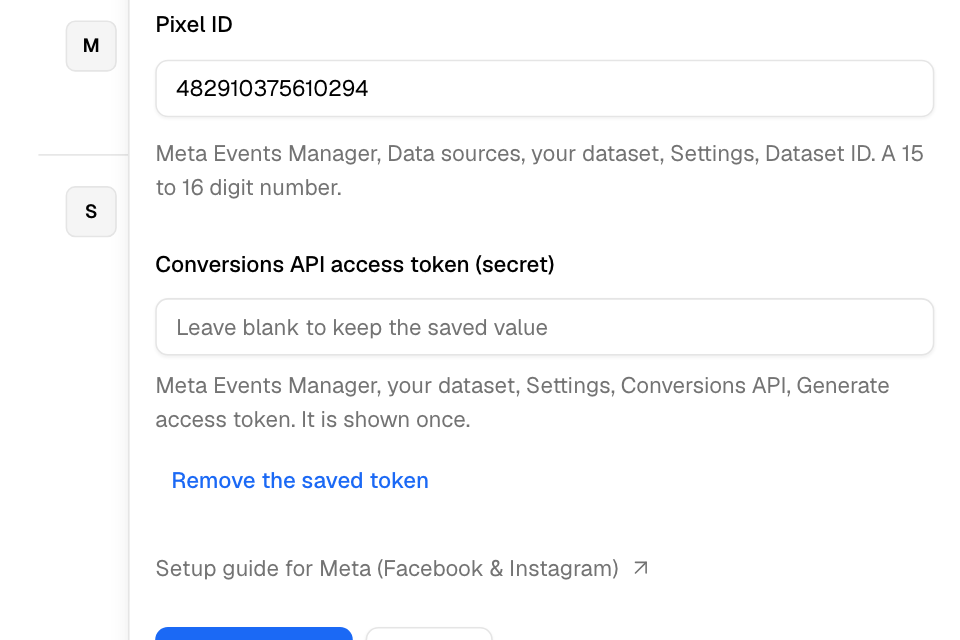
Connect Meta
- In Meta Events Manager, open Data sources, then your dataset, then Settings. Copy the Dataset ID. It has 15 or 16 digits.
- On the same page, under Conversions API, select Generate access token. Copy it. Meta shows it once.
- In Zyda, go to Setup > Integrations and select Meta (Facebook & Instagram).
- Paste the number in Pixel ID.
- Paste the token in Conversions API access token (secret).
- Select Connect.
The token field stays off until you enter a Pixel ID. A token without a Pixel would count events twice.
Test your events
- In Meta Events Manager, open Test Events and copy the test code.
- In the Meta sheet, paste it in Test event code.
- Copy the Test link and open it.
- Browse your store and place a test order.
Your events show in Meta's Test Events tab. Only the browser that opened the link is affected. Your customers' events are not changed.
Change or remove the token
- Zyda never shows a saved token again. Leave the field blank to keep it.
- To use a new token, paste it and select Save changes.
- To stop server events but keep the Pixel, select Remove the saved token.
When the tile says Action required
Meta refused the token or the Pixel ID. The row shows the reason:
| Message | What to do |
|---|---|
| The access token was rejected. Generate a new one and save it to resume tracking. | Make a new token in Meta Events Manager and save it. |
| The Pixel ID was rejected. Check it and save it again to resume tracking. | Copy the Dataset ID again and save it. |
If Meta keeps refusing the token for an hour or more, Zyda removes the saved token. Server events then stop until you save a new one.
Add your menu as a Meta catalog
A Meta catalog lets you run ads that show your dishes, with photos, prices and a link to order. Zyda gives you a feed of your menu that stays up to date.
- On the Meta row, select More (the three dots), then Product catalog.
- Copy the Catalog data source link.
- In Meta Commerce Manager, open your catalog. Go to Catalog, Data sources, Add items, then Data feed.
- Choose Use URL and paste the link.
- Set the schedule to daily, and save.
For Arabic names, add the second link in the same catalog as a Language feed. A catalog cannot use the Arabic link alone.
The catalog works with or without the Pixel. If your store is not published yet, the sheet says "Your store link is not ready yet. Publish the store, then come back."
Order Food on Instagram and Facebook
Meta no longer lets new stores connect the Order Food button. If your store connected it before, it still shows on the page as connected. Its row has no Edit and no Disconnect. If the button is removed, it cannot be connected again.
If Order Food created a Pixel for you, the Meta sheet says so. Zyda uses your own Pixel when you enter one. If you do not, Zyda uses the Order Food Pixel.
Rules and limits
- Zyda sends no events for orders your staff take in the dashboard. Phone orders have no ad click behind them.
- Disconnecting Meta removes the Pixel ID and the token together.
Common questions
Why do I see fewer purchases in Meta than in Zyda?
Orders your staff take in the dashboard, and orders your own system sends with the orders API, are not sent. Also, the purchase value leaves out delivery, service fee and tax.
Do I need both the Pixel and the token?
The Pixel alone works. The token adds server events, so Meta loses fewer of them.