For: Owners, Operations
Where: Setup > Integrations > Webhooks, API keys
Available: Web dashboard · All countries
This guide is for the developer who receives a restaurant's Zyda orders in their own system, such as an ERP, a POS or a spreadsheet tool. To send orders to Zyda, see Connect your own system: orders API and webhooks.
Add a webhook
- In the Zyda dashboard, open Setup > Integrations > Webhooks.
- Select Add webhook and enter your URL.
- Choose the events you want.
- Choose which parts of the order to send (see "Parts of the order").
- Select Save, then copy the webhook secret. Zyda shows it once. Keep it on your server only.
The URL must start with https://, reach a public address, and hold no user name or password. Zyda refuses a private or internal address when you save it. Zyda does not follow redirects.
From the same page the store can send a test event, read the delivery log of the last 30 days, send a past delivery again, make a new secret (the old one stops working at once), and turn a webhook off and on.
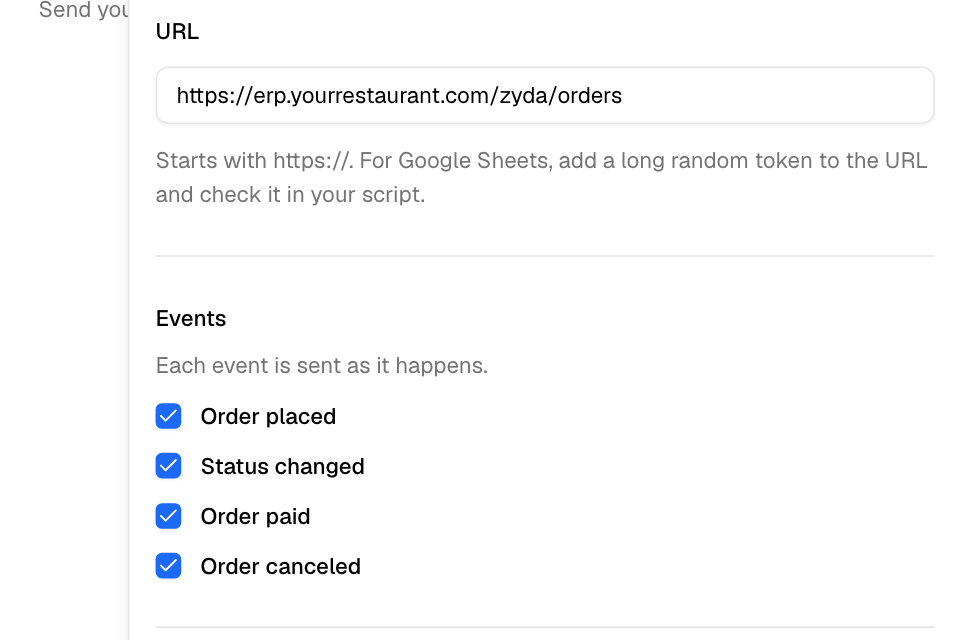
Webhook events
| Event | When Zyda sends it |
|---|---|
order.created |
The order is submitted. This is the first time it reaches the store. |
order.status_changed |
Every status change after that: accepted, ready, dispatched, delivered, fulfilled, canceled, returned, deleted. Also when staff correct an order back to an earlier status. |
order.paid |
The money is in: at submit for an order paid up front, or later when an online payment is recorded, when staff mark cash or card on delivery as collected, or when staff mark an on-account order as paid. |
order.canceled |
The order is canceled. Zyda sends it together with its order.status_changed. |
Every order of the store sends events, from any source, including live orders you sent with the orders API. These send nothing:
- an order that is never submitted, for example an expired unpaid online order;
- a recorded sale you sent with the orders API;
- a dine-in table round. Its money is paid on the table.
Zyda does not promise the order in which deliveries arrive. A retry can arrive after a later event. Use occurred_at and order.status to decide which state is newest.
The webhook request
Zyda sends an HTTP POST with a JSON body.
| Header | Value |
|---|---|
Content-Type |
application/json |
User-Agent |
Zyda-Webhooks/1 |
X-Zyda-Event |
The event name, for example order.created. |
X-Zyda-Delivery |
The delivery id. It is also delivery_id in the body. It stays the same on every retry of one delivery. |
X-Zyda-Signature |
t=<unix seconds>,v1=<signature>. See "Check the signature". |
The webhook body
Every event has the same shape. This is version 1.
order.statusis the status this event is about.order.previous_statusis the status before it. Onorder.createdit ispending.- Times are ISO 8601, in UTC.
- Amounts are numbers, in the store's currency.
testistrueonly for a test event.
Example of order.status_changed:
{
  "version": 1,
  "event": "order.status_changed",
  "delivery_id": "6f1c2a9e-0b7d-4c55-9a51-2f0e8d3b7c14",
  "occurred_at": "2026-10-14T10:32:00Z",
  "test": false,
  "store": { "id": 4321, "name": "Sample Store" },
  "order": {
    "id": 880123,
    "number": "1042",
    "status": "accepted",
    "previous_status": "submitted",
    "created_at": "2026-10-14T10:20:05Z",
    "submitted_at": "2026-10-14T10:20:06Z",
    "due_at": "2026-10-14T10:50:06Z",
    "is_scheduled": false,
    "time_slot": null,
    "delivery_type": "pickup",
    "origin": "manual_order",
    "is_manual_order": true,
    "branch": { "id": 101, "name": "Main Branch" },
    "channel": "whatsapp",
    "captured_by": "api",
    "taken_by": "staff",
    "customer": { "name": "Sample Customer", "phone": "+96550000000" },
    "address": {
      "area": null, "city": null, "block": null, "street": null, "avenue": null, "building": null,
      "floor": null, "unit_no": null, "unit_type": null, "notes": null, "lat": null, "lng": null
    },
    "items": [
      {
        "id": 5550001,
        "menu_item_id": "a1b2c3d4-0000-4000-8000-000000000001",
        "variant_id": "123456",
        "name": "Burger patties, 6 pieces",
        "name_ar": null,
        "variant_name": "Regular",
        "quantity": 2,
        "unit_price": 4.75,
        "total_price": 9.5,
        "notes": "Extra fat",
        "options": []
      }
    ],
    "payment": {
      "method": "CASH",
      "status": "paid",
      "cash_collected_at": null,
      "currency": "KWD",
      "subtotal": 9.5,
      "discount": 0.0,
      "voucher_code": null,
      "delivery_fee": 0.0,
      "service_fee": null,
      "tax": 0.0,
      "total": 9.5
    }
  }
}
Only event, order.status and order.previous_status change between events:
| Event | order.status |
order.previous_status |
|---|---|---|
order.created |
submitted |
pending |
order.status_changed |
the new status | the status before it |
order.paid |
the order's status at that time | the status before it, if the same change moved the status. Otherwise null. |
order.canceled |
canceled |
the status before it |
Notes on the fields:
channelis the order source key, for examplewebsite,phoneortalabat. See "Order sources".captured_byis the system that recorded the order. It isapifor an order you sent.taken_byis who took the order:customer,staff,ring_agentorai_agent.- Each entry in
items[].optionsholdsname,name_ar,quantityandprice. - For cash and card on delivery,
payment.statuscan readpaidbefore collection.cash_collected_atis set, andorder.paidsent, when staff mark it collected. discountincludes the voucher.channel,captured_by,taken_byandcash_collected_atcan benullon older orders.
Parts of the order
Each webhook can leave out any of these parts: customer (name and phone), address, items and payment. A part that is left out keeps its keys. Each value is null, and items is []. So the shape of the body never changes.
Check the signature
Check every request before you trust it.
- Read
tandv1from theX-Zyda-Signatureheader. - Build this text: the value of
t, a dot, then the raw request body exactly as you received it. For example1760437920.{"version":1,...}. - Compute HMAC-SHA256 of that text. Use the webhook secret as the key. Write the result as lowercase hex.
- Compare your result with
v1. Use a constant-time compare. If they differ, refuse the request. - Refuse the request if
tis more than a few minutes away from your clock. This stops someone from sending an old request again.
Use the raw body. If you parse the JSON and write it again, the bytes change and the signature no longer matches.
Node.js example (the steps above work the same in any language):
const crypto = require('crypto');

function verifyZydaSignature(rawBody, signatureHeader, secret, toleranceSeconds = 300) {
  const parts = Object.fromEntries(
    String(signatureHeader || '').split(',').map((part) => {
      const at = part.indexOf('=');
      return [part.slice(0, at).trim(), part.slice(at + 1).trim()];
    })
  );
  const t = parts.t;
  if (!t || !parts.v1) return false;
  if (Math.abs(Date.now() / 1000 - Number(t)) > toleranceSeconds) return false;

  const expected = crypto.createHmac('sha256', secret).update(`${t}.${rawBody}`).digest('hex');
  const a = Buffer.from(expected, 'utf8');
  const b = Buffer.from(parts.v1, 'utf8');
  return a.length === b.length && crypto.timingSafeEqual(a, b);
}
Answer quickly, and retries
- Answer with any
2xxstatus within 10 seconds. Zyda waits 5 seconds to connect. Do slow work after you answer, for example in a queue. - The store sees the first 2 KB of your answer in the delivery log.
- A timeout, a network error,
5xxor429is tried again after 1 minute, 5 minutes, 15 minutes, 1 hour, 3 hours, 6 hours and 14 hours: 8 tries in all, over about a day. - Any other answer, including other
4xxand a redirect, fails the delivery at once. One exception: a Google Apps Script web app (script.google.com) that answers302or303counts as delivered, because the script ran. Zyda still does not follow the redirect. - The same delivery can reach you more than once. Drop repeats by
X-Zyda-Delivery. - After 50 failed deliveries in a row, Zyda turns the webhook off. A delivery counts as failed only after all its tries. The store turns it on again with Send events.
A test event sent from the dashboard has "test": true, a delivery_id that starts with test_, and a made-up order with id 0 and number TEST-0001.