For: Owners, Operations
Where: Setup > Integrations > Webhooks, API keys
Available: Web dashboard · All countries
This guide is for the developer who connects a restaurant's own system to Zyda, such as an ERP, a POS or a spreadsheet tool. It covers both directions: Zyda sending orders to your system, and your system sending orders to Zyda.
How it works
- Webhooks (Zyda to your system). Zyda sends you an HTTP request when one of the store's orders changes.
- Orders API (your system to Zyda). You send Zyda the orders the store took outside Zyda, for example on a marketplace or on the phone.
You can use one direction, or both. Someone at the store who can open Setup > Integrations sets up both in the dashboard. See Set up webhooks and API keys.
All examples on this page are made up. They contain no real key, secret, store or customer.
Zyda's webhooks, which send your orders to your system as they happen, have their own guide: Receive Zyda orders by webhook.
Get an API key
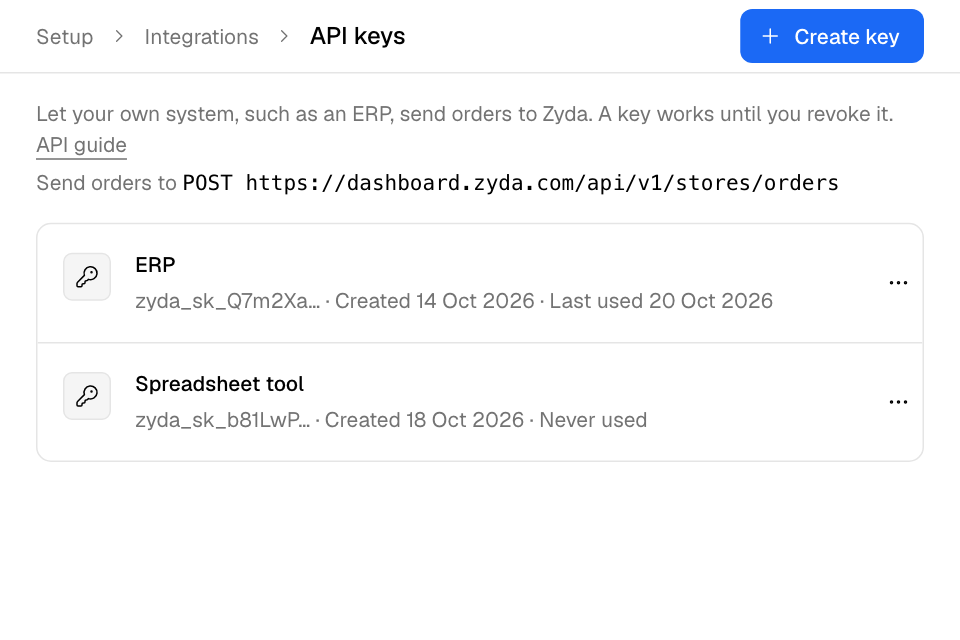
- In the Zyda dashboard, open Setup > Integrations > API keys.
- Select Create key, then Create.
- Copy the key. Zyda shows it once. Keep it on your server only.
A key starts with zyda_sk_. The key names the store, so you never send a store id. The store can revoke a key at any time. A store can have up to 10 active keys.
Send an order
POST https://dashboard.zyda.com/api/v1/stores/orders
Authorization: Bearer <key>
Content-Type: application/json
- Send one order per request, as a JSON object.
- The body can be at most 256 KB.
- One key can make at most 120 requests a minute. Over that, the answer is
429with aRetry-Afterheader in seconds.
What Zyda does with the order depends on status:
completedorcanceled: a recorded sale. Zyda stores the sale. Nothing else happens: no message to the customer, no kitchen ticket, no POS push, no webhook event.placed: a live order. The order is still open. It goes to the store's current orders, and staff move it through its statuses. This works only for an order source with Show in current orders turned on. See "Live orders".
Order fields
Fields marked required must be present and not blank. Zyda ignores fields that are not listed here.
| Field | Type | Required | Notes |
|---|---|---|---|
branch_id |
integer | required | Zyda's id of the branch. It must be a branch of the store that owns the key. |
channel |
string | required | The order source. One of the keys in "Order sources" below. The store must have it turned on. |
external_order_id |
string | required | Your own id for the order. At most 128 characters. Letter case is ignored, so ERP-1 and erp-1 are the same order. |
placed_at |
string | required | When the customer placed the order. ISO 8601 with a time zone, for example 2026-10-14T13:05:00+03:00. At most 10 minutes in the future. |
status |
string | required | completed, canceled or placed. |
total |
number | required | What the customer paid in total. See "Money". |
currency |
string | required | The store's currency code, for example KWD or EGP. Any other currency is refused. |
subtotal |
number | optional | See "Money". |
discount |
number | optional | See "Money". |
delivery_fee |
number | optional | See "Money". |
tax |
number | optional | See "Money". |
delivery_type |
string | optional | delivery, pickup or dine_in. |
payment_method |
string | optional | cash, card_on_delivery or prepaid. |
notes |
string | optional | Free text. At most 2000 characters. On a live order, staff see the first 1000 characters as the order note. The customer never sees it. |
customer |
object | optional | See "The customer object". null is accepted. |
items |
array | optional | The order lines. At most 200. See "The item object". |
The customer object
| Field | Type | Required | Notes |
|---|---|---|---|
name |
string | optional | At most 255 characters. |
phone |
string | optional | At most 32 characters. Required for a live order. |
Zyda finds the customer by phone only. A local number is read in the store's country, or send the country code (+965...). An invalid phone links no customer, but a recorded sale is still saved.
The item object
Each line in items:
| Field | Type | Required | Notes |
|---|---|---|---|
name |
string | required | At most 255 characters. |
quantity |
number | required | More than 0 and less than 100,000. Zyda keeps 3 decimals, so 1.5 kg is 1.5. Must be a whole number on a live order. |
unit_price |
number | required | The price of one unit. See "Money". |
external_item_id |
string | optional | Your own id for the product. At most 128 characters. |
zyda_item_id |
integer | optional | Zyda's id of the product variant. At most 2,147,483,647. Required on every line of a live order. |
modifiers |
array | optional | Options on the line. At most 50. See "The modifier object". |
The modifier object
Each entry in modifiers:
| Field | Type | Required | Notes |
|---|---|---|---|
name |
string | required | At most 255 characters. |
quantity |
number | optional | Left out, null or blank means 1. |
unit_price |
number | optional | Left out, null or blank means 0. |
external_id |
string | optional | Your own id for the option. At most 128 characters. |
Order sources
The value of channel is one of these keys:
website, app, whatsapp, instagram, facebook, tiktok, phone, walk_in, talabat, instashop, deliveroo, keeta, jahez, hungerstation, careem, noon_food, elmenus, breadfast, snoonu, mrsool, the_chefz, rafeeq, other
The store turns sources on and off in Setup > Business > Order sources. A source that is turned off is refused for a new order. A resend or a cancel of an order Zyda already holds is still accepted after the store turns its source off.
Money
Every amount is in the store's currency, from 0 up to less than 1,000,000,000, with 3 decimals kept. Send a JSON number or a string of digits. A string such as "12.750" avoids rounding errors.
Send the same order again
channel plus external_order_id names one order of the store. Sending it again never makes a second order. So it is safe to retry a request after a timeout.
Sending a recorded sale again updates it (200, "result": "updated"). Required fields are replaced. An optional field you leave out keeps its old value. items, when sent, replaces all lines. To cancel it, send it again with "status": "canceled". It cannot be sent again as placed.
If two requests for the same order arrive at the same time, one of them gets 409. Send it again after a few seconds.
Live orders
An order with "status": "placed" becomes a live order when its source has Show in current orders turned on (Setup > Business > Order sources). It reaches the store's current orders like an order a staff member keys in. On any other source, placed is refused with 422. Send the order once it is completed instead.
A live order sent with the API:
- sends the customer no message;
- pays no Zyda order commission;
- earns the customer no loyalty points or cashback;
- sends no purchase event to the store's ad platforms;
- still goes to the store's POS, alerts the staff and is accepted automatically if the store accepts orders automatically.
Version 1 limits. Zyda refuses each one with 422 and its own message:
delivery_typemust bepickup, or left out. Version 1 takes no delivery address.itemsis required.- Every line needs
zyda_item_id, the Zyda id of the product variant. - The product must be published at the branch and allow pickup. It must not be a combo, and it must not need options chosen.
- Every line's
quantityis a whole number. The whole order holds at most 9,999 units. customer.phoneis required and must be a valid phone number.payment_methodiscash,card_on_deliveryorprepaid. Left out, it iscash.prepaidmeans the money is already taken. Zyda takes no payment.
Zyda's menu prices the order, and the answer carries Zyda's total. Staff see modifiers as text on the line.
The store can still refuse the order, for example when the branch is closed or an item is out of stock. The answer is then 422. The reason is in errors.order, and its code is in code. No order is made.
After the order is placed, staff move it in Zyda. Follow its status with webhooks. To cancel it, send it again with "status": "canceled" (200, "result": "canceled"; Zyda never refunds; 409 if the store can no longer cancel it). Any other resend changes nothing (200, "result": "unchanged").
Answers
Every answer is JSON.
A success answer holds Zyda's id, the result, your channel and external_order_id, and the order's status in Zyda. kind is imported_order for a recorded sale and order for a live order. customer_linked is true when Zyda found or made the customer from the phone. A live order also has order_number and Zyda's total.
| Code | Meaning |
|---|---|
201 |
The order is new and Zyda saved it. "result": "created". |
200 |
Zyda already had this order. updated: a recorded sale took the new values. unchanged: a live order sent again stays as it is. canceled: you canceled a live order. |
400 |
The body is not a JSON object. |
401 |
The key is missing, unknown or revoked. |
409 |
Another request is writing the same order right now, or the store can no longer cancel this live order. |
413 |
The body is larger than 256 KB. |
422 |
A field is missing or wrong, or the store refused a live order (see errors.order). |
429 |
More than 120 requests in a minute for this key. Wait the seconds in Retry-After. |
503 |
Zyda cannot take the order right now. Send it again later. |
Every error answer has an error message. A 422 also has errors. It maps each field name to one or more messages. Line fields are named by position, for example items[2].quantity:
{
  "error": "invalid order",
  "errors": {
    "placed_at": ["is required"],
    "items[0].quantity": ["must be greater than 0"]
  }
}
Retry 409, 429, 503 and network errors with the same body. Do not retry 400, 401, 413 or 422 until you change the request.
Example: a recorded sale
Request body:
{
  "branch_id": 101,
  "channel": "instashop",
  "external_order_id": "ERP-100045",
  "placed_at": "2026-10-14T13:05:00+03:00",
  "status": "completed",
  "total": "12.750",
  "currency": "KWD",
  "delivery_fee": "0.750",
  "delivery_type": "delivery",
  "payment_method": "prepaid",
  "customer": { "name": "Sample Customer", "phone": "+96550000000" },
  "items": [
    {
      "name": "Ribeye steak",
      "quantity": "1.5",
      "unit_price": "8.000",
      "external_item_id": "SKU-RIB",
      "modifiers": [{ "name": "Sliced thin", "external_id": "MOD-SLICE" }]
    }
  ]
}
Answer 201:
{
  "id": 5012,
  "result": "created",
  "kind": "imported_order",
  "channel": "instashop",
  "external_order_id": "ERP-100045",
  "status": "completed",
  "customer_linked": true
}
Example: a live order
Request (the source whatsapp has Show in current orders turned on):
{
  "branch_id": 101,
  "channel": "whatsapp",
  "external_order_id": "ERP-100046",
  "placed_at": "2026-10-14T13:20:00+03:00",
  "status": "placed",
  "total": "9.500",
  "currency": "KWD",
  "delivery_type": "pickup",
  "payment_method": "cash",
  "customer": { "name": "Sample Customer", "phone": "+96550000000" },
  "items": [
    {
      "name": "Burger patties, 6 pieces",
      "quantity": 2,
      "unit_price": "4.750",
      "zyda_item_id": 123456,
      "modifiers": [{ "name": "Extra fat" }]
    }
  ]
}
Answer 201:
{
  "id": 880123,
  "result": "created",
  "kind": "order",
  "order_number": "1042",
  "channel": "whatsapp",
  "external_order_id": "ERP-100046",
  "status": "submitted",
  "customer_linked": true,
  "total": 9.5
}
Rules and limits
- Up to 5 webhooks and up to 10 active API keys per store.
- 120 requests a minute per key. Bodies up to 256 KB. Up to 200 lines per order and 50 modifiers per line.
- The delivery log keeps 30 days.
Common questions
Does Zyda message the customer about an order I send?
No. Neither a recorded sale nor a live order sends the customer anything.
Can a live order be a delivery order?
Not in version 1. A live order must be pickup. Send a delivery order once it is completed, as a recorded sale.
My webhook stopped. Why?
After 50 failed deliveries in a row, Zyda turns it off. Fix your endpoint, then turn Send events back on. The delivery log shows each error.