For: Owners, Operations, Finance
Where: Finance > Plan > Services
Available: Web dashboard · All countries
Your plan has every dashboard feature. Some services cost extra, such as the WhatsApp Inbox, the Calls Inbox, Dine-in or more branches. You add and remove them on the Plan page.
How it works
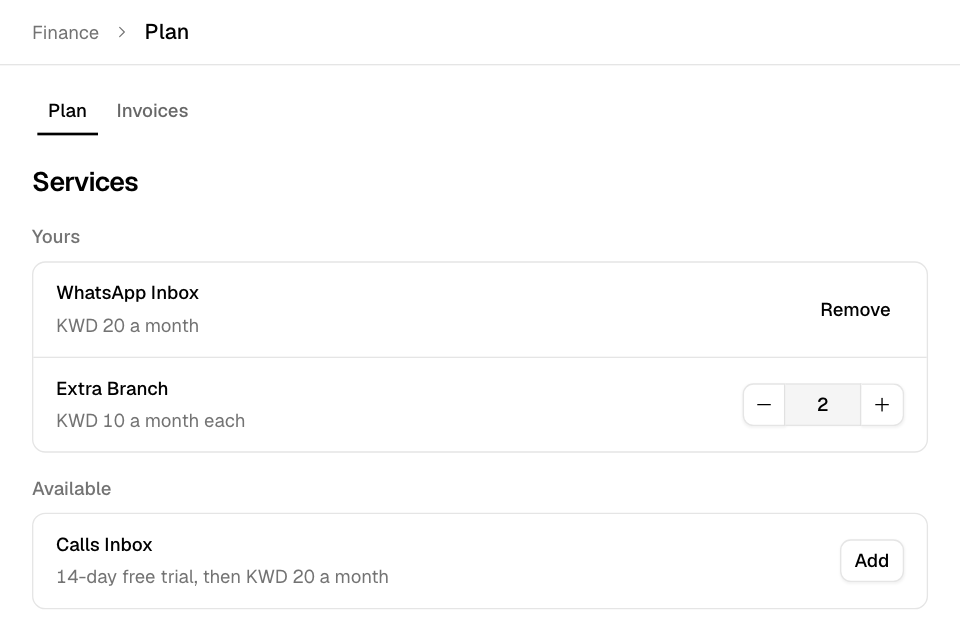
Go to Finance > Plan and scroll to Services. It has two lists:
- Yours: the services your store has, with what each costs a month.
- Available: the services you can add, with their price and any free trial.
A service row can show:
- Free trial and the days left, then the price after the trial.
- "a month each", with a count, for a service you buy more than one of, such as branches.
- What using the service costs, such as an amount included each month and the price after it.
- Ends on a date, or Drops to a number on a date, for a change that applies at your renewal.
Add a service
- Go to Finance > Plan.
- Under Services, find the service in Available.
- Select Add.
- Read the message:
- With a free trial, it says how many days are free and the price after.
- Without a trial, you pay only for the days left in your current billing period. It also says the monthly price and your renewal date.
- Select Add to my plan.
Most services turn on at once. The WhatsApp Inbox and the Calls Inbox wait for their invoice when your free trial is already used. Pay the invoice to turn them on. See Pay your Zyda invoices.
Some services show Contact Us instead of Add. Zyda's team adds these for you.
Change the number of branches
- Under Yours, find the service you buy per branch.
- Select + to add one, or − to remove one.
A higher number applies at once, and you pay for the days left in your billing period. A lower number applies at your next renewal. The row shows Drops to the new number and the date.
Remove a service
- Under Yours, find the service.
- Select Remove.
- Select Remove again to confirm, or Keep it to stop.
The service ends at once. If its invoice for this period is still unpaid, Zyda cancels that invoice. A paid invoice is not refunded.
When you remove Dine-in, diners cannot start new table sessions after that.
Buy AI credits
Zyda AI features use AI credits. The AI credits section shows the credits you have left and the packs you can buy.
- Go to Finance > Plan.
- Under AI credits, select a pack. Each button shows the credits and the price.
- Pay on the page that opens.
This section shows only if your store uses AI credits.
Rules and limits
- Only the Owner and Operations roles can add, remove or change services.
- The Owner, Operations and Finance roles can buy AI credits on this page.
- A service is billed on the same billing period as your plan.
Common questions
Why is my service price different from the one I saw before?
The price shown a month is rounded up to a whole number. Your invoice shows the exact amount for your billing period.
I removed a service by mistake. Can I get it back?
Yes. Find it under Available and add it again. A free trial is given once per store.