For: Owners
Where: Setup > Team > People > Edit
Available: Web dashboard · All countries
People change jobs, and people leave. Change a person's role the day their job changes, and remove them the day they leave.
How it works
A new role works at once. The person may need to refresh the page to see their new sidebar. It shows only what the new role allows.
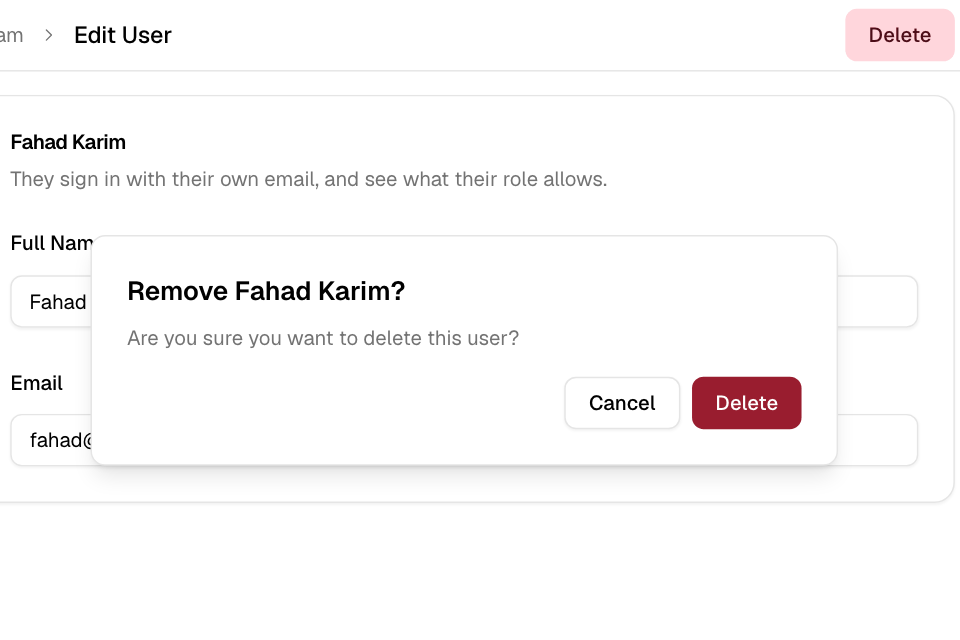
When you remove a person, they leave your store's team at once. Zyda also signs them out of the dashboard on every device. Their Zyda sign-in is not deleted. If they work at another store on Zyda, they can sign in again and use that store.
Change a person's role or branches
- Go to Setup > Team.
- Select Edit next to the person.
- Under User Role, choose the new role.
- Under Branches, choose their branches if the role allows it.
- Select Save Changes.
Change a person's email
- Edit the person, as above.
- Enter the new Email.
- Select Save Changes.
Zyda sends a link to the new email. The email changes only when the person opens the link and confirms. Until then, they sign in with the old email. Zyda also tells the old email about the change. The link works for 24 hours.
Remove a person
- Edit the person, as above.
- Select Delete at the top of the page.
- Read "Remove" and the person's name, then select Delete.
Rules and limits
- Only the store owner can change or remove people.
- Your store must keep at least one owner. To change the role of the last owner, make someone else an owner first.
- You cannot remove yourself. If you try, you see "Something went wrong!". Ask another owner to remove you.
- You cannot change another person's password. They use Forgot your password? on the sign-in page.
- If the person also works for another store on Zyda, you cannot change their name, email or phone number. You can still change their role.
- You can ask for an email change 10 times an hour. Each person can get 5 requests an hour.
| Message | What to do |
|---|---|
| A store needs at least one owner. Make someone else an owner first. | Give the Owner role to another person, then try again. |
| Only Branch staff and your own roles can be limited to branches. | Choose All branches, or choose another role. |
| This email is already used by another account. | Use another email. Each email signs in to one Zyda account. |
| Too many email change requests. Try again later. | Wait one hour. |
Common questions
Does the person see that I changed their role?
They see the new pages, and lose the old ones, when their dashboard reloads. Zyda does not send them a message.
I removed someone by mistake. How do I bring them back?
Add them again with the same email. They keep their own password, and you choose their role again.