For: Owners, Operations
Where: Finance > Plan > Change plan
Available: Web dashboard · All countries
Your business grows, or you want to pay once a year instead of every 3 months. You can change your plan or your billing period from the Plan page.
How it works
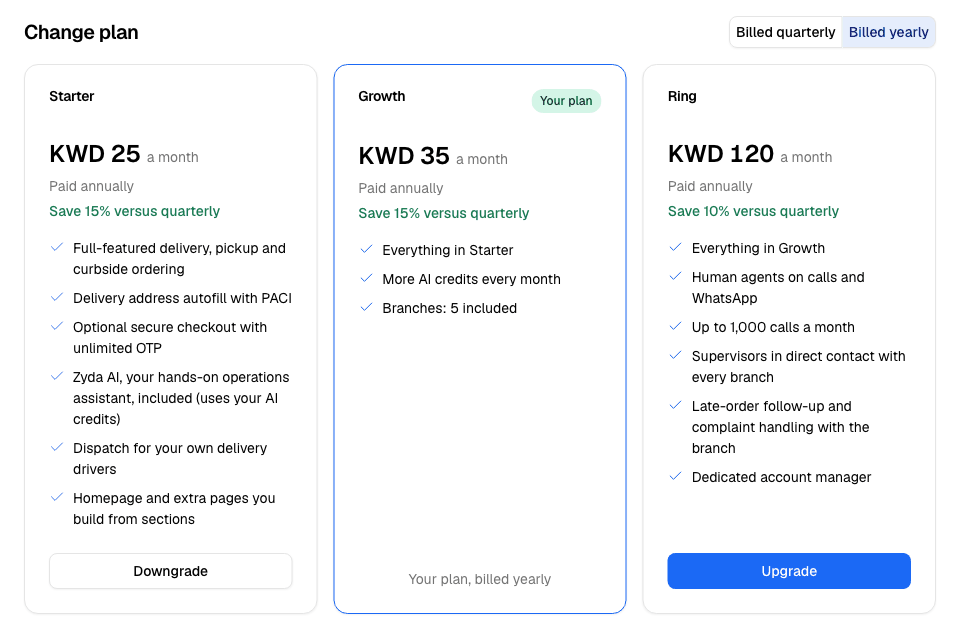
Go to Finance > Plan and scroll to Change plan. The toggle at the top chooses the billing period: Billed quarterly or Billed yearly.
Each plan has a card with:
- its price a month, rounded up to a whole number, and how often it is billed
- "Save" and a percentage on a yearly price, compared with paying quarterly
- the first 6 things the plan includes
- one button
Your own card says Your plan. The other cards say Upgrade, Downgrade, Switch to yearly, Switch to quarterly or Choose.
Every plan has every dashboard feature. Plans differ in what they include, such as the number of branches or the services included.
Change your plan
- Go to Finance > Plan.
- Under Change plan, choose Billed quarterly or Billed yearly.
- On the plan you want, select Upgrade, Downgrade or the switch button.
- Read the message. It says when the change starts and what you will pay.
- Select Confirm change. To stay on your plan, select Keep and your plan's name.
When the change starts
| Your plan now | The change starts |
|---|---|
| On its free trial | Right away. |
| Paid and running | When your current billing period ends. Until then, the page shows Plan change scheduled and the start date. |
| Past the end of its billing period, for example with an unpaid bill | Right away. |
To undo a scheduled change, select Keep and your plan's name on the Plan change scheduled notice.
Compare plans
Select Compare plans under the cards. A table opens with every feature of each plan, grouped by area, and the monthly price of each paid service.
Rules and limits
- Only the Owner and Operations roles can change the plan. Others see "Only the owner or an operations manager can change the plan."
- You can have one scheduled change at a time. To pick another plan, undo the scheduled change first.
- If you cancelled your plan, keep your plan first. Then you can change it.
- Some plans are priced for each business. They show Contact Us instead of a price.
Common questions
Can I pay monthly?
New plans are billed quarterly or yearly. If your plan is billed another way, the Plan card shows how.
Do I pay the full price of the new plan right away?
A paid plan changes when your current period ends, and the next bill is for the new plan. A store on its free trial changes at once.