For: Owners, Finance
Where: Finance > Transaction fees
Available: Web dashboard · Kuwait, Egypt
Needs: MyFatoorah as your payment gateway
Each branch may keep its own accounts. Transaction fees shows what one branch sold in a month and the fees on its orders, so you can settle each branch on its own.
How it works
Go to Finance > Transaction fees. Choose a branch and a month. The cards show:
| Card | What it shows |
|---|---|
| Total Sales | What the branch sold in the month. |
| Payment processing fee | The fee on the branch's online payments. |
| Service fee | The service fee on the branch's orders. It shows only if Zyda set a service fee for your store. |
| Marketing processing fee | The fee on each of a new customer's first 3 orders while Autopilot is on. It shows only if your store has this fee. |
| Total | All the fees added together. |
If only one fee has an amount, Total does not show, because it would be the same number.
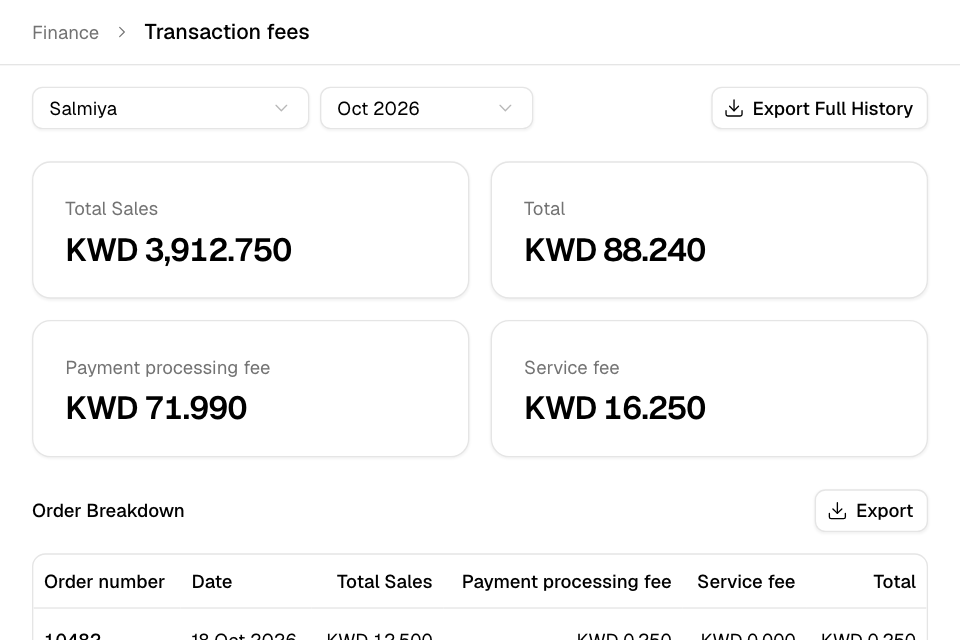
Check a branch's month
- Go to Finance > Transaction fees.
- Choose the branch.
- Choose the month. The list goes back to your store's first month.
- Read the cards.
- Scroll to Order Breakdown to see each order with its sales and fees, 50 orders on each page.
- Select an order number to open the order.
Get the figures by email
- To get one month's orders, select Export above Order Breakdown.
- To get every month since your store started, select Export Full History.
Zyda emails you an .xlsx file when it is ready.
Rules and limits
- Transaction fees shows only if your payment gateway is MyFatoorah.
- Total Sales counts orders paid online through MyFatoorah and orders paid in person.
- You need view access to transactions. Owners and the Finance role have it.
- If a branch has no fees in a month, the page says "No fees for this branch in this month".
Common questions
Is this my commission?
No. This page shows fees. Your order commission fee is on your monthly invoice. See Pay your Zyda invoices and Understand your fees and payout.
Can I see all branches together?
Not on this page. For all branches together, go to Finance > Fees & payout and choose All permitted branches.