For: Owners, Operations
Where: Respond > Calls > Calls, and Respond > Calls > Performance
Available: Web dashboard · Kuwait, Egypt
Needs: Your store's calls connected
You want to know how your phone line is doing: which calls were missed, which turned into orders, and how callers rated them. The Calls page lists every call, and Performance shows the numbers.
How it works
Respond > Calls has up to three tabs:
- Calls: every call, newest first, with its recording and its order.
- Performance: your answer rate, orders, ratings and Zyna's results for a period.
- Setup: see Choose who answers calls and when Zyna answers.
Managers and team leads on your Who answers list see all three tabs and every call. Other staff who answer calls see Calls only, with their own calls and Zyna's calls.
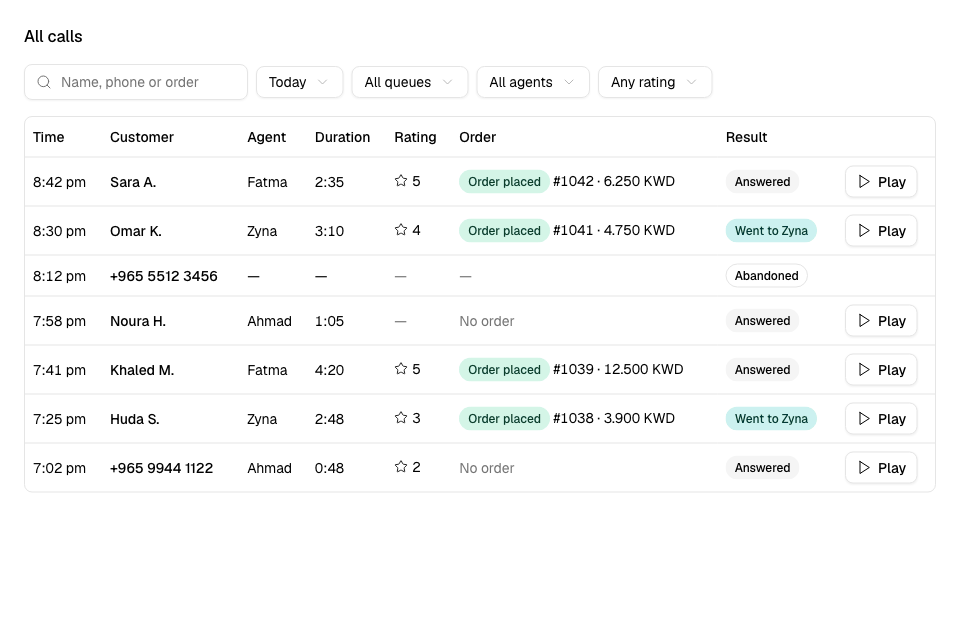
Find a call
- Go to Respond > Calls > Calls.
- Use the filters above the list:
- Search by Name, phone or order.
- Day.
- Queue: orders or complaints.
- Agent: the person who answered.
- Rating: 1 to 2 stars, 4 to 5 stars or No rating.
- To clear the filters, select Reset.
Each row shows the time, the customer and who answered. It also shows the wait, the call's length, its label, its rating and its Result:
| Result | Meaning |
|---|---|
| Answered | Someone on your team answered. |
| Went to Zyna | No one was free in time, so Zyna answered. |
| Abandoned | The caller hung up before anyone answered. |
| Missed | No one answered, and the store had no AI credits, so the caller heard that the line is unavailable. |
| Live or Waiting | The call is on now, or the caller is waiting. |
If an order was placed on the call, the row shows Order placed with the order number and total.
Open a call
Select a row. The call opens on the side of the page with:
- the phone number, and how long the caller waited, talked and how long the wrap-up took,
- the order placed on the call, with its items, branch, address and status,
- the recording and the Transcript,
- the notes and the complaint details.
To play a recording from the list, select Play.
For a complaint that needs a follow-up, a manager or team lead selects Mark resolved when it is solved.
Listen to a live call
Managers and team leads can select Listen on a live call. Neither the caller nor the person on the call hears you. Select Stop listening to leave.
Take over a call from Zyna
When Zyna is on a call, the top of the Calls tab shows Zyna is on these calls now. For each call you see:
- who she is talking to, and for how long,
- Her cart and its total,
- Zyna's note and what is Still missing, such as the address or the minimum order.
To take the call yourself, select Take over. The call joins your call bar. The first person who selects Take over gets the call.
Zyda is trying this with a few stores first. If your Calls tab never shows Zyna is on these calls now, it is not on for your store yet.
Check your call performance
- Go to Respond > Calls > Performance.
- Choose the Period: Today, 7 days, 30 days or All time.
You see:
- Calls answered, Total calls, Answer rate and Speed of answer.
- Conversion and Orders: how many calls turned into orders.
- CSAT: the callers' average rating, and Response rate, how many callers rated.
- Missed rings, Abandoned and Zyna takeovers.
- Zyna's own results: Zyna orders, Zyna sales, Zyna conversion and Pay links sent.
- A chart of calls answered by your staff, by Zyna, and abandoned.
- A table of each person: calls answered, pause time and time signed in.
Rules and limits
- Take over needs the call bar. If you are not on the Who answers list, the page says to ask a manager to add you.
- To take over, allow the microphone and finish any call you are on.
- A rating or a conversion based on few calls shows a note, such as "From fewer than 5 ratings".
Common questions
Why is a recording missing?
A recording shows when the call ends. If it still does not show, the page says "The recording is not available."
Why did a caller hear that the line is unavailable?
No one answered in time, and your store had no AI credits for Zyna. Buy AI credits on Finance > Plan.