For: Owners, Finance
Where: Finance > Transactions > Deposits
Available: Web dashboard · Kuwait, Egypt
Needs: MyFatoorah as your payment gateway
You want to know when your online payments reach your bank, and which orders a deposit pays for. If your store takes online payments with MyFatoorah, Deposits shows each transfer to your bank account.
How it works
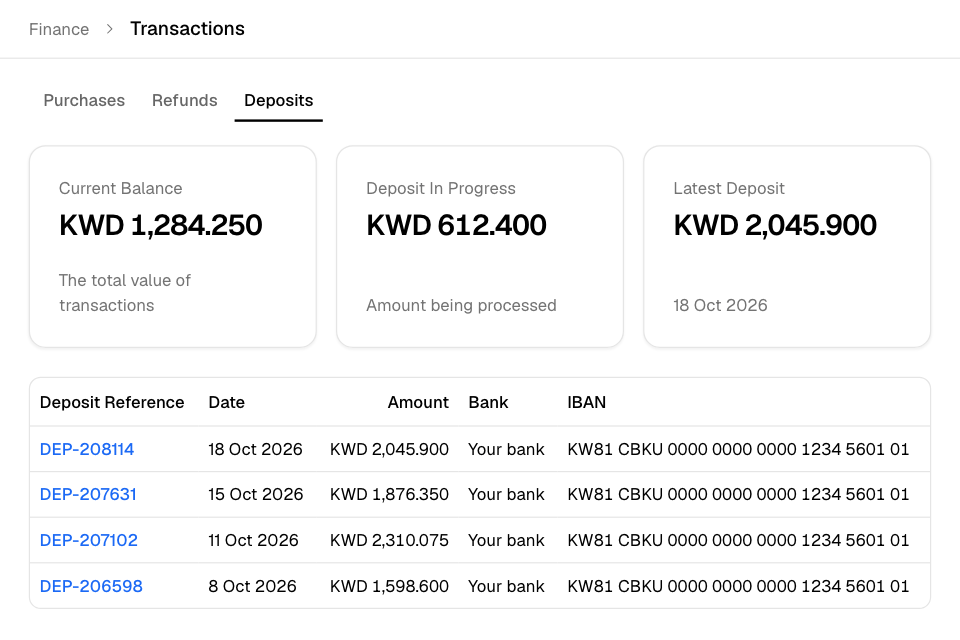
Go to Finance > Transactions, then select Deposits. Three cards sit at the top:
| Card | What it shows |
|---|---|
| Current Balance | The money from your transactions that is waiting to be deposited. |
| Deposit In Progress | The amount MyFatoorah is processing now. |
| Latest Deposit | The amount and date of the last deposit. |
Under the cards, the table lists every deposit, newest first, 10 on each page:
| Column | What it shows |
|---|---|
| Deposit Reference | The deposit's number. Select it to see its orders. |
| Date | When the deposit was made. |
| Amount | The amount deposited. |
| Bank | Your bank. |
| IBAN | The bank account the money went to. |
See the orders in a deposit
- Go to Finance > Transactions > Deposits.
- Select a Deposit Reference.
- Check the orders. Each row shows the Order No., the Due Deposit, the Paid Date and the Invoice Value.
- Select an order number to open the order.
To go back, select the back arrow next to the deposit reference.
Export a deposit's orders
- Open the deposit.
- Select Export.
Zyda emails you the report. A message says it is being generated.
Rules and limits
- Deposits shows only if your payment gateway is MyFatoorah.
- You need view access to transactions. Owners and the Finance role have it.
- MyFatoorah decides when deposits happen. To change your bank account, see Connect a payment gateway for online payments.
Common questions
Why is the Due Deposit lower than the Invoice Value?
The invoice value is what the customer paid. The due deposit is the part of it that MyFatoorah deposits to you. Fees are taken first. See Understand your fees and payout.
I use another gateway. Where are my deposits?
Deposits is for MyFatoorah only. Check your bank statement or your gateway's own dashboard.