For: Owners, Operations, Finance
Where: Finance > Plan
Available: Web dashboard · All countries
You want to know which plan you are on, what it costs, and when Zyda bills you next. The Plan page shows all of it, and tells you when a bill needs your action.
How it works
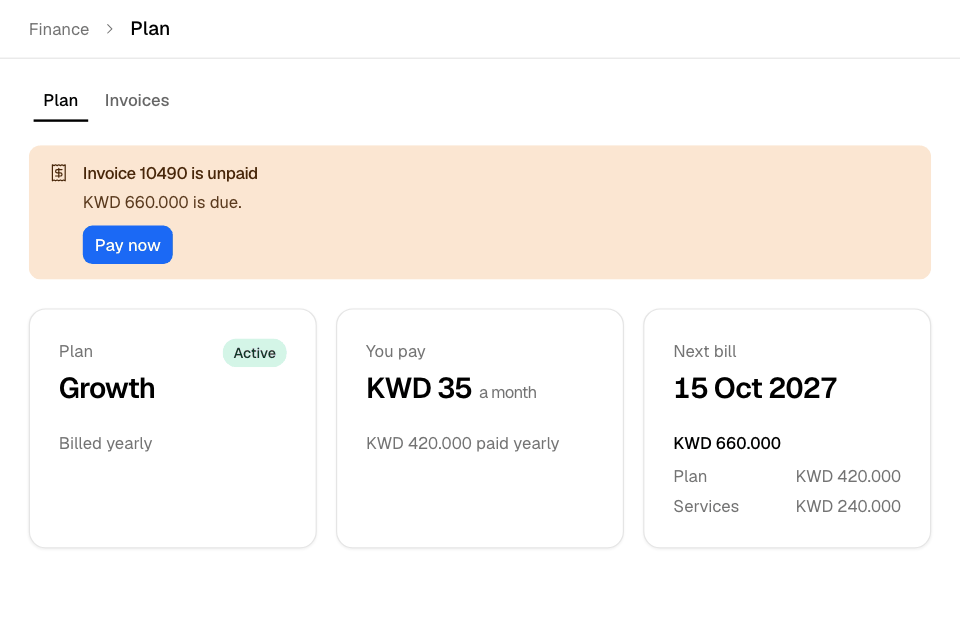
Go to Finance > Plan. Three cards sit at the top:
| Card | What it shows |
|---|---|
| Plan | Your plan's name, its status and how often you are billed, for example Billed yearly. |
| You pay | What your plan costs a month, rounded up to a whole number. Under it, the amount of each bill, for example "paid yearly". If you pay less than the list price, the list price shows crossed out. |
| Next bill | The date of your next bill and its total, split into Plan, Services and, in Egypt, VAT 14%. |
Every plan has every dashboard feature. Paid services, such as the WhatsApp Inbox, are added on top. See Add or remove paid services and AI credits.
Plan statuses
| Status | Meaning |
|---|---|
| Free trial | Your store is in its free trial. The third card shows Trial ends, with the days left. |
| Active | Your plan is paid and running. |
| Overdue | A bill is unpaid. The third card shows Due now. |
| Changing | You chose a new plan. It starts on the date shown. |
| Ending | You cancelled your plan. The third card shows Plan ends. |
| Ended | Your plan has ended. |
Notices that need you
Notices show above the cards, the most urgent first. Each has one button.
| Notice | What to do |
|---|---|
| Your store is closed because an invoice was not paid. | Select Pay now. Your store opens again right away when you pay. If the notice asks you to contact us, pay your invoices, then contact Zyda support. |
| Your payment is overdue | Select Pay now. If you owe more than one invoice, select View invoices. Until you pay, your dashboard is limited to orders. |
| Your free trial ends on a date | Select Pay now before that date to keep your plan. |
| Invoice number is unpaid | Select Pay now. |
| Plan change scheduled | To stay on your plan, select Keep and your plan's name. |
| Your plan ends on a date | To stay, select Keep my plan. After that date, your store stops taking orders. |
Pay now opens the invoice in a new tab. You pay there.
Check your recent invoices
Recent invoices lists your last 3 invoices. Select View all to see every invoice. See Pay your Zyda invoices.
Rules and limits
- You need access to the plan. The Owner, Operations and Finance roles have it.
- The free trial lasts 14 days. Zyda can extend it by 1 or 2 weeks, or to a later date in your contract. The Plan page still shows the 14-day date.
- VAT: bills in Egypt include 14% VAT. Bills in other countries have no VAT.
- If your store is billed on commission only, this page shows your Customers, Sales and Customers' balance instead of a plan.
- If your store has no plan, the page says "This store has no plan". Select Contact Us to choose one.
Common questions
Why is the monthly price different from my bill?
You pay shows the monthly cost. You are billed for the whole period at once, for example every 3 months or every year. The line under the price shows the amount of each bill.
Why does the next bill show no amount?
You have a plan change scheduled. The next bill is for the new plan, so the page shows only the date.
What happens if I do not pay?
7 days after a plan or usage invoice's date, your dashboard is limited to orders. If a plan renewal stays unpaid, your plan is cancelled 14 days after the bill's date, and your store stops taking orders. See Pay your Zyda invoices.