For: Owners, Operations
Where: Respond > Calls > Setup
Available: Web dashboard · Kuwait, Egypt
Needs: Your store's calls connected
You decide who picks up your restaurant's calls, how long a call rings, and when Zyna, Zyda's AI agent, steps in. All of it is on one page.
How it works
Setup has six parts:
| Part | What you set |
|---|---|
| Who answers | The staff who take calls, and their role. |
| Calls | How calls ring, when Zyna answers, and what happens after closing. |
| Labels | The labels staff pick for a call when it ends. |
| Pause reasons | The reasons staff pick when they pause. |
| Your number | Your phone line and its status. |
| Welcome and hold | What callers hear first, and the music on hold. |
The person who connected your calls manages them. Only call managers and Zyda staff can change these settings. Everyone else can read them.
Add the staff who answer calls
- Go to Respond > Calls > Setup > Who answers.
- Select Add staff. The list shows your team members who do not answer calls yet.
- Select Add next to a person.
To add someone who is not on your team yet, select Invite someone new. This opens the form to add a team member.
Each person has a Role:
| Role | What they can do |
|---|---|
| Agent | Takes calls. |
| Team lead | Takes calls, and edits teams and queue lists. |
| Manager | Edits everything for your calls. |
To stop someone from taking calls for a while, set them to Off. To take them off the list, select Remove.
Set how calls ring and when Zyna answers
- Go to Respond > Calls > Setup > Calls.
- Set the options:
- Ring order: In this order, Everyone at once or Take turns.
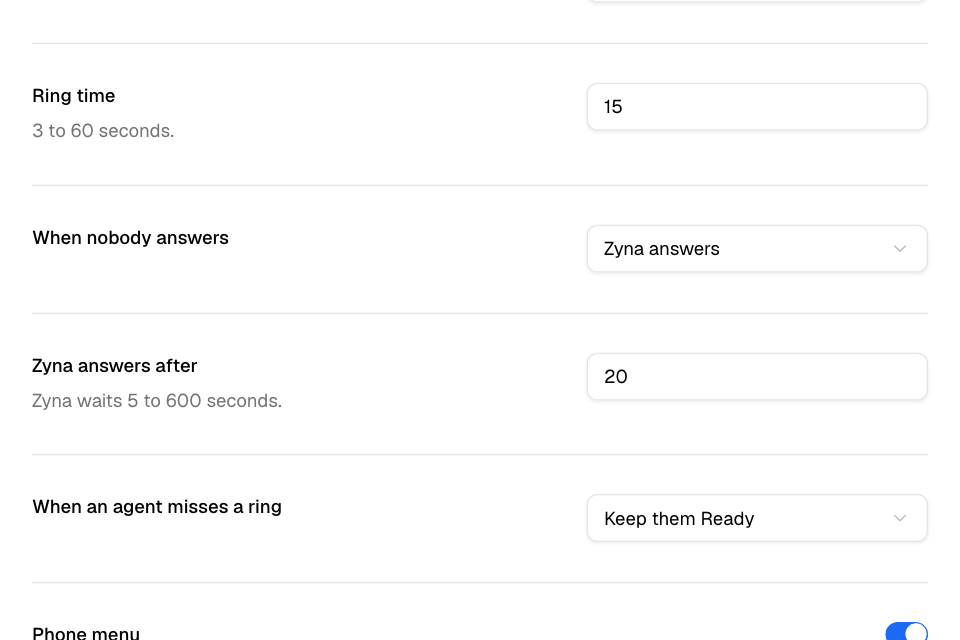
- Ring time: how long a call rings for each person, from 3 to 60 seconds.
- When nobody answers: Zyna answers or Keep ringing.
- Zyna answers after: how long the caller waits before Zyna answers, from 5 to 600 seconds.
- When an agent misses a ring: Keep them Ready or Pause them.
- Phone menu: callers pick orders or complaints first.
- After closing: Zyna answers or Say you are closed.
- Rating after the call: the caller rates the call from 1 to 5 on the keypad.
- Ready at sign-in: staff whose microphone works go Ready when they sign in.
- Open the order screen on answer: an order call opens a new order with the caller as the customer.
- Select Save.
You see "Settings saved". If a number is out of range, the page says "Check the numbers in red."
Zyna uses the name, gender, call voice and tone you set on Respond > Chats > Zyna AI. See Set up Zyna AI to answer WhatsApp chats.
Choose what phones get when Zyna answers
Under Call notifications, choose what your team's phones get when Zyna picks up a call:
| Level | What the phones get |
|---|---|
| Live | A live card, a push notification, and the in-app bar, toast and sound. |
| Push only | A push notification, and the in-app bar, toast and sound. |
| In-app only | The in-app bar, toast and sound. |
| Off | Nothing. |
Each person sets the sound on their own phone.
Zyda is trying these notifications with a few stores first. Until they are on for your store, the phones get nothing, whatever level you choose.
Set labels and pause reasons
Labels: staff pick one after each call.
- To start, select Use the Zyda template.
- To add your own, select Add label. Enter the Name, the Arabic name (optional) and the Group.
- Mark a label as a Complaint to ask staff for the complaint details after the call.
- To hide a label, select Remove. Past calls keep it.
- To go back to Zyda's list, select Reset to Zyda template.
Pause reasons: staff pick one when they pause. Your calls start with 1:1, Break and Outbound call.
- Select Add pause reason to add one.
- Turn on Counts as occupied if time in this pause counts as working time.
Set the welcome and the hold music
- Go to Respond > Calls > Setup > Welcome and hold.
- For Welcome and for Hold music, choose:
- Default: Zyda's own.
- Text: write it in English or Arabic.
- Recording: select Upload and choose an mp3, wav, m4a or ogg file.
- Turn on Say "this call is recorded" after the welcome if you want callers to hear it.
Rules and limits
- Someone who answers calls for another calls desk cannot be added. Their row says "Answers calls elsewhere".
- A manager cannot change or remove their own row.
- Ring time: 3 to 60 seconds. Zyna answers after: 5 to 600 seconds.
- Zyna needs AI credits. Without credits, a call nobody answers hears that the line is unavailable.
Common questions
How do I stop Zyna from answering calls?
Set When nobody answers to Keep ringing, and After closing to Say you are closed. Then select Save.
Why can I not change these settings?
Only the people with the Manager role on Who answers can change them. Ask one of them, or the person who connected your calls.