For: Owners, Operations, Marketing
Where: Respond > Chats > Connect WhatsApp
Available: Web dashboard · All countries
Needs: The WhatsApp Inbox service, on free trial or paid
Customers already message your restaurant on WhatsApp. Connect your number to Zyda, and every chat arrives in one inbox your team can answer from the dashboard.
How it works
You connect your number through Meta's official sign-up. It takes about two minutes, and the number stays yours.
- Customer messages arrive in Respond > Chats > Inbox.
- Your first connection starts a free trial of the WhatsApp Inbox service. The page shows how many days are free and the price after that.
- Your first connection also turns on Zyna AI, the AI agent that answers chats for you. You can turn it off on its own page. See Set up Zyna AI to answer WhatsApp chats.
- Meta charges your business directly for WhatsApp messages. You add a payment method in Meta, not in Zyda.
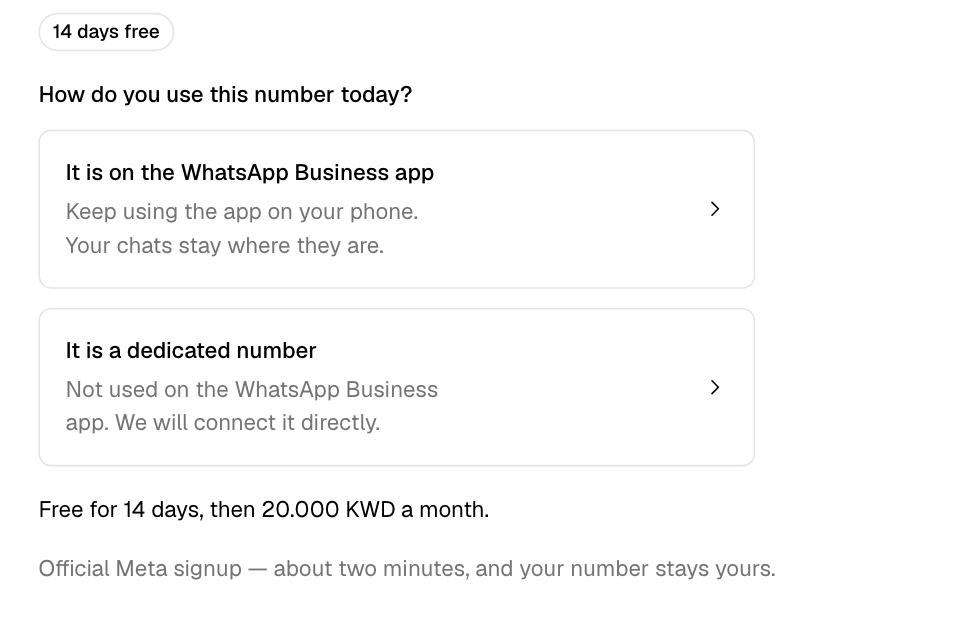
Connect your number
- Go to Respond > Chats.
- Select Connect WhatsApp.
- Answer How do you use this number today?:
- Select It is on the WhatsApp Business app if your team uses the app on a phone. You keep using the app, and your chats stay where they are.
- Select It is a dedicated number if the number is not on the WhatsApp Business app. Zyda connects it directly.
- Follow Meta's steps in the window that opens.
- If WhatsApp asks to check that you own the number, select Send code by SMS or Call me instead. Enter the code you get.
- Add a payment method in Meta. On the step One more step: add a payment method in Meta, select Open Meta billing. Add a payment method, and set your country and currency.
- Select I added it.
Your inbox opens. The number shows at the bottom of the inbox, after Connected as.
Fix a Meta payment warning
If Meta blocks messages because your WhatsApp Business account has no payment method, the inbox shows Add a payment method in Meta. Until you fix it, Meta blocks some of your replies and all of your campaigns.
- Select Open Meta billing.
- Add a payment method and a currency.
- Select I added it.
The warning comes back if Meta blocks a message again.
Disconnect your number
- Go to Respond > Chats > Inbox.
- At the bottom of the inbox, next to your number, select Disconnect.
- Read what stops and what stays, then select Disconnect again.
When you disconnect:
- Zyna AI stops replying.
- Campaigns, broadcasts and WhatsApp notifications stop sending from this number. This includes review invites, loyalty reminders and order updates. A notification that can also go by SMS goes by SMS.
- Your number keeps working in the WhatsApp Business app.
- Your chat history stays in Zyda. It comes back when you connect the same number again.
Reconnect your number
If the number is disconnected, the inbox fades and shows Your WhatsApp number is disconnected. Every chat is still there.
- Select Reconnect WhatsApp.
- Follow Meta's steps again.
When the free trial ends
The trial lasts 14 days. During the trial, the inbox shows how many days are left.
When the trial ends and the WhatsApp Inbox invoice is not paid, the inbox fades and shows Your free trial has ended. Customers can still message you, but you cannot reply.
- Select Pay.
- Pay the invoice on the page that opens.
The inbox works again when the invoice is paid. Only the inbox stops. The rest of your dashboard keeps working. See Pay your Zyda invoices.
Rules and limits
- One WhatsApp number connects to one Zyda store. A number already connected to another store is refused. That store's owner must disconnect it first.
- The Owner, Operations and Marketing roles can connect the number. Only the Owner can disconnect it.
- The free trial is given once per store. A store that used its trial pays before it connects.
- Zyna AI turns on by itself only on a store's first connection. A reconnect keeps your Zyna AI setting.
Common questions
Can I keep using the WhatsApp Business app on my phone?
Yes. Choose It is on the WhatsApp Business app when you connect. Your team can keep using the app.
Can I connect Instagram too?
Instagram messages can show in the same inbox. You cannot connect Instagram yourself yet. Contact Zyda support to connect it.
Where do I write the messages I send first, such as campaigns?
WhatsApp lets you message a customer first only with a template that Meta approved. See Create WhatsApp templates for campaigns.