For: Owners, Operations
Where: Respond > Calls > Connect your calls
Available: Web dashboard · Kuwait, Egypt
Needs: A store in Egypt
At rush hour, phone calls ring and nobody picks up. Connect your calls to Zyda, and your staff answer them in the dashboard. When nobody answers in time, Zyna, Zyda's AI agent, answers and takes the order.
How it works
- A call rings your staff in the dashboard first. With the default settings it rings for 15 seconds.
- If nobody has answered after 20 seconds, Zyna answers and takes the order. You can change both times, or leave Zyna out.
- When the store is closed, or none of your staff is signed in, Zyna can answer too.
- Answered calls are recorded. After the call, the caller can rate it from 1 to 5 on the phone keypad.
- An order placed on a call is linked to the call and to the person who answered.
Your staff do not need new phones. They answer on a computer with a headset or a microphone.
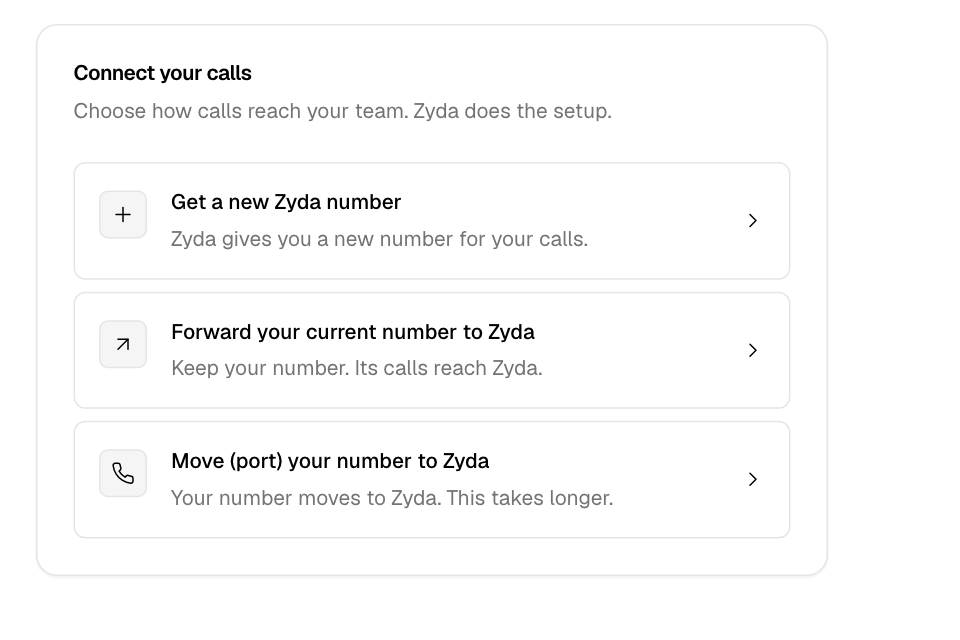
Connect your calls
- Go to Respond > Calls.
- Select Connect your calls.
- Choose how calls reach you:
- Get a new Zyda number: Zyda gives you a new number for your calls.
- Forward your current number to Zyda: you keep your number, and its calls reach Zyda.
- Move (port) your number to Zyda: your number moves to Zyda. This takes longer.
- Fill in the form:
- Your current number, if you forward or move a number. It can be a phone number or a hotline such as 19xxx.
- Phone company (optional).
- Contact number (optional): Zyda calls this number about the request.
- Branch (optional): the branch these calls are for, or Any branch.
- Notes (optional).
- Select Send request.
The page opens Setup, so you can add the staff who answer calls. See Choose who answers calls and when Zyna answers.
Follow your request
Go to Respond > Calls > Setup > Your number. The request moves through these steps:
| Step | What happens |
|---|---|
| Requested | Zyda has your request and will contact you. |
| Zyda is setting it up | Zyda is working with the phone company. |
| Test call | Call your number to test it. |
| Connected | A first call came in on the number. |
If Zyda needs something from you, the step says "Zyda needs something from you".
To stop the request, select Cancel request, then confirm. You can ask again later.
Rules and limits
- The Owner and Operations roles can connect calls. Other people see "Ask the store owner to connect your calls."
- A store can have one open request at a time.
- Today Zyda can get phone lines in Egypt only. In Kuwait, the page says "Phone numbers are not available in your country yet."
- Zyna needs AI credits to answer calls. See Add or remove paid services and AI credits.
- Some stores answer calls on a calls desk that serves several brands. Their Calls page says "Your calls are answered on a calls desk."
Common questions
Can I keep my number?
Yes. Forward it to Zyda, or move it to Zyda. You can also get a new Zyda number.
Does Zyna take complaints or card details?
No. Complaints go to your staff only. Zyna does not take card details: she sends a pay link on WhatsApp to finish the order.
What does Zyna know about my restaurant?
Your live Zyda menu, prices, branches and delivery areas. When you change the menu, she uses the change on the next call.