For: Owners, Operations, Marketing
Where: Grow > Loyalty > Rewards
Available: Web dashboard and Zyda phone app (Android) · All countries
Needs: A live points program
Points only bring customers back when there is something worth spending them on. Rewards are what customers buy with their points, for example a free coffee for 50 points.
How it works
You create rewards and give each one a points price. Customers see your rewards on the Rewards page of your store and app. Each reward shows Unlocked when the customer has enough points, or how many points they still need.
When a signed-in customer redeems a reward, it goes into their cart. Zyda takes the points when the order is placed.
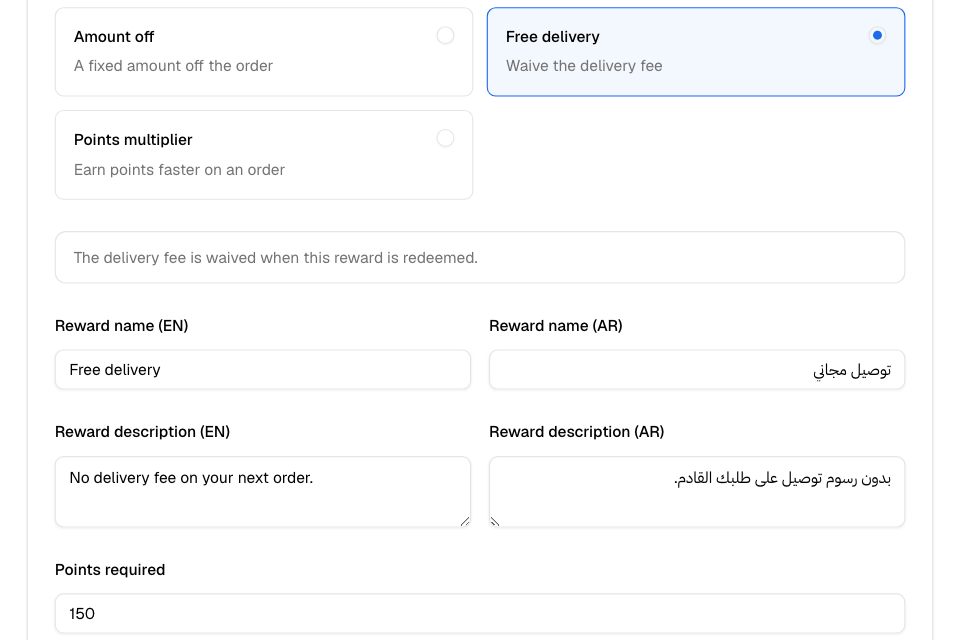
Reward types
| Type | What the customer gets |
|---|---|
| Free item | One item from your menu, free. You choose the item. |
| Percentage discount | A percentage off the items, from 1% to 100%. You can set a maximum discount. |
| Amount off | A fixed amount off the items. |
| Free delivery | No delivery fee on the order. |
| Points multiplier | More points on this order, for example 2 for double points. The value must be greater than 1. |
Discounts apply to the items, not to delivery. A percentage discount counts the item price only, not paid extras such as added toppings. A discount never takes the items below zero.
You cannot change a reward's type after you create it. To change it, delete the reward and create a new one.
Create a reward
- Go to Grow > Loyalty > Rewards.
- Select Create reward.
- Choose the Reward type.
- Fill in the type's details. For example, for Free item, choose the Reward item.
- Enter the Reward name (EN). Add the Arabic name and the descriptions if you sell in Arabic.
- Enter Points required.
- Optional: set the extra options (see below).
- Select Add reward.
The reward is live at once, unless you set a start date.
Control when and how often a reward is used
Under Extra Options:
- Require a minimum order amount?: the customer's items must reach this amount.
- Applies to: delivery, pickup or both.
- Redemption limits: Total redemptions for all customers, and Per customer. Leave blank for no limit.
- Valid Days: tick the days the reward works. Leave all empty for every day.
- Limit to specific hours?: choose Yes, set a time window, then From and To. Useful for a quiet-hours reward, such as 3 PM to 6 PM.
- Schedule availability?: choose Set a date range for a reward that runs for a season.
For a scheduled order, Zyda checks the day and hour of the scheduled time, not the time the customer orders.
Reward statuses
| Status | Meaning |
|---|---|
| Active | Customers can redeem it now. |
| Scheduled | Its start date is in the future. |
| Expired | Its end date has passed. |
| Inactive | It was deleted, or its free item was removed from the menu. |
Edit or delete a reward
- To edit, select Edit on the reward, change it, then select Save changes.
- To delete, select Delete, then confirm. Customers can no longer redeem it. Past redemptions stay in your members' history.
Rules and limits
- You need a live points program to add rewards. If you deactivate points, your rewards stay in the list, but you cannot add new ones.
- One reward per order.
- A customer cannot use a reward and a promo code on the same order. Automatic offers also stop while a reward is in the cart.
- Customers must sign in with their phone number to redeem. Guests can only see the rewards.
- Rewards do not work on wholesale (business) orders.
- If you remove a free-item reward's item from the menu, the reward stops.
Common questions
My customer says a reward will not apply. Why?
The customer sees one general message: "This reward can't be applied to your current cart." Check that they are signed in and have enough points. Check the reward's minimum, days, hours, order type and limits. Check that there is no promo code in the cart.
Do customers see the days and hours a reward works?
No. Mention them in the reward description, for example "Weekdays, 3 PM to 6 PM".
Can customers use two rewards on one order?
No. Each order can have one reward.
Do customers earn points on an order where they used a reward?
Yes. The reward does not lower the points they earn on that order.