For: Owners, Operations
Where: Serve > Delivery > Edit zones > tick zones > Edit selected
Available: Web dashboard · All countries
A branch can have dozens of zones. Sometimes the same change applies to many of them, such as a new fee or new hours for the holidays. Change them all in one step.
How it works
Tick the zones in the list, then choose a change from Edit selected. The change applies to every ticked zone. Fields you do not change stay as they are in each zone.
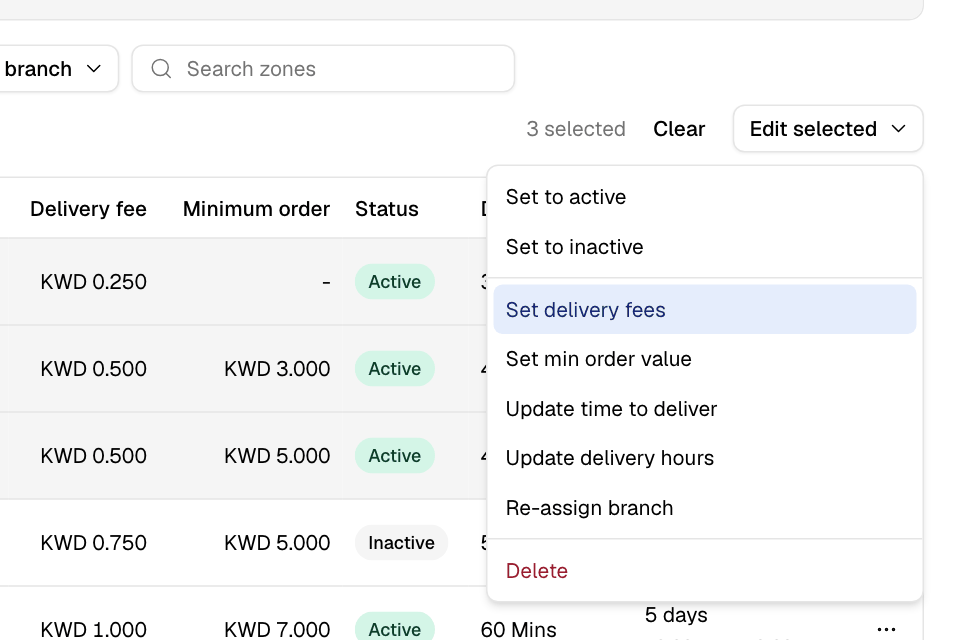
Edit several zones
- Go to Serve > Delivery and select Edit zones.
- Choose the branch.
- Tick the zones. Tick the box in the header row to select every zone in the list.
- Select Edit selected.
- Choose a change:
| Change | What it does |
|---|---|
| Set to active | Customers in these zones can order delivery. |
| Set to inactive | Customers in these zones cannot order delivery. The zones are kept. |
| Set delivery fees | Choose Set a fee and enter it, or choose Free delivery. |
| Set min order value | Choose Set a minimum and enter it, or choose No minimum. |
| Update time to deliver | Enter a time in minutes or hours. Include your preparation time. |
| Update delivery hours | Change the days and hours. Each zone keeps the rest of its schedule. |
| Re-assign branch | Move the zones to another branch. They leave this list and appear under that branch. |
| Delete | Delete the zones. Customers there can no longer order delivery. |
- Select Apply or Confirm.
You see "Successfully updated 3 zones", for example. Select Clear to untick all zones.
When some zones are not changed
If some zones fail, you see "Some zones were not updated:" and their names. The other zones are changed. Open each named zone to see why. For example, a delivery time shorter than the preparation time is refused.
Rules and limits
- You can edit the zones of one branch at a time.
- The fee and the minimum order must be 0 or more. The delivery time must be a whole number of minutes, more than 0.
- In Kuwait, a fee above KWD 1.000 per order is refused. A zone that already had a higher fee can keep it or lower it.
- Deleting zones cannot be undone.
- A few older stores still have an older zones page. If Edit zones opens a different page, contact Zyda support.
Common questions
Can I change the zone shapes in bulk?
No. Change each shape on the map. See Change a zone's fee, minimum, time or hours.
Can I copy zones to another branch in bulk?
Re-assign branch moves the zones; it does not copy them. To copy one zone to more branches, open it and tick them under Fulfilled by.