For: Owners, Operations, Branch staff, Marketing, Finance
Where: The tabs at the bottom of the Zyda app
Available: Zyda phone app (Android) · All countries
Needs: The new look of the Zyda app. The iPhone version does not have it yet.
The Zyda app has most of what the web dashboard has, in a shorter list made for a phone. This page shows where each thing is.
How it works
Five tabs sit at the bottom of the screen. Each person sees only the tabs and items their role allows. For example, branch staff do not see Home, so the app opens on Orders for them.
| Tab | What it holds | Who sees it |
|---|---|---|
| Home | Today's sales, orders and visits, with the last 7 and 30 days | People who can see Home for the whole store |
| Orders | Current and past orders, busy branches, new orders | People who can see orders |
| Inbox | WhatsApp and Instagram chats, calls and reviews in one list | People who can see at least one of these |
| Menu | Turn items and options on or off for a branch | People who can see availability |
| More | Every other page, your account, settings and help | Everyone |
A number on the Orders tab is the count of new orders. Tap a tab you are already on to go back to its first screen.
Switch the store or branch
The store's name and the branch under it sit at the top of the screen. Tap the store's name to open Switch Store and search your stores. Tap the line under it to pick a branch, or All branches.
- If you see Home, the picker is at the top of Home.
- If you do not see Home, the picker is at the top of Orders and More. It shows only when you have more than one store or branch.
What More opens
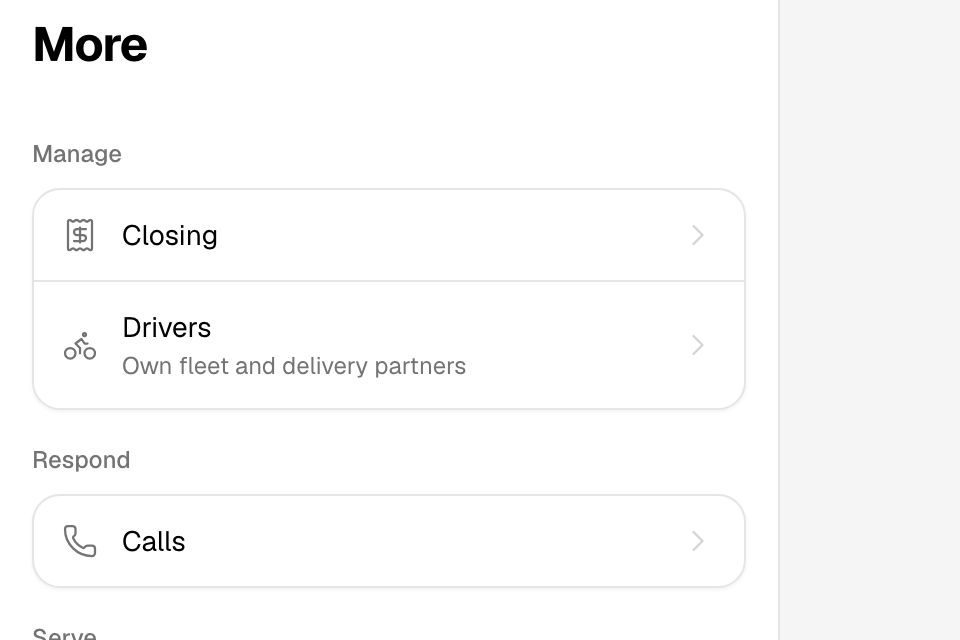
Items in More follow the web dashboard's menu. Most open a screen in the app. A few open a page that says "Coming soon to the app. Use the web dashboard for now." Tap Open web dashboard to open that page in your phone's browser.
| Group | Item | Opens |
|---|---|---|
| Manage | Closing | The closing report for a business day. See Close the day. |
| Drivers | Your own drivers and delivery partners. | |
| Respond | Calls | Call settings and Zyna AI for calls. |
| Serve | Delivery | Delivery zones, fees and times. |
| Pickup, Curbside | The web dashboard. | |
| Grow | Offers, Loyalty, Campaigns, Banners | Your offers, loyalty program, campaigns, and the banner and popup on your store. |
| Understand | Sales, Customers | Sales reports and customer profiles. |
| Finance | Fees & payout | What Zyda takes and what you get paid. See Understand your fees and payout. |
| Transactions | The web dashboard. | |
| Plan | Your plan and invoices. | |
| Setup | Menu editor | Items, modifiers and prices. |
| Branches | Branches and their order settings. | |
| Team | People and roles. | |
| Business, Storefront, Payments, Integrations | The web dashboard. |
Your account and settings
The last group, Account, is the same for everyone:
- The row with your name: your details, email, phone number and password.
- Settings: printing, notifications, language and the new look.
- What’s new: the latest changes in Zyda. A dot on More means there is something you have not read.
- Help: this help centre, in the app's language.
- Chat with us: a chat with Zyda support.
- Sign out: signs you out of this phone.
To change the language, go to More > Settings > Language. The app restarts in the new language.
Rules and limits
- Your role decides the tabs and items you see. See See what each role can open and do.
- If the app cannot read your role, it shows only Orders and More until it can.
- The app is always light. It does not follow the phone's dark mode.
Common questions
Why don't I see Home?
Home shows only to people who can see the whole store. People limited to some branches, such as branch staff, open on Orders.
An item in More opens the web dashboard. Why?
That page is not in the app yet. Open web dashboard opens the same page in your phone's browser. Sign in there with the same account.