For: Owners
Where: Setup > Team > People > Edit > Branches
Available: Web dashboard · All countries
A cashier in Salmiya does not need to see the orders of your Hawally branch. Limit each person to the branches they work in.
How it works
Branches belong to the person, not to the role. One Branch staff role can serve every branch, and each person gets their own branches.
When you limit a person to some branches, three pages show only those branches:
- Home
- Orders, including what they can accept, change and refund there
- Availability, where they mark items sold out
Every other page in their role works for the whole store. The By branch badge in a role marks these three pages.
All branches includes the branches you add later. Only some branches does not. Tick a new branch for the person when you add it.
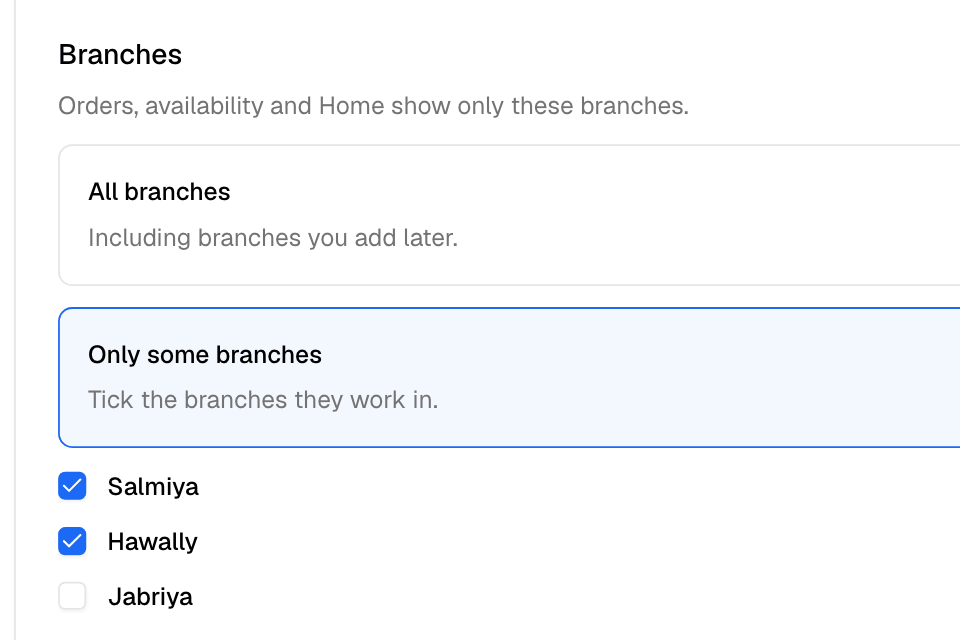
Choose a person's branches
- Go to Setup > Team.
- Select Edit next to the person. For a new person, select Add person.
- Under User Role, choose Branch staff or one of your own roles.
- Under Branches, choose Only some branches.
- Tick each branch the person works in.
- Select Save Changes, or Add for a new person.
On the People tab, the person's branches show under their role.
Rules and limits
- Only Branch staff and your own roles can be limited to branches.
- Owner always works in every branch. Operations, Marketing and Finance also cover the whole store. For them, the Branches choice is greyed out.
- Tick at least one branch, or you see "Tick at least one branch."
- If you delete every branch a person works in, they lose access to your store until you tick another branch for them.
- If you delete a role, its people move to the template it came from. Only people moved to Branch staff keep their branches.
Common questions
Can an operations manager look after only one branch?
Not with the Operations role, which covers the whole store. Copy Operations into a role of your own, then limit the person to that branch. Only Home, Orders and Availability follow the limit. Pages such as Menu and Delivery still cover the whole store.
Does a branch limit change the sales reports they see?
No. Only Home, Orders and Availability follow the branch limit. If the role can view Sales, the person sees the whole store's sales.