For: Owners, Operations, Marketing
Where: Grow > Offers
Available: Web dashboard and Zyda phone app (Android) · All countries
The offers list shows every offer, how much it has been used, and what it has cost. From here you list, share, pause, copy or delete offers.
How it works
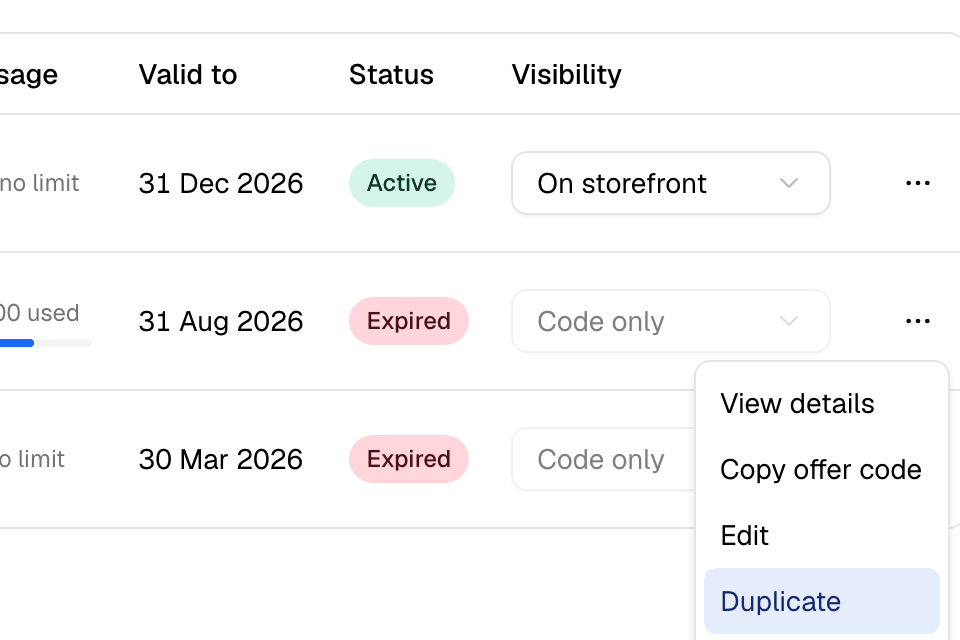
Grow > Offers has five tabs: All, Active, Deactivated, Scheduled and Expired. Each row shows the code (or Automatic), the reward, its conditions, how many times it was used, the budget given, the end date and the status.
Search finds an offer by its code.
Show an offer on your store
New offers start as Code only: they work, but your store does not list them. To list one:
- Find the offer.
- Under Visibility, choose On storefront.
Automatic offers show by themselves, marked Applied automatically. Offers for some customers only, such as new customers, are not listed, but they still apply.
Share an offer link
- Select … on the offer.
- Select Copy offer code.
You get a link to your store. When a customer opens it, the offer applies by itself. Share it in a post, an ad or a message.
Pause or start an offer
Select …, then Deactivate or Activate. You see "Offer updated".
An expired offer cannot be started again. Duplicate it with new dates.
Copy an offer
Select …, then Duplicate. A new offer opens with the same settings. The code is empty, the start date is today, and there is no end date. Use this to run an offer again, or to change a setting you cannot edit.
Delete an offer
Select …, then Delete, then confirm. You can delete an offer only if no order has used it. Otherwise, deactivate it.
Common questions
Why did my offer turn itself off?
None of its chosen items are on the menu any more. A warning icon next to Deactivated says so.
Why did my offer stop before its end date?
Its total uses ran out, or its budget was spent.
Can I manage offers from my phone?
Yes, in the new look of the Zyda phone app on Android, under More > Grow > Offers. The iPhone version does not have the new look yet. Goals, automatic offers, budgets, codes and results are on the web dashboard only.