For: Owners, Operations, Finance
Where: Finance > Plan > Invoices
Available: Web dashboard · All countries
Zyda bills your plan, your paid services, the credits you buy and your monthly usage. Invoices lists every bill, so you can pay it and keep a receipt.
How it works
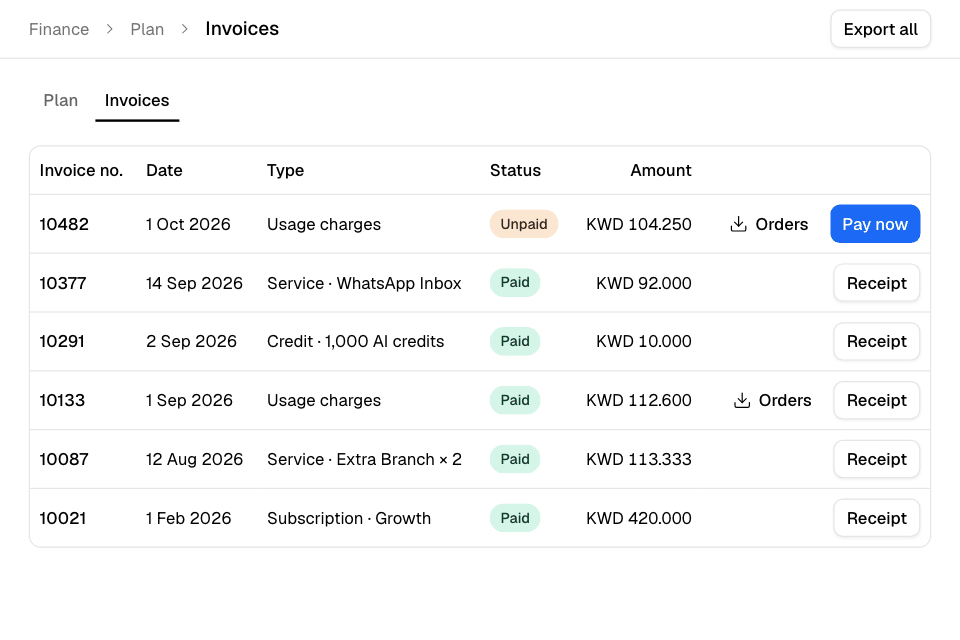
Go to Finance > Plan, then select Invoices. The newest invoice comes first.
| Column | What it shows |
|---|---|
| Invoice no. | The invoice number. |
| Date | The invoice date. |
| Type | What the invoice is for. |
| Status | Where the invoice stands, for example Paid, Unpaid or Cancelled. |
| Amount | The invoice total, in the currency it was billed in. |
The last column has one button. Pay now opens an unpaid invoice. Receipt opens a paid one. View opens any other.
Invoice types
| Type | What it bills |
|---|---|
| Subscription | Your plan, for its billing period. |
| Service | A paid service, such as the WhatsApp Inbox or an extra branch. |
| Credit | Credits you bought, such as SMS, message or AI credits. |
| Usage charges | Your monthly usage. See below. |
Pay an invoice
- Go to Finance > Plan > Invoices.
- Find the invoice with the status Unpaid.
- Select Pay now. The invoice opens in a new tab.
- Pay on that page.
The status changes to Paid when the payment goes through.
The monthly usage invoice
The Usage charges invoice bills what your store used in a month:
- Order commission fee: if your agreement has one, on the orders it covers, phone orders included. Cancelled orders and dine-in orders are never charged.
- Ring commission fee: if your store uses Zyda's Ring team, on the orders your agreement covers.
- Service fee and Marketing processing fee: only the part not already collected when the customer paid, for example on cash orders.
The part already collected at payment shows as settled. You pay only the balance due.
The delivery processing fee is not on this invoice. See Use the delivery network.
In Kuwait, Zyda issues the invoice when the balance due reaches KWD 100. In Egypt, it is EGP 5,000. Below that, the amount carries into the next month. Anything still unbilled is added at your plan renewal, or when your plan ends. In other countries, Zyda bills every month.
If your store has a saved card, Zyda charges the usage invoice to it.
To see the orders behind a usage invoice, select Orders on its row. A file downloads.
When an invoice is late
| Unpaid invoice | What happens |
|---|---|
| Plan renewal | 7 days after its date, your dashboard is limited to orders. 14 days after its date, your plan is cancelled and your store stops taking orders. Pay it, and your store opens again right away. |
| Usage charges, or a service added during your plan | 7 days after its date, your dashboard is limited to orders. Your store does not close. |
| WhatsApp Inbox or Calls Inbox | That service stops until you pay. Your dashboard is not limited. |
Pay the invoice, and the limit is removed.
Export your invoices
Select Export all to download every invoice in one file.
Rules and limits
- You need access to the plan. The Owner, Operations and Finance roles have it.
- Bills in Egypt include 14% VAT. The order commission fee, the service fee and the marketing processing fee already include VAT. The Ring commission fee has VAT added on top. Bills in other countries have no VAT.
- An invoice issued before VAT started in Egypt has no VAT.
Common questions
Where do I see the fees taken from my online payments?
In Finance > Fees & payout. See Understand your fees and payout.
I paid, but the Plan page still says overdue. What now?
Reload the page. If it still says overdue, check Invoices for another unpaid invoice. You may owe more than one.