For: Owners, Operations
Where: Serve > Wholesale > Production
Available: Web dashboard · All countries
Ten businesses order for the same morning. Your kitchen needs one number per product, not ten separate orders. The production sheet adds up every business order for a delivery day.
How it works
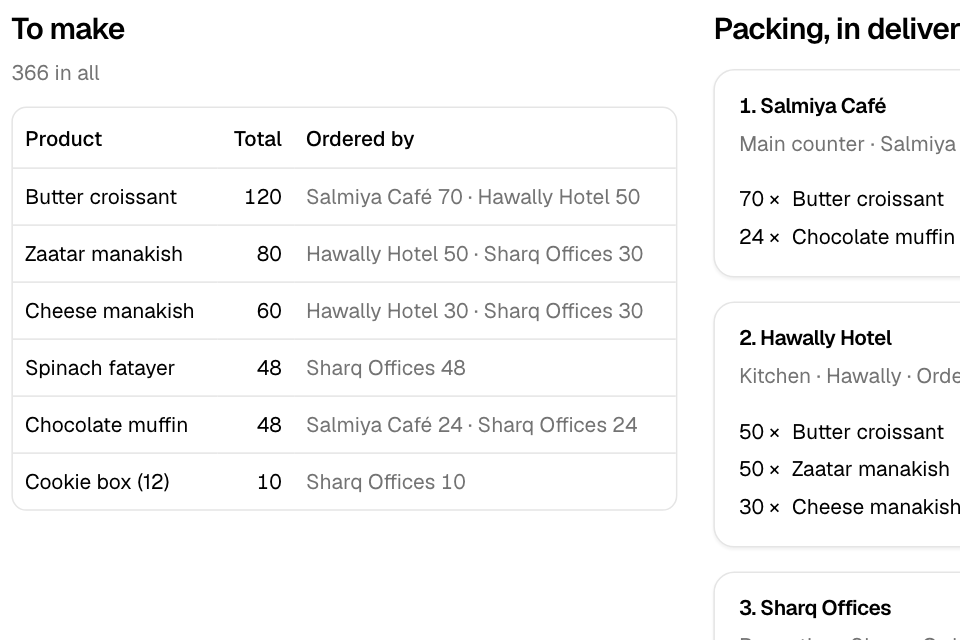
The production sheet lists the business orders for one delivery day. It has two parts:
- To make: each product, the total to make, and how much each business ordered. The heading shows the total number of items.
- Packing, in delivery order: one card per order, sorted by delivery area. Each card shows the business, its location, the order number and the items to pack. A badge says how it is paid: Paid or On account.
Until orders for the day close, a banner says "Orders are open until" and the time. Totals can still change. After the order-by time, the banner says orders are closed. A cancelled order still drops off the list.
The sheet refreshes by itself every minute while orders are open.
Open the production sheet
- Go to Serve > Wholesale > Production.
- Pick the Delivery day in the day box. It shows the next day with business orders.
- If you have more than one branch, pick a branch, or keep all branches.
Rules and limits
- The day box lists days from today on that have business orders.
- A day belongs to the order's delivery time, in your branch's time zone.
- Only business orders show here: orders placed through a business's link. Cancelled orders and orders never placed are left out.
- The orders close at the latest order-by time of the businesses that get deliveries that day.
- Only the Owner and Operations roles see the production sheet.
- The sheet has no print button. Use your browser's print, or open each order in Manage > Orders to print it.
Common questions
The sheet says "No upcoming orders". Why?
No business has an order for a day from today on, at this branch. Check the branch picker.
Why did a total go down after orders closed?
A business order was cancelled or returned. The sheet keeps checking after orders close.
Do my normal website orders show here?
No. They stay in Manage > Orders and the preparation list.