For: Owners, Operations, Marketing, Finance, Branch staff
Where: Help > What's New, or the banner on Home
Available: Web dashboard · All countries
Zyda changes the dashboard often. What's New tells you what changed for your job, why it helps you, and where to find it.
How it works
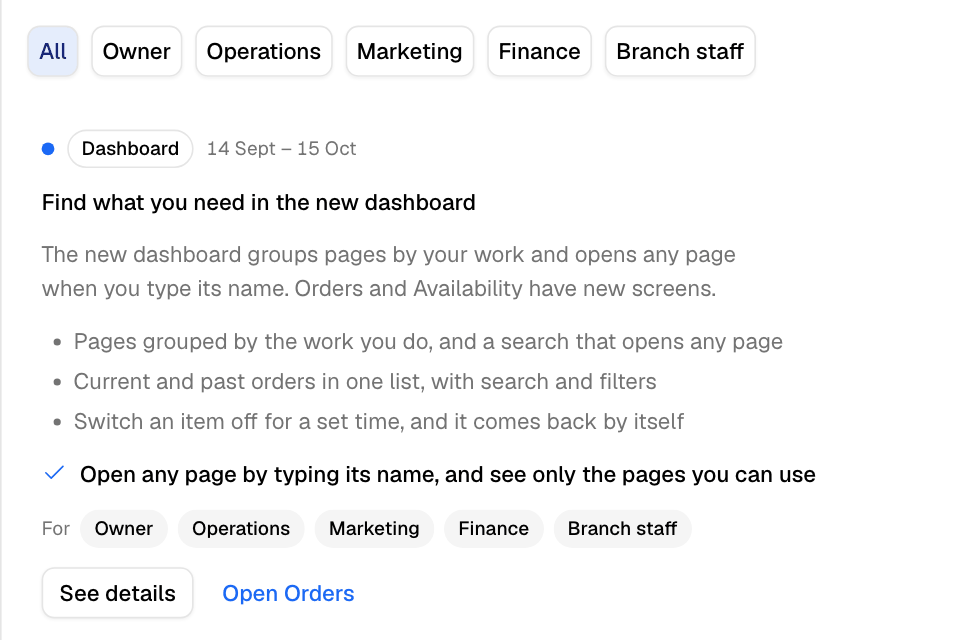
Each update covers one theme, such as a new Orders screen. An update has:
- a short title and what it does for you
- Why it matters, for each job it is for
- What's included: each new feature, with Where to find it and an Open button
- Try it: the steps to use it
- Good to know: rules and limits
- a button that opens the new screen
You see only the updates for your country and your job, about pages you can open.
Read what's new
- Select Help (the round life buoy icon) in the top bar.
- Select What's New.
- Select See details on an update.
- Select Next update to read the next one, or All updates to go back to the list.
When you have read every update, the button says All caught up.
If your role covers more than one job, you can see the updates for one job only. Choose the job above the list, for example Operations or Marketing. Choose All to see every update again. Only jobs that have updates show. An owner can see up to five jobs: Owner, Operations, Marketing, Finance and Branch staff.
The banner on Home
When there are updates you have not read, a banner shows at the top of Home. It shows one update at a time, with its number, for example "1 of 3".
- Select See what's new to read them. The button shows how many are new.
- Select Not now to hide the banner.
If your role cannot open Home, the banner shows on Orders instead.
Send feedback
- Select Help in the top bar.
- Select Share feedback.
- Answer the questions. Every question is optional.
- Select Send feedback.
Rules and limits
- An Open button shows only when the page is in your sidebar.
- Zyda keeps what you have read in this browser. On another computer or browser, updates can show as new again.
- Not now hides the banner. Help > What's New always lists every update.
Common questions
Where did the What's new button go?
It is in the Help menu in the top bar.
Why don't I see an update my colleague sees?
Updates are for a job. Your role decides which updates and which Open buttons you see.