For: Owners, Operations, Marketing
Where: Grow > Loyalty > Program > Manage > Expiry & reminders
Available: Web dashboard and Zyda phone app (Android) · All countries
Needs: SMS credits, or a connected WhatsApp number
Points that are about to expire are a good reason to order again. Customers do not see expiry dates for points in your store, so a reminder is often the only way they find out.
How it works
Zyda checks every day for points or cashback that will expire soon. It sends each customer one message on the days you choose, for example 7 days before. The message goes out about an hour before the time the customer usually orders, between 9 AM and 9 PM. It uses the language of the customer's last order.
Turn on reminders
- Go to Grow > Loyalty and select Manage on your active program.
- Select the Expiry & reminders tab.
- Make sure points or cashback expire. Reminders only apply when they do.
- Under Send a reminder before expiry, tick 1 day, 3 days or 7 days before. You can tick more than one.
- Under Send via, choose SMS or WhatsApp.
- Optional: edit the message (see below).
- Select Save.
To send no reminders, untick all the days.
Edit the message
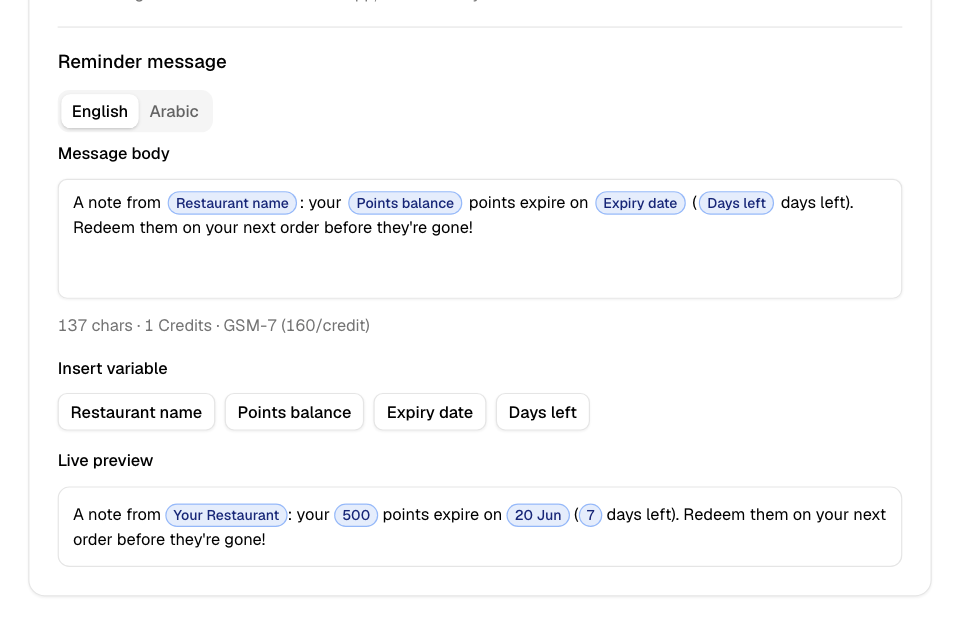
The message has an English and an Arabic version. Edit each on its own tab.
Select Insert variable chips to add details that change for each customer:
| Variable | Shows |
|---|---|
| Restaurant name | Your store name |
| Points balance | The points about to expire |
| Cashback amount | The cashback about to expire |
| Expiry date | The date they expire |
| Days left | The number of days until then |
The Live preview shows the message with sample values. The counter shows the length of the message in SMS credits. Arabic needs more than English for the same length. Keep the message within 4 credits. Zyda still takes only 1 SMS credit for each reminder it sends by SMS.
Select Reset to default to go back to Zyda's message.
SMS or WhatsApp
| SMS | ||
|---|---|---|
| Cost | 1 SMS credit per message | No SMS credit. Meta bills WhatsApp messages. |
| Needs | SMS credits | A connected WhatsApp number |
| If it fails | Not sent | Sent by SMS instead, for 1 SMS credit |
With SMS and no credits left, Zyda sends nothing. Buy credits in Grow > Campaigns > SMS credits.
WhatsApp is greyed out until you connect a WhatsApp number. Select Connect WhatsApp to set it up.
Common questions
The cashback amount in the message is higher than what is left. Why?
The message shows the cashback amount as it was earned, even if the customer already spent part of it.
Why didn't a customer get a reminder?
Check that they have points or cashback expiring on one of your reminder days. Check that you have SMS credits, or that WhatsApp is connected.