For: Owners, Operations, Marketing
Where: Grow > Loyalty > Program > Cashback
Available: Web dashboard and Zyda phone app (Android) · All countries
Cashback is the simplest loyalty program to explain: "Get 10% back on every order." The money goes into the customer's wallet in your store, and they can only spend it with you.
How it works
- A customer pays for an order.
- When the order reaches the status you choose, Zyda adds your percentage of the amount paid to the customer's wallet.
- On their next order, the customer turns on Wallet Balance at checkout. The wallet pays part or all of the order.
Cashback is counted on the full amount the customer pays, including the delivery fee and tax. It does not count the part paid from the wallet. For example, at 10%, an order of 12.000 KWD paid by card gives 1.200 KWD cashback.
You can run one loyalty program at a time. Turning cashback on ends a running points program.
Before you start
- Online payment: Online Payments Only needs online payment turned on for your store.
Set up cashback
- Go to Grow > Loyalty.
- Under Cashback, select Select.
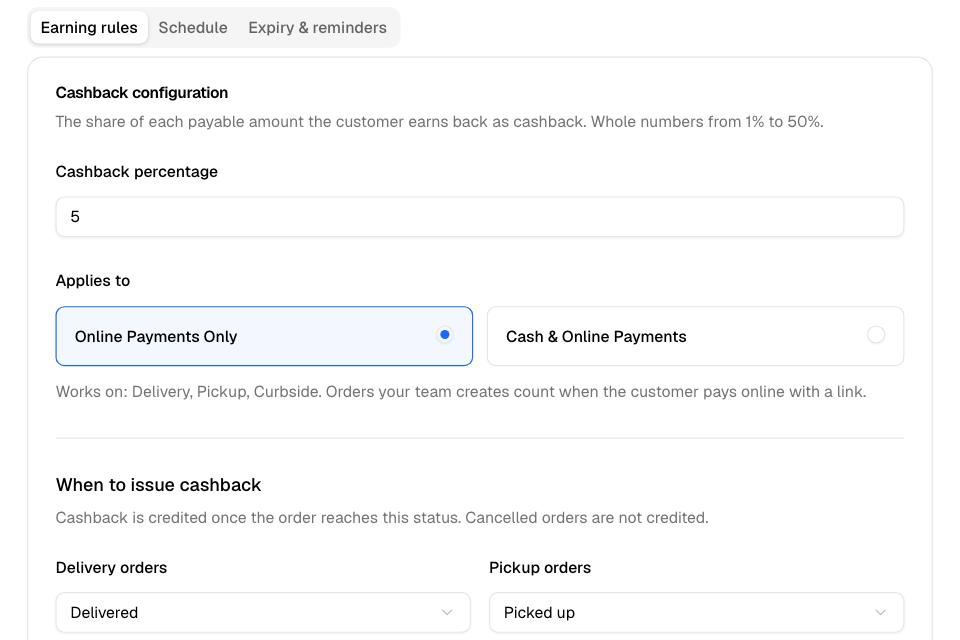
- On the Earning rules tab, enter the Cashback percentage, from 1 to 50.
- Under Applies to, choose Online Payments Only or Cash & Online Payments.
- Under When to issue cashback, choose the status for delivery and pickup orders. The defaults are Delivered and Picked up.
- On the Schedule tab, choose the Start Date. Choose Run this program continuously, or choose an end date.
- On the Expiry & reminders tab, choose when cashback expires and when to remind customers.
- Select Launch.
A program that starts today is active at once. A program with a later start date starts on that date.
Which orders earn cashback
- Delivery, pickup and curbside orders.
- Orders your team creates count too. With Online Payments Only, they count only when the customer pays online with a payment link.
These orders never earn cashback: dine-in, wholesale (business) orders, orders from your own system through the orders API, unpaid online orders, and cancelled orders. With Online Payments Only, cash orders do not earn.
Change the program
Each save starts a new cashback program on the start date you choose. The new program replaces the active one when it starts. Cashback customers already earned stays in their wallets.
To stop cashback, select Deactivate, then confirm. Wallet balances stay, and customers can still spend them.
Expiry
On the Expiry & reminders tab, choose Cashback expires and a number of months, or Cashback never expires.
- Each cashback amount expires on its own date, counted from the day of its order.
- If you change the expiry, it applies only to cashback earned after the change.
- Customers spend the oldest cashback first.
- Customers see expiry dates in their wallet on your web store.
Cancellations and refunds
- Cancelled order or failed payment: the cashback it earned is taken back. Any wallet money the customer used on it goes back to their wallet.
- Partial refund: the cashback is taken back in proportion.
Rules and limits
- Percentage: a whole number from 1 to 50.
- The wallet can pay up to the full order total, delivery included.
- The wallet also holds refunds and compensation you send to it. A customer can have a wallet balance even without a cashback program.
Common questions
Does cashback work with promo codes?
Yes. Cashback is counted on the lower total the customer pays.
Can a customer pay the whole order from their wallet?
Yes, if their balance covers it. Otherwise they pay the rest with another payment method.
Why did saving my change create a new program?
Cashback programs have a start date. Each save starts a new program on that date, and it replaces the active one.