For: Owners, Operations, Marketing
Where: Respond > Chats > Zyna AI
Available: Web dashboard · All countries
Needs: A connected WhatsApp number
Customers write at all hours, and your team cannot always answer at once. Zyna AI is Zyda's AI agent. She answers your WhatsApp chats in Arabic and English and takes the order in the chat.
How it works
When Zyna AI is on, she answers new WhatsApp chats. She can:
- answer questions about the menu and prices,
- build the cart and send the checkout link,
- take the delivery address,
- apply offers and vouchers,
- check and redeem loyalty rewards,
- schedule orders for later,
- share order status and reorder past orders.
She hands the chat to your team when the customer asks for a person, when the payment fails, or when a teammate replies. See Take over a chat from Zyna AI.
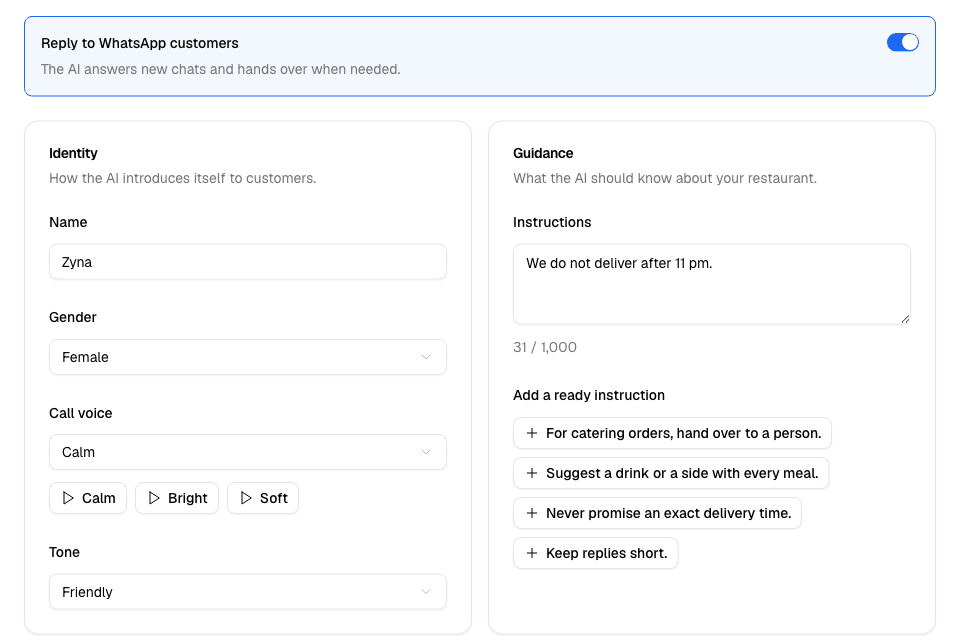
Turn Zyna AI on
Zyna AI turns on by herself when you connect WhatsApp for the first time. If she is off:
- Go to Respond > Chats > Zyna AI. You can also select Zyna AI at the top of the inbox.
- Select Turn on Zyna AI to turn her on with the settings already saved. Or select Set her up first to change her settings before she starts.
To turn her off later, turn off Reply to WhatsApp customers and select Save.
The page header shows Live when she is on and Off when she is off.
Set her name, tone and voice
Under Identity:
- In Name, type the name she uses with customers. Leave it empty to keep Zyna.
- In Gender, choose Female or Male.
- In Call voice, choose her voice for phone calls. Select a voice button to hear it. This voice is used only if your store uses Zyda calls.
- In Tone, choose Friendly, Formal or Playful.
- Select Save.
You see "Zyna AI saved".
Tell her about your restaurant
Under Guidance, write what she should know in Instructions. For example: "We do not deliver after 11 pm."
To add a ready line, select one under Add a ready instruction:
- For catering orders, hand over to a person.
- Suggest a drink or a side with every meal.
- Never promise an exact delivery time.
- Keep replies short.
Select Save.
Rules and limits
| Setting | Limit |
|---|---|
| Name | 30 characters. Empty means Zyna. |
| Instructions | 1,000 characters. The counter shows how many you used. |
| Tone | Friendly is the default. |
| Gender | Female is the default. |
- The Owner, Operations and Marketing roles can open this page. Others are sent to the inbox.
- She answers from your Zyda menu and prices.
- If your plan counts AI credits, each customer message she answers uses 1 AI credit. When none are left, she stops answering until more credits are added. See Add or remove paid services and AI credits.
- A ready line is greyed out when it is already in your instructions, or when it would pass the 1,000-character limit.
Common questions
Does Zyna AI reply on Instagram?
No. She answers WhatsApp chats only.
Can I see what Zyna AI said to a customer?
Yes. Open the chat in Respond > Chats > Inbox. Her messages show her name.