For: Owners, Operations, Marketing
Where: Respond > Chats > Inbox > open a chat > Take over
Available: Web dashboard · All countries
Needs: A connected WhatsApp number and Zyna AI turned on
Zyna AI answers most WhatsApp chats. Some chats need a person, such as a complaint or a special request. You can take over any chat and give it back to Zyna AI later.
How it works
Zyna AI hands a chat to your team when:
- the customer asks for a person,
- a payment fails, or
- a teammate replies in the chat.
A chat that waits for your team moves to the Needs you view and shows a Needs you badge. The dashboard plays a sound. Zyda can also alert your team on WhatsApp. See Choose which alerts your team gets.
In a chat that waits for your team, Zyna AI may keep replying until someone from your team writes. Your next message takes the chat over.
When a teammate replies in a chat, Zyna AI stops replying in that chat. She can answer again later, as the section "When Zyna AI answers again" explains below.
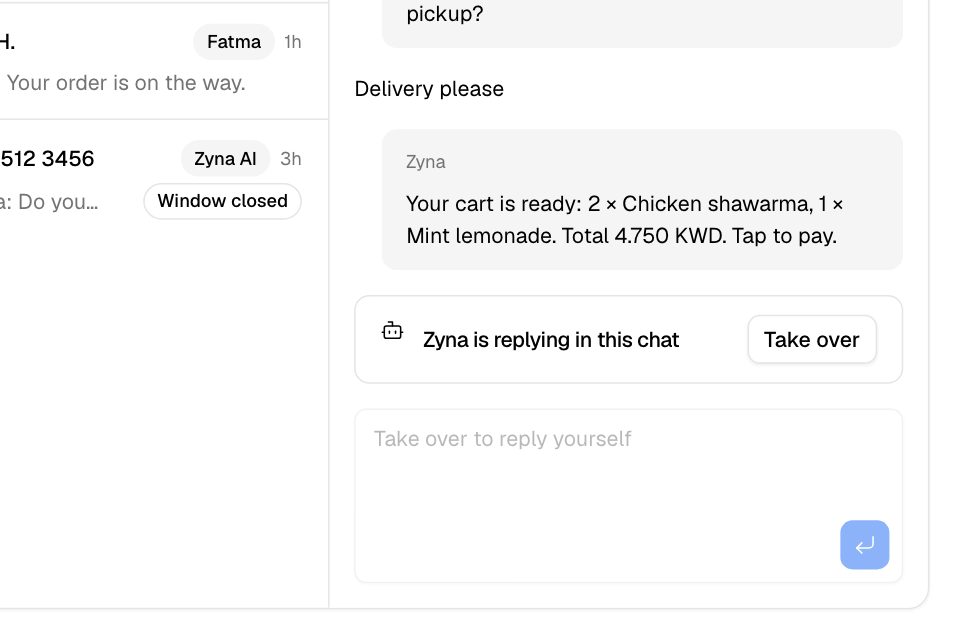
Take over a chat
- Go to Respond > Chats > Inbox.
- Open the chat. While Zyna AI answers, the chat shows "Zyna is replying in this chat", and the reply box is locked.
- Select Take over. The chat shows "Zyna is paused" and "You are replying to this customer." Zyna AI stays quiet until you reply.
- Type your reply and send it.
If you renamed Zyna AI, the chat shows the name you chose.
Answer a chat that needs you
- Select the Needs you view.
- Open a chat. The banner says the chat is waiting for your team.
- Reply to the customer. Your message takes the chat over, and the chat leaves Needs you.
Hand a chat back to Zyna AI
- Open the chat.
- Select Hand back to Zyna.
Zyna AI answers the customer's next messages again.
When Zyna AI answers again
After someone from your team replies, Zyna AI stays quiet in the chat. She answers again when one of these happens:
- Nobody from your team writes for 15 minutes, and then the customer asks something new. A short closing message, such as "thanks" or "ok", does not count.
- Your team's last message asks the customer to wait, such as "one moment". Then she waits 30 minutes instead of 15.
- 12 hours pass after your team's last message.
- You select Hand back to Zyna.
When she answers again after a silence, the chat shows a note: "Zyna AI resumed after 15 minutes without a staff reply".
Rules and limits
- Zyna AI answers WhatsApp chats only. Instagram chats are always answered by your team.
- You need the WhatsApp area at edit level to take over or hand back a chat.
- A reply sent from the WhatsApp Business app on your phone also counts as a teammate's reply.
Common questions
Why did Zyna AI stop replying in one chat?
Someone from your team replied, or took the chat over. Select Hand back to Zyna to let her answer again.
Why did Zyna AI answer again after my team replied?
Nobody from your team wrote for 15 minutes, and the customer asked something new. She answers so the customer is not left waiting. Reply again to make her stop.
How do I see only the chats Zyna AI is answering?
In the chat list, set the second filter to Handled by Zyna AI. It shows only when Zyna AI answers at least one chat.
How do I turn Zyna AI off for every chat?
Go to Respond > Chats > Zyna AI and turn off Reply to WhatsApp customers. See Set up Zyna AI to answer WhatsApp chats.