For: Owners, Operations
Where: Serve > Dine-in > Settings
Available: Web dashboard · All countries
Dine-in lets guests scan a QR code on their table, order from their phone and pay there. You do not need a waiter to take the order or bring a card machine. Every store can use it. You turn it on yourself and choose the branches.
How it works
Dine-in has two switches:
- The store switch, Dine-in (QR table ordering). It turns dine-in on for your store, so you can add tables and print their QR codes.
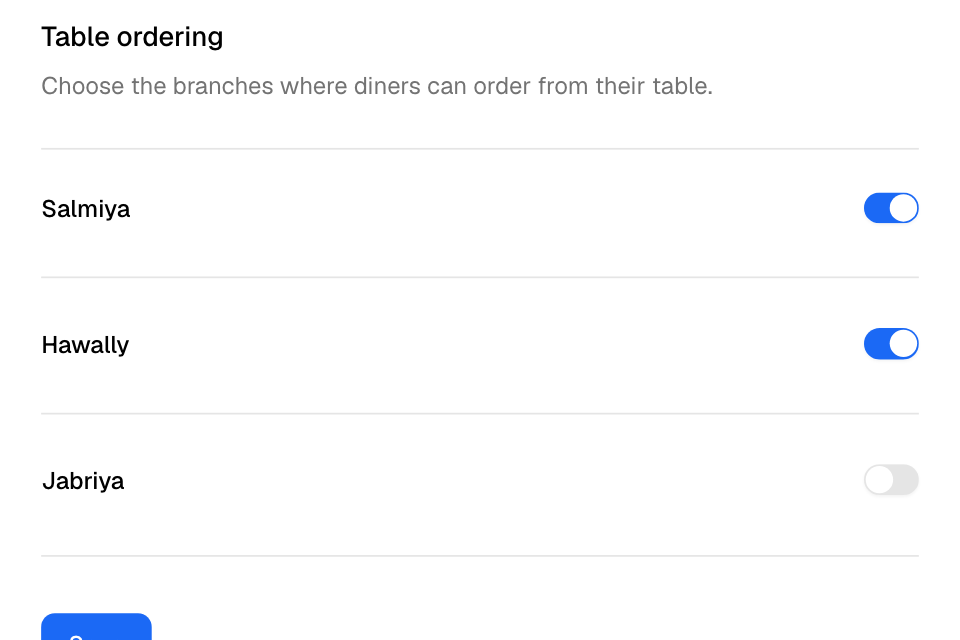
- A Table ordering switch for each branch. Guests can order only at branches where it is on.
When a branch has its tables but Table ordering is off, guests who scan see your menu but cannot order.
Table orders follow your pickup rules at that branch. Guests can order only while the branch is open, and they pay online with the methods the branch takes for pickup.
Turn on dine-in
- Go to Serve > Dine-in. The Get started page opens.
- Select Start 30-day free trial. If your store already had its trial, the button is Turn on dine-in.
- The Settings page opens. Under Table ordering, switch on each branch that takes table orders.
- Turn on Tips if guests can add a tip when they pay.
- Under Session length (minutes), type how long a quiet table stays open. The default is 120.
- Select Save.
You see "Dine-in settings saved". If this is your first branch, your free trial starts now. Next, add your tables. Read Add tables and print their QR codes.
The free trial and the price
Every store gets one free trial of 30 days, once. You see Start 30-day free trial on the Get started page until your store starts it.
- The 30 days start when you switch on Table ordering for your first branch.
- Nothing is charged when the trial ends.
- The Settings page and the Plan page show how many days are left.
- Zyda sends you an email 7 days before the trial ends, and another on the day it ends.
When the trial ends and you have not added Dine-in, dine-in pauses:
- Guests cannot open a new table. Tables that are already open can still order and pay until they close.
- You cannot switch on a branch.
- The Dine-in tab opens a page that says "Your free trial ended".
To keep dine-in on, select Add Dine-in. It opens Finance > Plan, where you add Dine-in to your plan. Dine-in is paid with your plan, for the same period. The price includes your first dine-in branch. Each extra dine-in branch has its own price:
| Your plan is paid | Kuwait: Dine-in | Kuwait: each extra branch | Egypt: Dine-in | Egypt: each extra branch |
|---|---|---|---|---|
| Every 6 months | 150 KWD | 30 KWD | 25,000 EGP | 5,000 EGP |
| Every year | 250 KWD | 50 KWD | 42,500 EGP | 7,500 EGP |
| Every 2 years | 450 KWD | 90 KWD | 75,000 EGP | 15,000 EGP |
- Egypt prices are before 14% VAT. Other countries see their price on the Get started page and the Plan page.
- Other plans, such as a plan paid every 3 months, have no Dine-in price. The page says "Contact us for the price", and Contact Us shows instead of Add Dine-in.
- After you add Dine-in, an extra branch you switch on is charged at once, for the rest of your plan's period. A branch you switch off stops costing at your next renewal.
- Dine-in covers up to 10 branches. For 11 or more, contact us.
- If you remove Dine-in on the Plan page, dine-in stops at once. Guests cannot open a new table.
- Zyda takes no commission on table payments.
Change dine-in settings
| Setting | What it does |
|---|---|
| Dine-in (QR table ordering) | Turns dine-in on or off for the store. When it is off, Live tables and Tables are hidden. |
| Tips | Guests can add a tip when they pay. |
| Session length (minutes) | A table closes by itself after this many minutes with no activity. A table that still owes money stays open. |
| Table ordering | Turns guest ordering on or off for one branch. |
If you leave the page with changes you did not save, the dashboard asks first.
Rules and limits
- Session length (minutes) takes whole minutes from 1 to 1440. A value under 15 works as 15.
- Guests can order only during the branch's opening hours. On holidays and after the last order time, they see the menu only.
- When the branch is busy, a guest's order is refused when they send it.
- Guests pay online through Tap or MyFatoorah only. Online payment must be on for your store. Guests can always pay your staff at the counter.
Common questions
Why can't some of my team see Dine-in?
The Dine-in tab needs Pickup and curbside in the person's role. The Owner and Operations roles have it. Branch staff, Finance and Marketing do not, so they do not see Live tables, waiter calls or the table bill. Branch staff can still accept a table's first round and mark rounds served on the Orders page. To let waiters use Live tables, give their role Pickup and curbside in Setup > Team > Roles.
A branch did not switch on. Why?
Read the message at the top of Settings. Either the free trial ended and you have not added Dine-in, or you already have 10 dine-in branches. For the first, select Add Dine-in. For the second, select Contact Us.
How do I move dine-in from one branch to another?
Switch off the old branch and switch on the new one, then select Save. Zyda saves the branch you switched off first.