For: Owners, Operations
Where: Serve > Delivery > Edit zones > Add zone
Available: Web dashboard · All countries
Customers can order delivery only from an address inside one of your zones. A zone is an area on the map that one or more branches deliver to. Each zone has its own fee, minimum order, delivery time and hours.
How it works
Each zone belongs to a branch. When a customer enters an address, Zyda finds the zones that cover it. The customer sees that zone's delivery fee, minimum order and delivery time at checkout.
When more than one branch covers the address, the order goes to a branch that is open and not busy. If several can deliver, the branch with the lowest delivery fee gets the order. If all of them are busy or closed, the customer can schedule the order or pick it up.
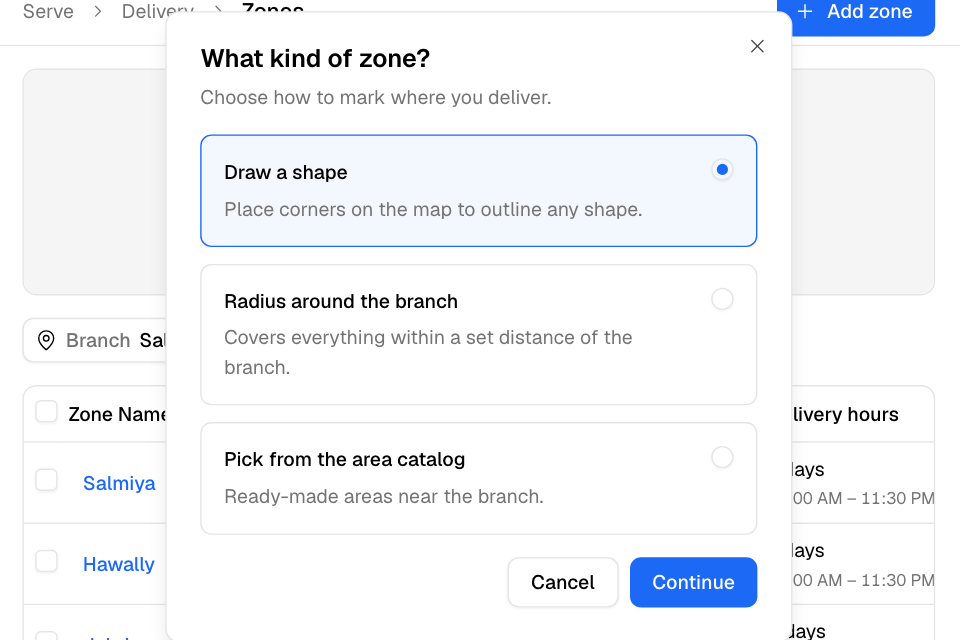
You can make a zone in three ways:
| Kind | What you do |
|---|---|
| Draw a shape | Click the map to place the corners of any shape. |
| Radius around the branch | Set a distance. The zone covers everything within that distance of the branch. |
| Pick from the area catalog | Tick ready-made areas near the branch, such as Salmiya or Hawally. Each area becomes its own zone. |
Add a zone
- Go to Serve > Delivery and select Edit zones.
- Choose the branch at the top of the list.
- Select Add zone.
- Choose the kind of zone and select Continue. The map opens.
- Mark the area:
- Draw a shape: click the map to place each corner. You need at least three corners. Drag a corner to move it. Select Undo to remove the last corner. Then select Continue.
- Radius around the branch: a circle of 1 km opens around the branch. Drag its edge to change the distance.
- Pick from the area catalog: tick the areas in Near the branch, or search them in All areas. You can also click an area on the map. Then select Continue.
- Fill in the details (see below).
- Select Save. With several catalog areas, the button says Add 3 areas, for example.
You see "Zone added", or "3 zones added" for catalog areas.
The zone details
- Zone Name: the name your team sees, such as Salmiya. Each zone of a branch needs its own name. Catalog areas keep the area's name.
- Fulfilled by: the branches that deliver to this zone. Tick more than one to give each ticked branch its own copy of the zone. A radius zone stays with its own branch.
- Delivery fee: what the customer pays for delivery. Enter 0 for free delivery.
- Minimum order: the smallest order total you accept here. Leave it empty for no minimum.
- Delivery time: how long delivery takes, in minutes or hours.
- Delivery hours: choose Every day for the same hours each day, or Custom per day. A new zone starts with the branch's opening hours.
- Published: on means customers in this zone can order delivery.
If your POS sends delivery areas to Zyda, you also see POS External ID. Enter the area's ID from your POS.
Find your way on the map
- Under Branch, choose one branch or All branches. Each branch has its own colour.
- Turn on Hide other branches to see only the chosen branch's zones.
- Use Search places to move the map to a street or landmark.
- Select List to go back to the zones list.
- Click a zone to change its shape or details. See Change a delivery zone.
Rules and limits
- You must choose one branch before you can add a zone. On the map, All branches cannot add zones.
- The delivery fee must be 0 or more. The delivery time must be a whole number of minutes, more than 0.
- The delivery time cannot be shorter than your preparation time. It also cannot be longer than how far ahead customers can book, minus two time slots.
- In Kuwait, the delivery fee can be KWD 1.000 per order at most. This is the law.
- Pick from the area catalog is greyed out when there are no catalog areas near the branch.
- If delivery is off for the branch, the list shows "Delivery is off for this branch". Your zones are kept. Select Turn on to take delivery orders again.
- A few older stores still have an older zones page. If Edit zones opens a different page, contact Zyda support.
Common questions
A customer says we do not deliver to them. Why?
Their address is not inside a published zone, the zone is outside its delivery hours, or delivery is off for the branch. Check the zone's Status and Delivery hours in the list.
Two branches cover the same street. Which one gets the order?
A branch that is open and not busy. If both can deliver, the one with the lower delivery fee.
What fee should I set in Kuwait?
At most KWD 1.000. With your own drivers, Zyda suggests KWD 0.250 when the branch is inside the zone. When the branch is outside the zone, it suggests KWD 0.500. These are suggestions only.