For: Owners, Operations, Branch staff
Where: Manage > Drivers (in Kuwait, Manage > Drivers > Dispatch)
Available: Web dashboard · All countries
If your restaurant has its own drivers, add them to Zyda once. Then you can send them orders, and they get each order on WhatsApp. You do not need a separate app for your fleet.
How it works
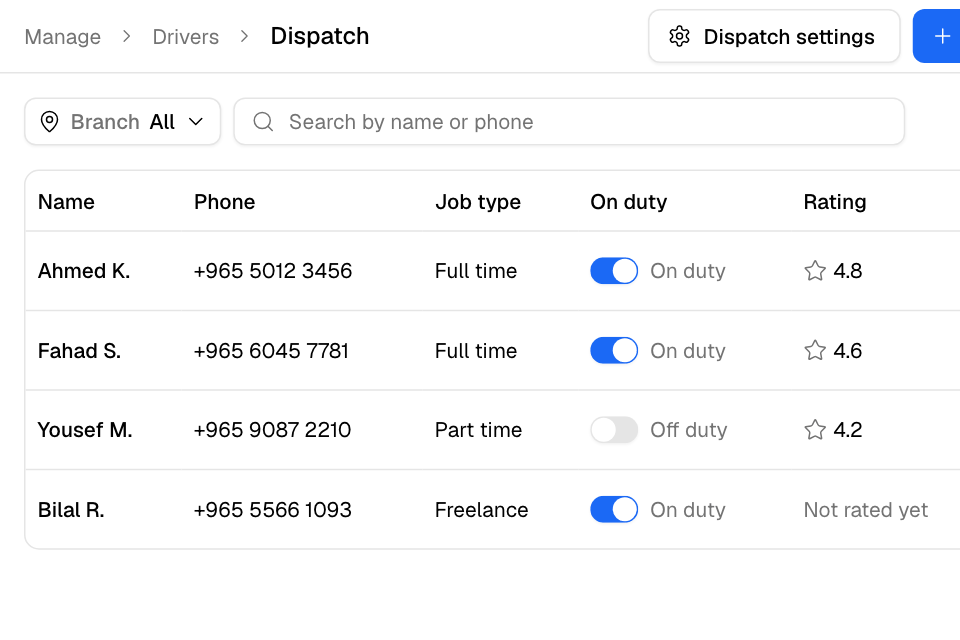
Your drivers are listed in Manage > Drivers. In Kuwait, they are under the Dispatch tab. Each driver has a name, a phone number on WhatsApp and the branches they take orders from.
When you assign an order to a driver, the driver gets it on WhatsApp from Zyda. The driver then updates the order from WhatsApp, up to delivered. See Assign a driver or courier to an order.
The list shows each driver's Job type, whether they are On duty, and their Rating.
Add a driver
- Go to Manage > Drivers. In Kuwait, select the Dispatch tab.
- Select Add driver.
- Enter the driver's Full name.
- Enter the Phone number. Use the number the driver has on WhatsApp.
- Optional: enter an Email.
- Choose the Language: English or Arabic. The driver gets order messages in this language.
- Choose the Job type: Full time, Part time or Freelance.
- Under Branches, tick the branches the driver takes orders from.
- Select Add driver.
You see "Driver added".
You can also add a driver while you assign an order. See Assign a driver or courier to an order.
Mark a driver on or off duty
Use the switch in the On duty column. It saves at once.
Turn a driver off duty when they finish their shift. Automatic assignment gives orders only to drivers on duty. See Assign your own drivers automatically.
Edit a driver
- Select … on the driver's row, then Edit.
- Change the details.
- Select Save.
You see "Driver saved".
Delete a driver
- Select … on the driver's row, then Delete.
- Select Delete to confirm.
The driver leaves your fleet and stops getting orders.
Find a driver
- If you have more than one branch, choose a branch at the top to see only the drivers of that branch.
- Type in Search by name or phone.
Rules and limits
- In Kuwait, adding your first driver turns on Own fleet for your store.
- The phone number must be a valid mobile number.
- The email is optional. If you enter one, it must be valid.
- You cannot delete a driver who has active orders. You see "This driver can't be deleted yet". Reassign the orders, or wait until they are delivered.
- Rating is the average of the ratings customers gave this driver's orders, with one decimal. Customers rate a delivery from a WhatsApp message. A driver with no ratings shows "Not rated yet".
Common questions
Who can manage drivers?
The Owner, Operations and Branch staff roles.
My driver did not get the WhatsApp message. What do I check?
Check the phone number in Edit, with the right country code. The number must be on WhatsApp.
Can a driver work for two branches?
Yes. Tick both branches under Branches.