For: Owners, Branch staff, Operations
Where: Manage > Orders > open an order > Cancel order
Available: Web dashboard and Zyda phone app (Android) · All countries
Sometimes you cannot make an order. An item ran out, the kitchen is overloaded, or the customer changed their mind. To reject a new order, or cancel one already in progress, use Cancel order and say why.
How it works
The reason you choose does two jobs. It tells your reports why orders get cancelled. It also lets you fix the cause in the same step, for example take a sold-out item off the menu.
When you cancel, Zyda:
- tells the customer by push notification, and by SMS if order status SMS is on
- cancels the driver or courier request
- puts back the stock and the daily limit of each item
- gives the promo code use back to the customer
- takes back loyalty points and cashback, and gives back points the customer spent
- updates your POS, if you use one
Cancelling does not send money back by itself. You choose the refund next.
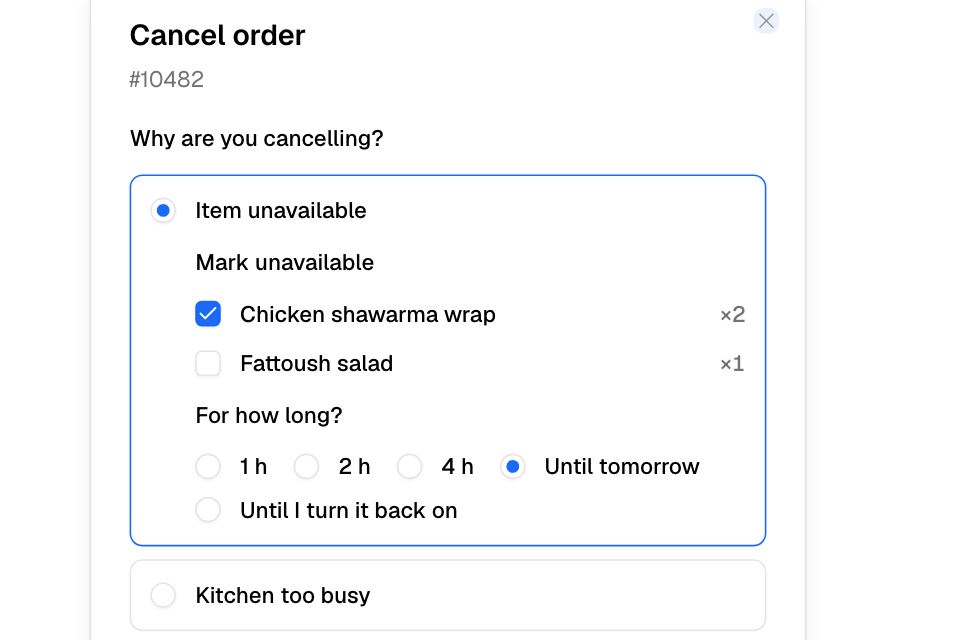
Cancel an order
- Open the order in Manage > Orders.
- Select Cancel order.
- Under Why are you cancelling?, choose a reason.
- Answer the extra question for that reason, if there is one.
- Select Confirm Cancellation.
If the order was paid online and you have the refunds permission, the refund screen opens next. See Refund an order.
The reasons
| Reason | What you can do in the same step |
|---|---|
| Item unavailable | Tick the items to take off the menu at this branch: for 1 hour, 2 hours, 4 hours, until tomorrow, or until you turn them back on. Not shown when your POS manages the menu. |
| Kitchen too busy | Pause new orders at this branch for 30 minutes, 1 hour or 2 hours, for delivery, pickup or both. Or choose Don't pause. |
| Store closed or closing | – |
| Delivery problem | Say what happened: no driver, outside the delivery area, or the customer could not be reached. Delivery orders only. |
| Customer asked to cancel | Say why: waited too long, changed their mind, ordered by mistake, wants to change the order, or did not say. |
| Payment problem | – |
| Duplicate, fake or test order | Choose duplicate, fake or prank, or test order. |
| Other | Describe what happened, in at least 15 characters. |
Test order shows only to people whose role has Refund money: the Owner and Operations roles, or a role of your own with that switch on. Test orders do not count in your cancellation rate.
If you cancel an order, then the pause fails, you see "The order is cancelled, but the branch could not be set as busy." Set the branch as busy from the Orders page.
Courier orders
If a courier company has the order, the screen warns you first. The courier may charge a cancellation fee, or you may need to call the courier's support.
Common questions
Is there a Reject button?
No. To reject a new order, select Cancel order and choose the reason.
Can I cancel a delivered order?
Yes. Cancellation works from any status.
Will the customer get their money back?
Only when you refund. Cash and card on delivery orders have nothing to refund through Zyda.