For: Owners
Where: Finance > Plan > Cancel plan
Available: Web dashboard · All countries
If you want to stop using Zyda, you can cancel your plan yourself. Your store keeps working until the end of the period you already paid for.
How it works
When you cancel, Zyda schedules the cancellation for the last day of your current billing period. Until that day:
- Your store keeps taking orders.
- The Plan page shows Your plan ends on and the date.
- You can undo the cancellation.
After that day, your store stops taking orders.
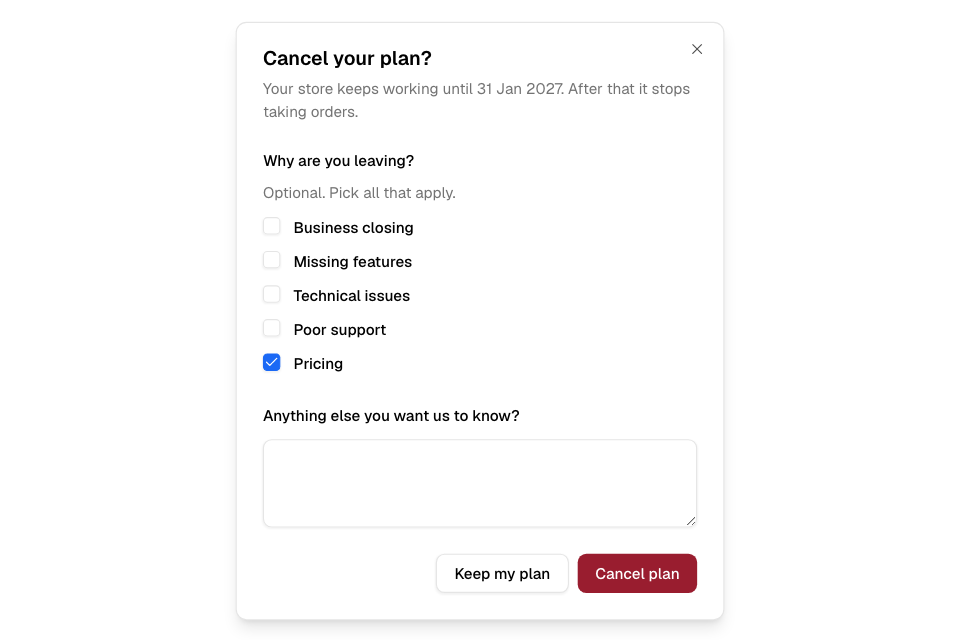
Cancel your plan
- Go to Finance > Plan.
- Scroll to the end of the page. Find Cancel plan.
- Select Cancel plan.
- Optional: tick why you are leaving, and add a comment.
- Select Cancel plan to confirm. To stop, select Keep my plan.
A message says when the cancellation is scheduled.
Undo a cancellation
- Go to Finance > Plan.
- On the Your plan ends on notice, select Keep my plan.
You see "Your subscription will continue."
What you still pay
Anything you used that is not billed yet, such as your order commission fee, is billed when the plan ends. See Pay your Zyda invoices.
Rules and limits
- Only the store owner can cancel the plan.
- During the free trial, Cancel plan does not show.
- While a cancellation is scheduled, you cannot change your plan. Keep your plan first.
- A plan that has ended has nothing to cancel.
Common questions
Do the reasons matter?
They are optional. They help Zyda improve. You can cancel without them.
Can I pause my plan instead?
The Plan page has no pause. Contact Zyda support to talk about your options.