For: Owners, Operations
Where: Serve > Delivery, and Serve > Delivery > Performance
Available: Web dashboard · All countries
Late deliveries cost you repeat customers. See how much you sell by delivery, and how often your deliveries arrive by the time you promised.
The Delivery page
Serve > Delivery shows the last 30 days against the 30 days before:
- Delivery orders, and their share of all your orders.
- Delivery sales.
- Average order.
Under Set up, you see what decides where and by whom you deliver:
- Branches delivering: how many branches take delivery orders. Select Branches to change it.
- Zones: how many zones you have, and how many are active. Select Edit zones to change them.
- Drivers: how many drivers you have, and how many are on duty. Select Drivers to manage them.
The badge next to the title says Live when at least one branch delivers, or Not set up.
How the on-time report works
Serve > Delivery > Performance counts your delivery orders in the dates you choose.
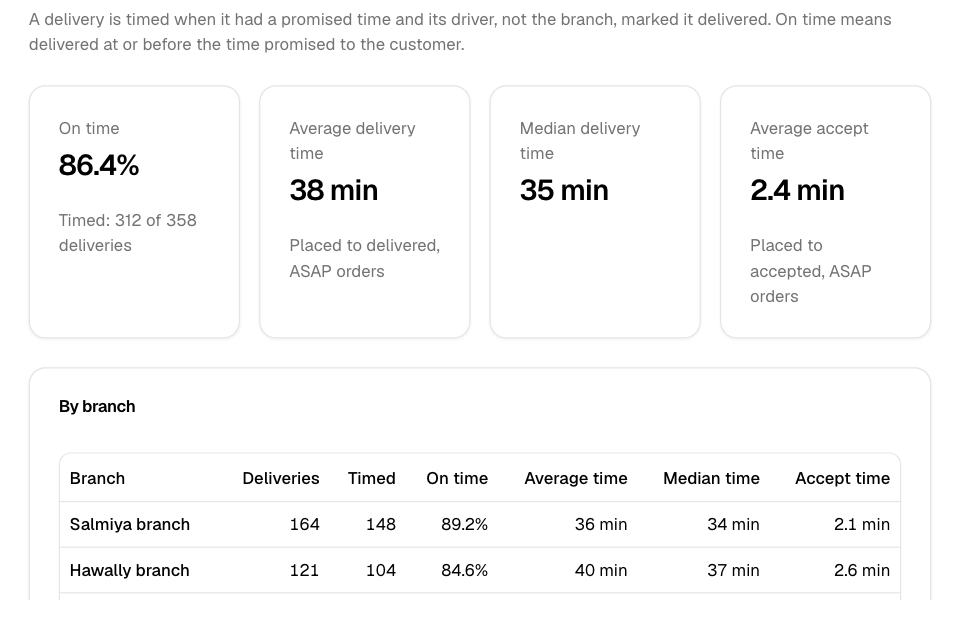
A delivery is timed when it had a promised time and its driver, not the branch, marked it delivered. On time means delivered at or before the time promised to the customer. The report counts only timed deliveries for the on-time share.
Read the report
- Go to Serve > Delivery and select Performance.
- Choose the dates and, if you want, the branches.
- Read the cards:
- On time: the share of timed deliveries that arrived on time. Under it: "Timed: 120 of 150 deliveries", for example.
- Average delivery time and Median delivery time: from order placed to delivered, for ASAP orders.
- Average accept time: from order placed to accepted, for ASAP orders.
- Read On time by day to see which days were late.
- With more than one branch, read By branch. It lists each branch's deliveries, timed deliveries, on-time share, average and median time, and accept time. The branch with the most deliveries is first.
Rules and limits
- You need access to both Delivery and Sales. The Owner and Operations roles have it.
- You see only the branches your sales access covers.
- A day with no timed deliveries shows as a gap in the chart, not as 0%.
- If your store accepts orders automatically, Average accept time is not shown. It would always be about zero.
- The report has no comparison with an earlier period.
Common questions
Why are fewer deliveries timed than delivered?
A delivery is timed only when it had a promised time and the driver marked it delivered. Orders marked delivered by the branch are not timed. A delivery is not timed either when the driver marked it picked up and delivered less than a minute apart.
How do I get more deliveries timed?
Assign orders to drivers or couriers, so they mark them delivered. See Assign a driver or courier to an order.
What is the median delivery time?
The middle value: half of the deliveries took less time, and half took more. A few very late orders change it less than the average.