For: Owners, Operations, Marketing
Where: Grow > Campaigns > New campaign > Recipients
Available: Web dashboard · All countries
A message to the right customers brings orders. A message to everyone wastes credits and annoys people. The Recipients step lets you pick exactly who gets a campaign.
How it works
Choose a group, then narrow it by branch or delivery zone if you want. Zyda shows how many customers the campaign reaches.
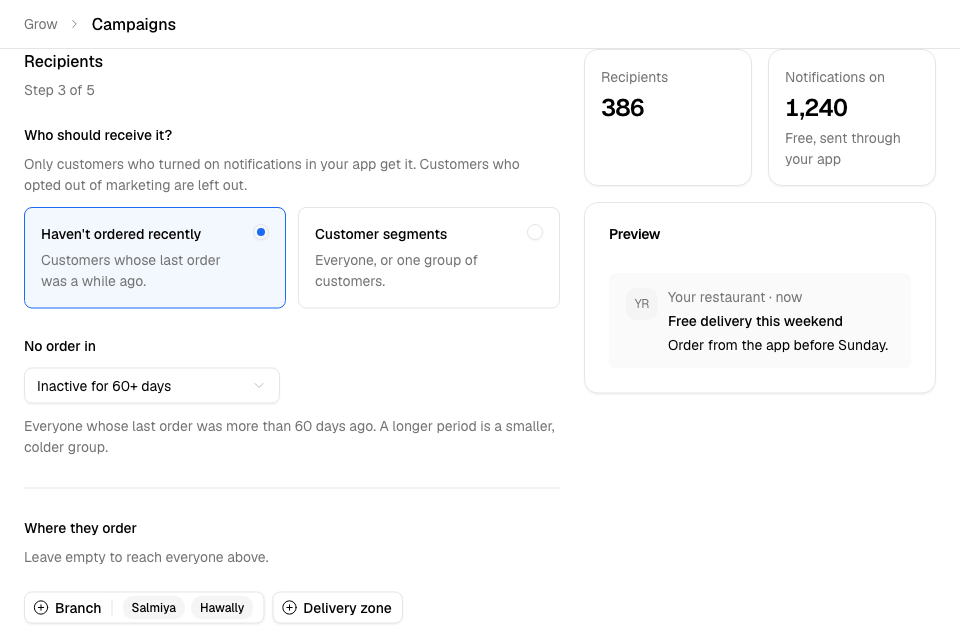
The groups
| Group | Who | SMS | Push | |
|---|---|---|---|---|
| Haven't ordered recently | No order in 30, 60, 90 or 180 days, or a number you choose. | ✓ | ✓ | ✓ |
| Customer segments | All customers, or one segment: Champions, Loyal, Promising, New, Low Value or Needs Attention. | ✓ | ✓ | ✓ |
| Abandoned carts | Customers who started an order in the last 1, 7 or 30 days and did not finish it. | ✓ | ✓ | – |
| WhatsApp contacts | Everyone saved on your connected WhatsApp number. | – | ✓ | – |
| Upload a list | A file of phone numbers. | ✓ | ✓ | – |
| Website regulars who don't use your app | Regular website customers in the last 28 days who have not used your app. The link opens your app. | ✓ | – | – |
Narrow by branch or zone
Under Where they order, choose Branch or Delivery zone. Leave both empty to reach everyone in the group. Pickup customers have no zone, so filter them by branch.
This is not available for uploaded lists, WhatsApp contacts or website regulars.
Send to your own list (SMS)
- Choose Upload a list.
- Select Download template. Keep "phone numbers" as the first column header.
- Fill in the numbers and save the file as .csv or .xlsx, up to 1 MB.
- Select Choose a file.
- Check the result: valid, duplicate and invalid numbers.
- Select Use this file and give the file a name.
Numbers must be in your store's country.
Send to your own list (WhatsApp)
- Choose Upload a list, then Upload a new list.
- Put one number per row, with the country code, for example +96599998691. An optional second column holds the customer's name, for templates that greet customers by name.
- Enter a List name and choose the file.
- Tick that these customers agreed to receive WhatsApp messages from you.
- Select Upload list.
Messaging people who did not agree can get your number restricted by Meta.
Who is always left out
- Customers who replied STOP to you on WhatsApp. This stops all your marketing messages to them, on every channel.
- Customers who got a campaign from you in the last 30 days.
- Customers without a phone number.
- For push: customers who did not turn on marketing notifications in your app.
A customer never gets the same campaign twice.
Common questions
Why is my reach smaller than my customer list?
Zyda leaves out customers who opted out or got a campaign recently. For WhatsApp, the estimate is before these are taken out.