For: Owners, Operations
Where: Setup > Menu > Items > Add combo
Available: Web dashboard · All countries
A combo sells several items together at one price, such as a burger meal with fries and a drink. Customers build it step by step on your store.
How it works
A combo is an item with:
- Sizes: each size has its own price, such as Regular and Large. The price customers see starts from the cheapest size.
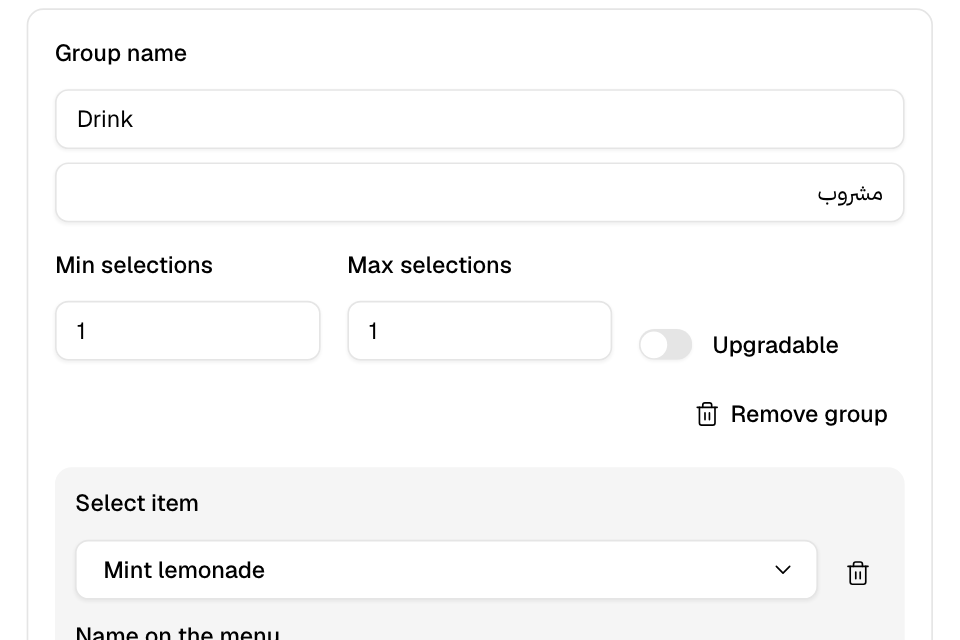
- Combo groups: the steps the customer goes through, such as Main, Side and Drink. Each group lists the items the customer can pick from.
Each option in a group points to one of your menu items. An option can cost extra, with a different extra price for each combo size.
In the menu list, a combo shows a Combo badge.
Create a combo
- Go to Setup > Menu > Items.
- Select Add combo.
- Enter the name in English and Arabic. Optional: add a description.
- Choose the Categories and the branches under Published in. A new combo starts in every branch.
- Under Sizes, enter a Size name and a Price. Select Add size for more sizes.
- Under Combo groups, select Add group.
- Enter the Group name, such as "Choose your drink".
- Set Min selections and Max selections.
- Select Add option. Under Select item, search for the item and pick it.
- Optional: change the Name on the menu, and enter an Extra price per size.
- Add the other options and groups.
- Select Add combo.
Edit or delete a combo
- Select the combo in the menu list.
- Change what you need, then select Save.
To delete it, select the "…" menu, then Delete combo. You cannot undo a delete.
To hide a combo without deleting it, turn off Published, then select Save.
Rules and limits
- A combo needs a name in English and Arabic, and at least one size with a price.
- Each size and each group needs a name in English and Arabic.
- In each group, Max selections is at least 1, and Min selections is not more than the maximum.
- Each group needs at least one option.
- Each option needs an item, and a price for every size. Enter 0 for no extra price.
- An option cannot be another combo.
- A combo goes only in a category without sub-categories.
- A combo synced from a POS is read-only. It shows Synced from POS.
Common questions
Why does an option say it cannot be ordered?
Its item needs modifiers that the POS does not accept. Customers do not see that option for the sizes listed under Affected sizes.
Do combo options use the items' own prices?
No. The combo size has its own price. Each option adds only its extra price, if you set one.