For: Owners, Branch staff, Operations
Where: Orders tab > New
Available: Zyda phone app (Android) · All countries
Needs: The new look of the Zyda app. The iPhone version does not have it yet.
A customer calls, sends a WhatsApp message or stands at the counter. Create the order on your phone, and it goes to the kitchen like any online order.
How it works
The app takes orders with the same rules as your online store and the web dashboard. It uses your menu, prices, delivery zones, opening hours and offers. The customer gets the same messages as for an online order.
The order screen works like your store on a phone: the menu fills the screen, and a bar at the bottom shows the items and the total.
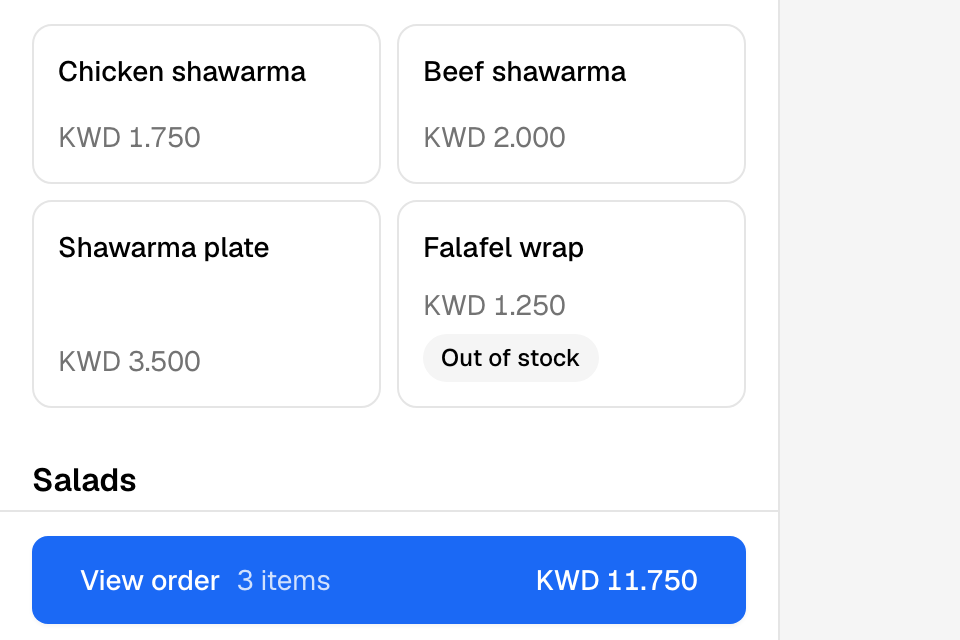
Create an order
- Open Orders and tap New.
- Enter the customer's mobile number.
- Tap the customer if Zyda finds them. If not, tap Add Customer, enter their Full Name and tap Save.
- At the top of the menu, check the branch. Choose Delivery or Pickup.
- For delivery, tap Choose the delivery address. Choose a saved address, or tap Add a new address. To change it later, tap Change beside the address.
- Tap an item on the menu. Choose its options and tap Add to order. Add the other items the same way.
- Tap View order at the bottom. Check the items. To use a voucher code, enter it under Voucher and tap Apply.
- Tap Continue.
- Under When, choose As soon as possible or Later. For Later, pick a day and a time.
- Tap Continue to payment.
- Choose how the customer pays: cash, card on delivery, a payment link, Paid in store, or the customer's wallet balance.
- Tap Place order.
The new order opens so you can check it.
If you choose the payment link, the button says Send payment link. Zyda sends the customer a link to pay online.
Order again for a regular customer
When a customer has ordered before, their past orders show after you pick them. Tap Reorder to put the same items in the order. Then continue from step 7.
Rules and limits
- You need orders at edit to see New.
- A delivery order needs its address before you can tap Continue.
- A grey Place order button says why under it, for example a missing address or an order below the zone's minimum.
- If you close the order screen with items in it, the app asks "Discard this order?". Tap Keep editing to go back.
- In Kuwait, you can search the address in PACI (Kuwait Finder).
- The app does not ask for the order source. To record a source such as Instagram or Walk-in, create the order on the web dashboard.
- For the full rules on payment, times and addresses, see Take an order by phone, WhatsApp or at the counter.
Common questions
Can I take card details on the phone?
No. Send a payment link. The customer pays from their own phone.
The number is blocked. What now?
Your store blocked this number, so it cannot order. To unblock it, see Block a customer's phone number.