For: Owners, Finance
Where: Finance > Transactions > Purchases or Refunds
Available: Web dashboard · All countries
A customer says their card was charged, or that a refund did not arrive. Transactions lists every online payment and refund through your payment gateway, so you can check what happened.
How it works
Go to Finance > Transactions. Two tabs sit at the top:
- Purchases: online payments customers made.
- Refunds: money sent back to customers' cards.
Each list has four status tabs: Successful, Pending, Failed and Expired. The newest transactions come first, 10 on each page.
| Column | What it shows |
|---|---|
| Reference | The transaction's reference at the payment gateway. |
| Time | The date and time of the transaction. |
| Amount | The amount paid or refunded. |
| Transaction fees | The fees on the transaction. This column shows only when a transaction on the page has a fee. |
| Method | How the customer paid, for example KNET or a card. |
| Order No. | The order number. |
| Customer | The customer's name and phone number. |
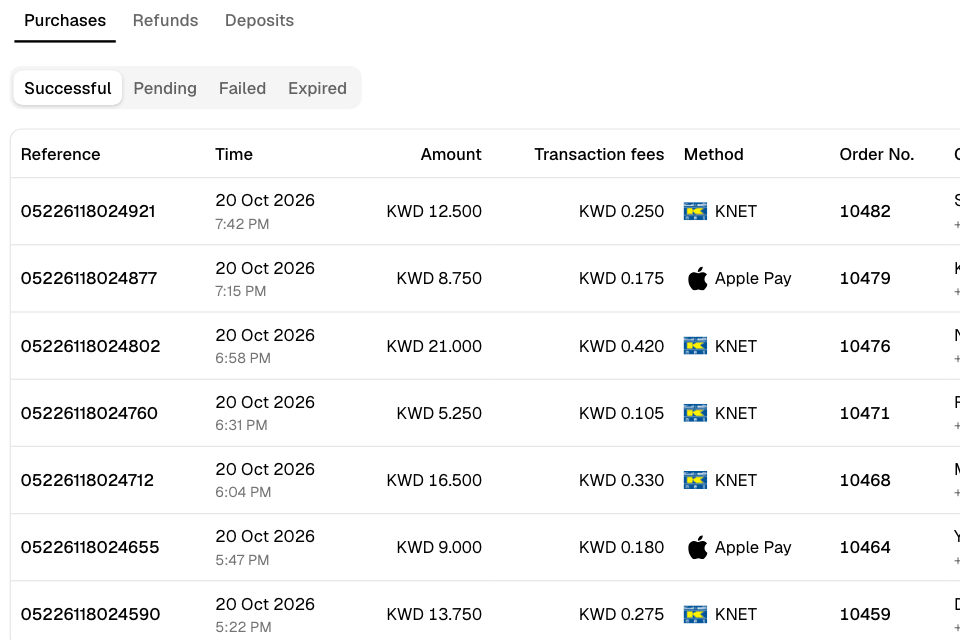
Find a payment
- Go to Finance > Transactions.
- Select Purchases.
- Select a status, for example Successful.
- Use the arrows under the list to move between pages.
- Select a row to open its order.
Only Successful payments open their order. A pending, failed or expired payment belongs to an order the customer never placed.
To search for one payment by order number or reference, use the sales report. See Find an online payment in the sales report.
Check a refund
- Go to Finance > Transactions.
- Select Refunds.
- Select a status, for example Pending.
- Select a row to open the order.
To refund an order, see Refund an order.
Rules and limits
- You need view access to transactions. Owners and the Finance role have it.
- The lists show transactions through your current payment gateway only.
- Cash and card machine payments are not in these lists.
- The list remembers the status tab you chose when you reload the page.
Common questions
I changed my payment gateway. Why are my old transactions missing?
The lists show only transactions through your current gateway.
What does Expired mean?
The customer started paying, but the gateway did not confirm the payment in time. The order was not placed.