For: Owners, Operations, Branch staff
Where: Home > Needs you
Available: Web dashboard · All countries
A branch left on busy, or delivery switched off by mistake, can cost orders for hours before anyone notices. Needs you at the top of Home lists what is costing you orders now, and fixes the common problems for you once you approve.
How it works
Zyda checks your store and lists up to four problems, the most money at stake first. Problems that stop all orders, such as an unpublished store, come first.
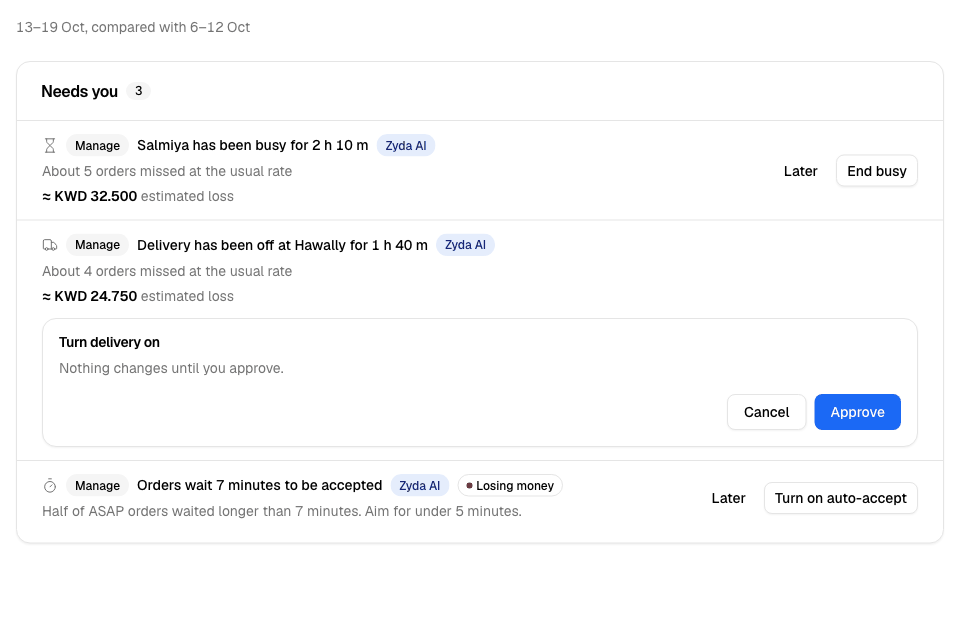
Each row shows:
- the problem, for example "Salmiya has been busy for 2 h"
- a line that explains it, for example "About 6 orders missed at the usual rate"
- the money at stake, when Zyda can estimate it: an estimated loss, a profit a month you could gain, or their website sales
- a Losing money mark on some problems: an unpublished store, slow accepting, and zones above the legal fee limit
- a Zyda AI mark. Zyda AI is Zyda's assistant. It recommends the fix.
- a button that fixes the problem, or opens the page where you fix it
When nothing needs you, the card says "Nothing needs you right now."
Fix a problem with one button
Some rows fix the problem from Home:
- Select the row's button, for example Turn delivery on.
- Check the card that opens. It says "Nothing changes until you approve."
- Select Approve. To stop, select Cancel.
The row then says what changed. A message offers Undo for 10 seconds.
These buttons work from Home:
| Problem | Button |
|---|---|
| A branch has been busy, or closed, for over an hour at a time it usually gets orders | End busy or Reopen |
| Delivery or pickup has been off at a branch for over an hour | Turn delivery on or Turn pickup on |
| A branch is unpublished | Publish branch |
| Your store is unpublished | Publish store |
| Half of your ASAP orders (for as soon as possible, not scheduled) wait more than 5 minutes to be accepted, over 5 orders or more | Turn on auto-accept |
| Dishes switched off for 2 days or more, but less than 4 weeks, that sold before | Turn 3 back on, with the number of dishes it turns on |
| A minimum order stops many carts in a zone | Set minimum to the amount Zyda AI suggests |
| A busy branch is the only one that delivers to some zones | Add another branch as backup |
| Kuwait only: zones charge more than the KWD 1 legal limit for a delivery fee | Set to KWD 1 |
Fix a problem on its own page
Other rows open the page where you fix the problem:
| Problem | Button |
|---|---|
| Items are off right now | See items opens Availability |
| Orders wait to be accepted, on one branch | See orders |
| Publishing a branch adds a charge to your plan | Open branch, which shows the price first |
| Talabat is cheaper or faster than your website in an area (Kuwait) | Open the zone |
| Zyda AI found menu names to tidy | Review menu names |
| Foodics is disconnected | Reconnect Foodics |
| Website regulars do not use your store app | Draft a campaign opens a new campaign to them |
Review Zyda AI's zone plan
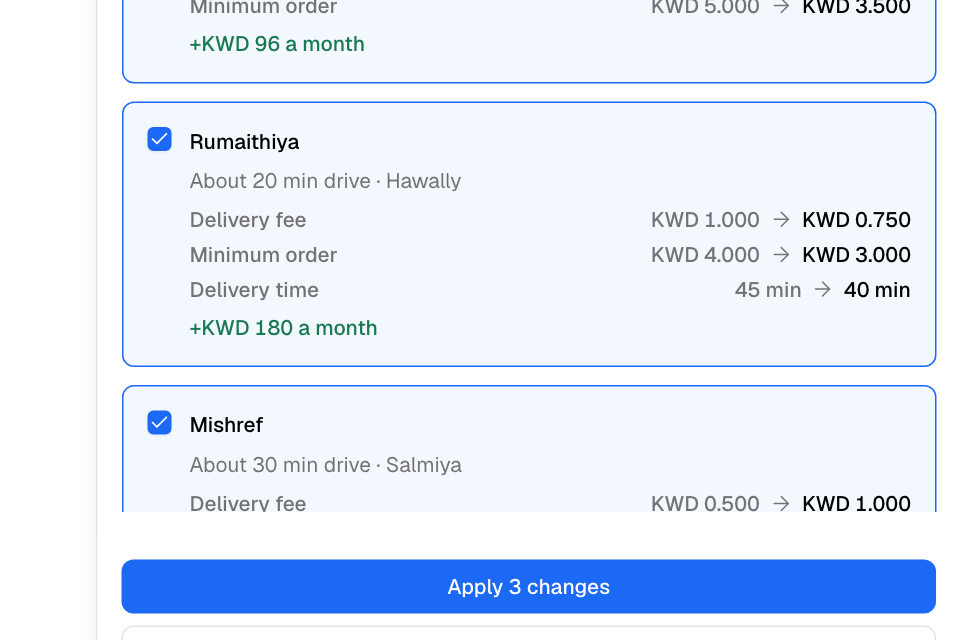
Zyda AI checks the delivery fee, minimum order and delivery time of your zones. When it suggests changes, a row opens its zone plan.
- Select the row's button.
- Read each zone: the value now, the new value, and the profit a month.
- Untick any zone you do not want to change.
- Select Apply with the number of changes.
To change a zone yourself, see Change a zone's fee, minimum, time or hours.
Hide a row for later
- Select Later on the row.
- You see "Hidden from Needs you." Select Undo to bring it back.
A hidden row stays hidden for you, in this browser, for this store. Other people still see it.
Rules and limits
- Needs you shows at most four rows. When you fix one, the next one can show.
- A busy, closed or switched-off branch shows only after an hour, and only at hours when it usually gets orders. A change you made minutes ago is taken as your choice.
- Money shows only if your role can see sales.
- Branch staff see the rows without amounts, and without the buttons that switch delivery, pickup or publishing.
- Publish store is for the store owner. Turn on auto-accept is not offered when your store uses a POS integration.
- If Home shows one branch, the rows are about that branch. Turn on auto-accept then becomes See orders, because auto-accept changes every branch.
- While your Zyda plan is locked for late payment, only End busy works from Home.
- If a check could not run, the card says so, for example "busy branches could not be checked just now."
Common questions
I ended busy by mistake. Can I undo it?
Yes. Select Undo in the message within 10 seconds. After that, set the branch as busy again from Manage > Orders. See Pause new orders when you are busy.
Why did a row come back after I fixed it?
Home's numbers are kept for about a minute. The row can show again until Home checks again.
Why does Needs you show other rows on Today?
On Today, Needs you lists what needs someone now: late orders, orders waiting to be accepted, items off and busy branches. See See how today is going.