For: Owners, Operations, Branch staff
Where: Manage > Preparation
Available: Web dashboard and Zyda phone app (Android) · All countries
Bakeries, caterers and busy kitchens prepare ahead. The preparation list adds up every item, option and note for the orders due in a period, so you know what to make before the orders arrive.
How it works
The list counts orders by their due time. An order placed last month for tomorrow counts tomorrow. Identical items with the same options and notes are added together.
A business day runs from 5 AM to 5 AM, in your store's time. An order due at 2 AM counts on the day before.
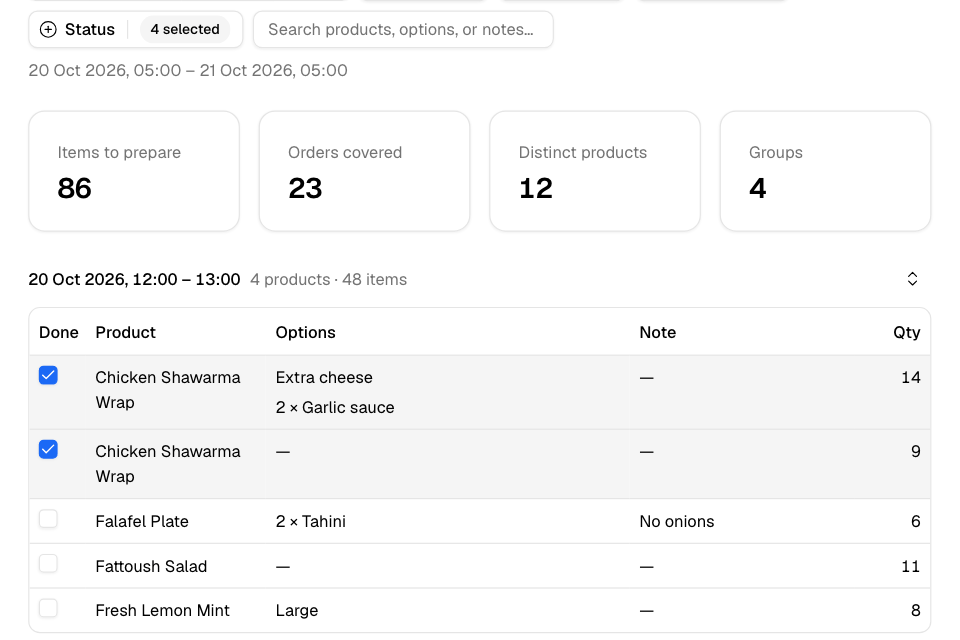
Use the list
- Go to Manage > Preparation.
- Under Preparation window, choose Today, Tomorrow, This week or Custom (up to 31 days).
- Under Status, choose which orders to count. For example, leave out new orders you have not accepted yet.
- Under Group by, choose Time slot, Date, Delivery area, Category or No grouping.
- Tick Done next to each line as the kitchen makes it.
The cards at the top show Items to prepare, Orders covered, Distinct products and Groups.
Search finds products, options or notes.
If you list allergens, an Allergens column shows them.
Print or export
- Select Print for a paper copy of the full list.
- Select Export CSV to open it in a spreadsheet.
Rules and limits
- Done ticks are saved on this device only. Other staff and devices do not see them.
- You see only the branches you have access to.
Common questions
Why is an order missing from the list?
Check its due time is inside the window, and its status is ticked under Status.