For: Owners, Operations
Where: Manage > Orders > open an order > Refund
Available: Web dashboard and Zyda phone app (Android) · All countries
Needs: The refunds permission
A customer got a cold dish, a missing item, or a cancelled order. You can send back all of the money, a set amount, or the price of some items. You can also add compensation to their wallet.
How it works
You can refund any paid order, cancelled or delivered, while money is left to refund. Zyda sends the money back the way the customer paid:
| Paid with | Money goes to | How long |
|---|---|---|
| KNET, Mada, Benefit or Meeza | The customer's bank | Within 24 hours |
| Credit card or Apple Pay | The customer's card | 5 to 10 working days |
| Store wallet | The customer's wallet | At once |
When an order was paid partly by card and partly by wallet, Zyda refunds the card first, then the wallet.
Cash, card on delivery, paid in store and on-account orders have nothing to refund through Zyda. Give the money back yourself.
Refund an order
- Open the order in Manage > Orders.
- Select Refund.
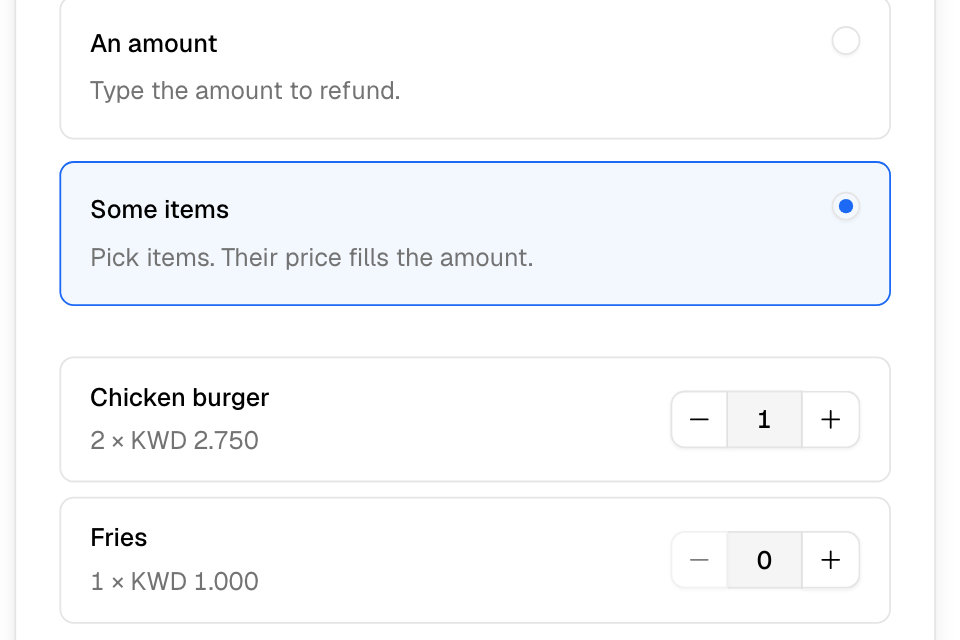
- Under How much, choose:
- Everything left: all the money not refunded yet.
- An amount: type the amount.
- Some items: choose how many of each item. Each item refunds what the customer paid for it, after discounts.
- Check Where the money goes. It also shows the service fee given back, the cashback taken back and what is left to refund.
- Optional: add Compensation to the customer's wallet, and a Reason.
- Select Refund.
The order's Refunds card lists each refund, who sent it, the reference and how long the card takes.
If a refund fails
- "Your balance with the payment provider is too low for this refund." Your balance at Tap or MyFatoorah is lower than the refund. Wait for new online orders to come in, then select Retry card refund.
- For any other card failure, select Retry card refund.
Rules and limits
- You need the refunds permission at the order's branch. The Owner and Operations roles have it. Branch staff, Finance and Marketing do not.
- Only one refund can run on an order at a time.
- You cannot refund more than is left.
- A refund takes back cashback in proportion. Loyalty points do not change.
- For a wholesale order on account, the refund lowers what the business owes. No money moves.
- Dine-in refunds are made on the table.
Common questions
Why don't I see the Refund button?
You do not have the refunds permission, the order is not paid online, or it is already fully refunded.
Where do refunds show in my reports?
In Manage > Closing, on the day you requested them, and in Finance > Transactions > Refunds.