For: Owners, Operations, Marketing
Where: Understand > Customers > Habits
Available: Web dashboard · All countries
Do customers come back? Do they pay cash or by card? Do they want delivery or pickup? Habits answers these questions with a chart and a table for each one.
How it works
Go to Understand > Customers, then select Habits. There are three tabs:
- New vs returning: customers ordering for the first time, against customers who ordered before.
- Payment methods: one part for each way customers paid, such as cash, KNET or card on delivery.
- Delivery vs pickup: delivery orders against pickup orders.
For each tab, choose what to measure in the list next to the tabs: Net Sales, Average Order Value, Total Orders or Total Customers.
The chart stacks the parts of each day or month. For Average Order Value, the parts stand side by side, because averages do not add up.
Under the chart, Full report shows the same numbers in a table, with one row for each day or month.
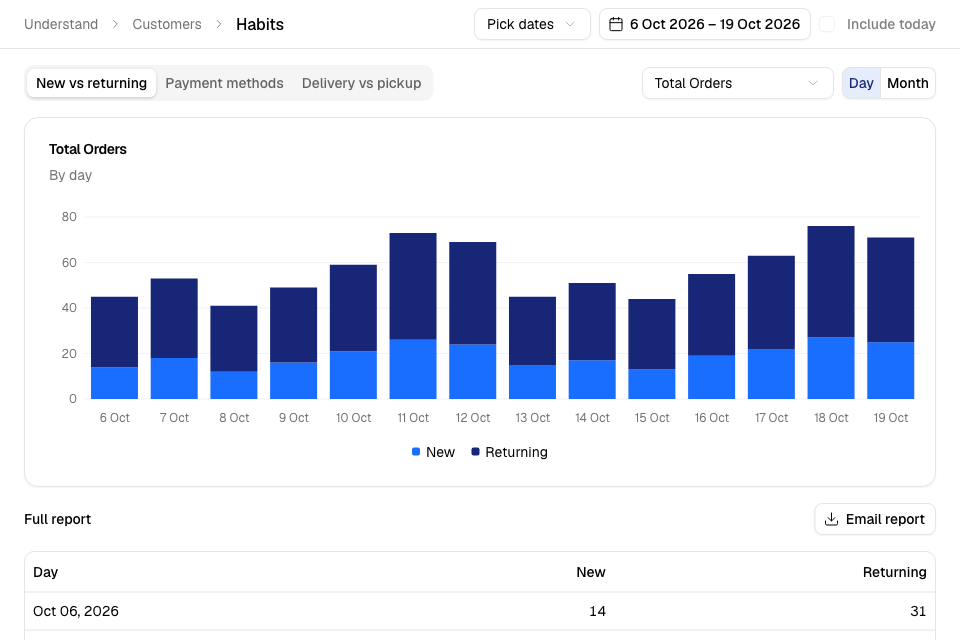
Read a habit
- Go to Understand > Customers > Habits.
- Choose the dates. Tick Include today to add today.
- Select a tab: New vs returning, Payment methods or Delivery vs pickup.
- In the list next to the tabs, choose what to measure.
- Select Day or Month.
If the dates are longer than 31 days, the chart shows months. The table can still show days.
Export a report
- Open the tab you want.
- Select the button over the table:
- On New vs returning, select Email report. Zyda emails it to you. You see "New vs Returning report has been sent to your email".
- On Payment methods and Delivery vs pickup, select Export. The file downloads to your computer.
The export uses the dates, the measure and Day or Month that you chose.
Rules and limits
- You need access to customers to see Habits. Its numbers also need view access to sales. Without it, the page shows "The report didn't load." The Owner, Operations and Marketing roles have both.
- Export and Email report need the Download reports permission. The Owner and Operations roles have it.
- Only accepted orders count.
- The table shows 30 rows on each page.
Common questions
What is a returning customer?
A customer who ordered from your store before. A new customer orders for the first time.
Where do I see each customer's segment?
On the Profiles tab. See Find customers by segment.