For: Owners, Operations, Marketing
Where: Understand > Sales > Items > Bought together
Available: Web dashboard · All countries
When customers often order two items together, you can sell them as a combo or suggest one with the other. Bought together finds those pairs in your own orders.
How it works
Go to Understand > Sales > Items, then select the Bought together tab.
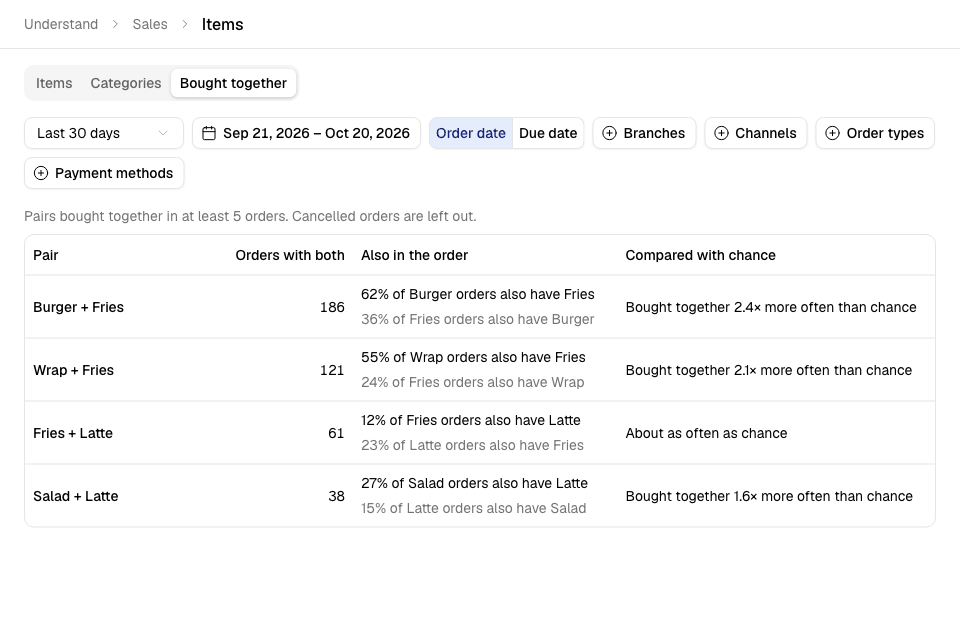
You see up to 20 pairs. The pair with the most orders comes first. For each pair, you see:
| Column | What it means |
|---|---|
| Pair | The two items, for example Burger + Fries. |
| Orders with both | How many orders had both items. |
| Also in the order | Two lines. For example, "62% of Burger orders also have Fries", and the same the other way. |
| Compared with chance | How much more often the two share an order than if customers picked them at random. |
Compared with chance reads one of three ways:
- "Bought together 2.4× more often than chance": a strong pair. Customers pick them as a set.
- "About as often as chance": both items are popular, but one does not bring the other.
- "Less often than chance": customers seldom take both.
Find your pairs
- Go to Understand > Sales > Items.
- Select Bought together.
- Choose the period, for example Last 30 days, or select Custom for your own dates (up to 93 days).
- Optional: narrow the orders with Branches, Channels, Order types or Payment methods.
- Read the pairs from the top.
To use a pair, make it a combo, or create an offer for it. See Create a combo meal.
Rules and limits
- A pair shows only when at least 5 orders had both items. This keeps out pairs that met by chance.
- Cancelled orders are left out.
- An item that is twice in one order counts once for that order.
- A very large order, with more than 50 different items, adds no pairs. This keeps catering and business orders from filling the list.
- An item you deleted shows as "Item no longer on the menu".
- You need view access to sales. There is no export on this tab.
Common questions
I see "No two items were bought together in 5 orders or more". Why?
Your period has too few orders with the same two items. Choose a longer period, or clear a filter.
Why does a popular pair say "About as often as chance"?
Both items are in many orders. They often meet in the same order, but one does not make customers take the other.