For: Owners, Operations
Where: Serve > Pickup
Available: Web dashboard · All countries
Some customers want to order ahead and collect the order themselves. Pickup lets them collect it in the branch. Curbside lets them stay in the car while your team brings the order out. You turn both on per branch, on one screen.
How it works
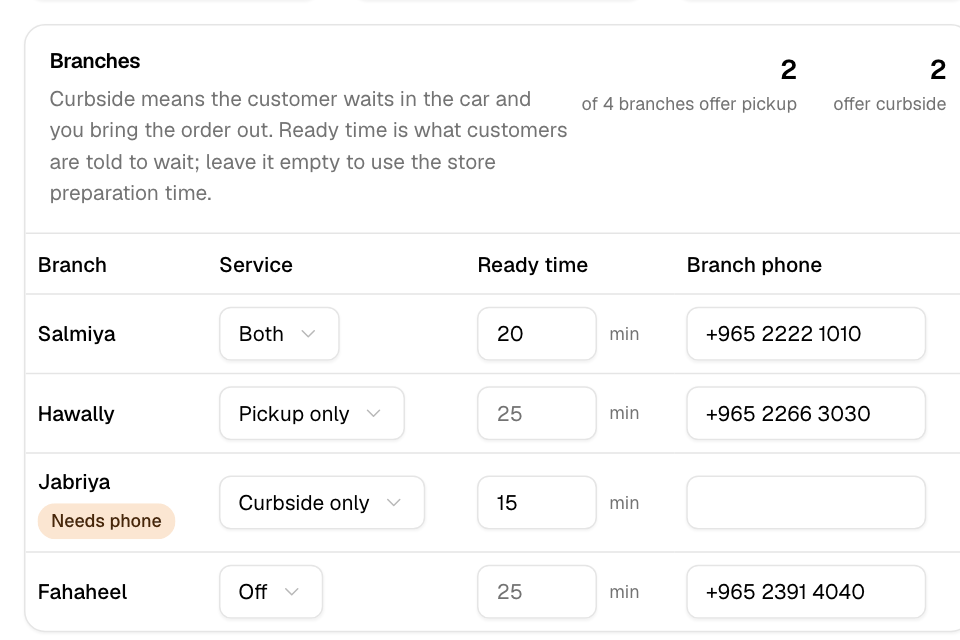
Each branch has one Service setting:
| Service | What customers can choose |
|---|---|
| Pickup only | Collect the order in the branch. |
| Curbside only | Wait in the car. Your team brings the order to the car. |
| Both | Either one, at checkout. |
| Off | No pickup at this branch. |
Each change saves as soon as you make it. When you turn on pickup or curbside, the branch also shows to customers as a place they can visit.
Customers see a Ready time at checkout. This is how long they are told to wait. If you leave it empty, the branch uses your store's preparation time.
Pickup and curbside orders come into Manage > Orders like any other order. Curbside orders are pickup orders that also carry the customer's car.
Turn on pickup or curbside
- Go to Serve > Pickup.
- If no branch offers pickup yet, select Turn on pickup. The branch list opens on the side.
- Find the branch. Under Service, choose Pickup only, Curbside only or Both.
- Under Ready time, type the minutes customers wait, or leave it empty to use your store's preparation time.
- Under Branch phone, type the number customers call about their order.
You do not need to select Save. Each field saves when you leave it.
If a branch shows Needs phone, add its Branch phone.
See how pickup is doing
When a branch offers pickup, the page shows three numbers. They cover the last 30 full days, compared with the 30 days before:
- Pickup orders, and their share of all your orders.
- Pickup sales.
- Average order.
Curbside orders count as pickup orders here. The numbers do not include today.
Rules and limits
- One setting controls pickup and curbside together. You cannot turn on curbside without choosing it in Service.
- Ready time takes whole minutes above 0.
- Opening hours, holidays and the last order time come from the branch. Change them in Setup > Branches.
- If a save fails, you see "Couldn't save. Try again." and the field goes back to what it was.
Common questions
Why does a branch show "Needs phone"?
The branch offers pickup or curbside but has no Branch phone. Customers use this number to call about their order. Add it in the table.
Do pickup or curbside cost extra?
No. Pickup and curbside are part of your plan.
Where do I change the branch's opening hours?
In Setup > Branches. Open the branch and change Opening hours.