For: Owners, Operations, Branch staff
Where: Manage > Drivers > Network
Available: Web dashboard · Kuwait
Without your own drivers, or on a busy night, you still need someone to deliver. The delivery network is a group of delivery companies (partners) near your branches. You can hand them orders from Zyda, one at a time or automatically.
How it works
Turn on the network, and its partners appear when you assign an order. Each partner shows its pickup time and fee. Each order a partner delivers has a delivery processing fee. Zyda takes it from your payment gateway after the delivery.
You choose:
- how much of the partner's fee the customer pays,
- your default partner,
- whether Zyda assigns orders to a partner for you, and how it picks one,
- when a late order moves to another partner.
Turn on the network
- Go to Manage > Drivers > Network.
- Turn on Use the delivery network.
Every other setting on the page needs the network on.
You can also turn it on from an order. See Assign a driver or courier to an order.
Choose what the customer pays
- Turn on Get delivery fee automatically from courier.
- Move the What the customer pays slider. It moves in steps of 5%.
The line under it says, for example, "Customer pays 60%, you pay 40%." The customer sees the partner's fee and pays your share of it. Toward Maximize Orders, the customer pays less. Toward Maximize Profit Per Order, the customer pays more. It saves when you let go.
Choose your default partner
Under Delivery partners, select Mark as Default next to a partner. It shows Current Default.
Each partner shows its rating and a short description. Partners appear here once they cover your branches.
Assign orders to partners automatically
- Turn on Assign orders automatically.
- Choose how Zyda picks a partner:
- Default: your default partner.
- Fastest: the fastest time to pickup.
- Cheapest: the cheapest delivery cost.
- Tick Every branch to turn it on for all branches, and choose once next to it. Or, under Set each branch, tick only some branches and choose for each one.
- Select Save.
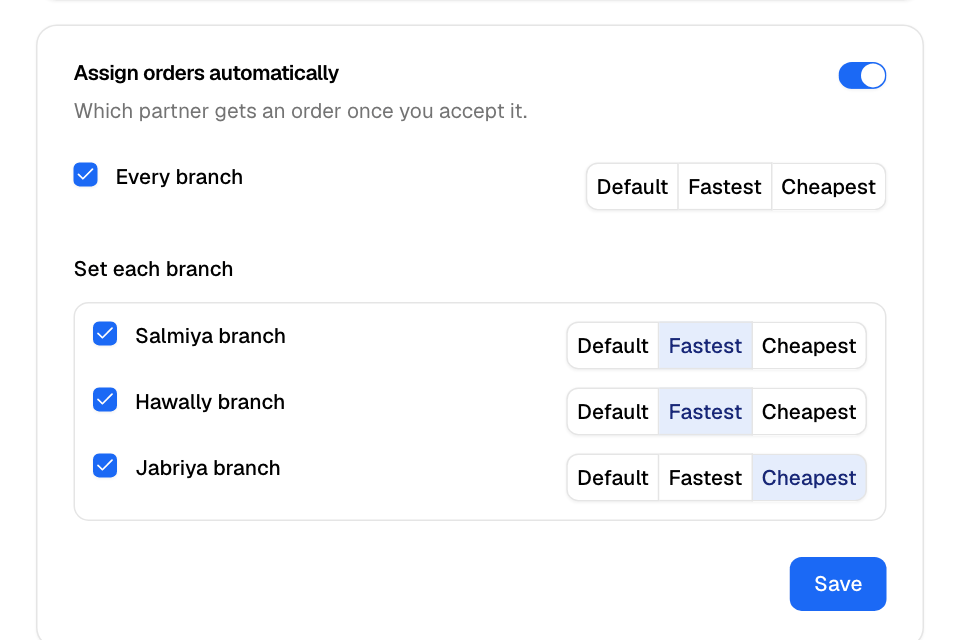
Once you accept an order, it goes to a partner.
Move late orders to another partner
- Under Move a late order to another partner, tick one or both:
- Reassign after late acceptance: the partner has not accepted the order after this many minutes. Set 3 or more.
- Reassign after late arrival: the partner is late to arrive by this many minutes. Set 15 or more.
- Select Save.
You see "Settings saved".
Rules and limits
- The Network tab shows in the sidebar for stores in Kuwait.
- Network automatic assignment and your own drivers' automatic assignment cannot both be on. Turn one off first. See Assign your own drivers automatically.
- Turning on network automatic assignment turns off automatic assignment to other courier companies you connected.
- The minimum times are 3 minutes for late acceptance and 15 minutes for late arrival.
- Partners take cash orders only if your store's online payments go through MyFatoorah.
Common questions
Who pays the delivery processing fee?
Your store pays it, on each order a partner delivers. Zyda takes it from your payment gateway when the partner delivers the order. With MyFatoorah, it comes out of your MyFatoorah balance, for cash orders too. With another gateway, it comes out of the order's online payment. It is not on your monthly invoice. See Understand your fees and payout.
Can I still use my own drivers?
Yes. Assign any order to your own driver from the order. When a partner declines an order, your own drivers can take it. See Assign your own drivers automatically.