For: Owners, Operations, Marketing
Where: Your online store and your app
Available: Web dashboard and Zyda phone app (Android) · All countries
A customer says their code does not work. This article shows what they see, and what each message means.
Where customers find offers
- Home page: automatic offers first, marked Applied automatically, then the codes you listed with an Apply button.
- Item cards on your website: a badge such as "Buy 1 get 1".
- Checkout: Offers and promo code, where customers type a code.
- Your link: a shared offer link applies the code by itself.
Offers limited to delivery zones are hidden from customers outside those zones.
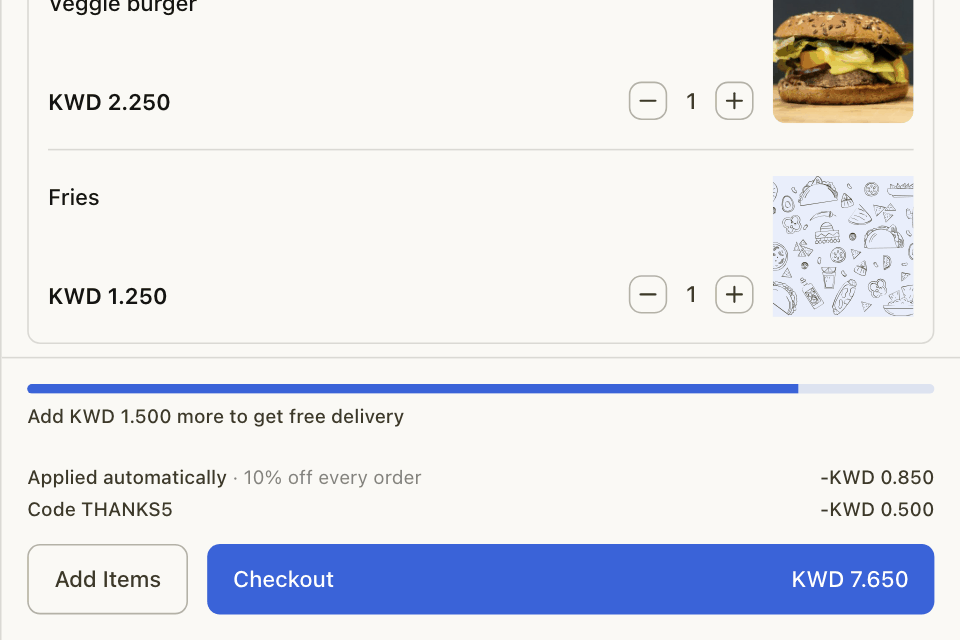
In the cart
- Each automatic offer has its own line, with the amount saved.
- A code has its own line.
- Customers close to a spend level or free item see "Add 1.500 KWD more to get free delivery".
- For a free item, customers may be asked to Choose your free item.
Messages when a code does not work
| The customer sees | Why |
|---|---|
| This voucher is not found or expired | The code is wrong, ended, paused, used up or its budget is spent. |
| This offer does not work at your order time | The order time is outside the offer's days or hours. |
| Sorry, this voucher not working for the current order mode | The offer is for delivery only or pickup only. |
| No eligible items added | No item in the cart counts for this offer. |
| Sorry, this voucher has reached its maximum redemption limit | The offer reached its total use limit, or this customer used it the maximum number of times. |
| This offer is not available for your account | The offer is for new, returning or regular customers only. |
| Your order subtotal didn't reach the minimum required amount | The cart is below the minimum. |
| Voucher only available in specific branches | The order is from another branch. |
| Not available in your area | The delivery address is outside the offer's zones. |
| Available in the app | The offer is for your app only. |
In your app, most of these show as "Invalid code". On the website, a code below its minimum shows as Pending Promo until the cart reaches the minimum.
Codes and loyalty rewards
A customer can use a promo code or a loyalty reward on an order, not both. In the app, the customer is warned before one replaces the other.
Common questions
Do customers in the app see buy X get Y offers?
The app does not show the badge, but the discount still applies at checkout.
Does a customer get the use back if I cancel the order?
Yes. Cancelled and returned orders give the use back. A partial refund does not.