For: Owners, Operations, Marketing, Finance, Branch staff
Where: Top bar > your brand's name > All brands
Available: Web dashboard and Zyda phone app (Android) · All countries
The short list in the top bar holds up to 50 brands. When you run many brands, use the Switch Store page. It lists every brand you can open, and you can search it.
How it works
The page shows one card. At the top is the brand you are in, with a badge: Published or Unpublished. Published means customers can open the store to order. Unpublished means they cannot.
Under it is a search box, then every other brand. Each row shows the brand's logo, its name and the same badge. Select a row to open that brand.
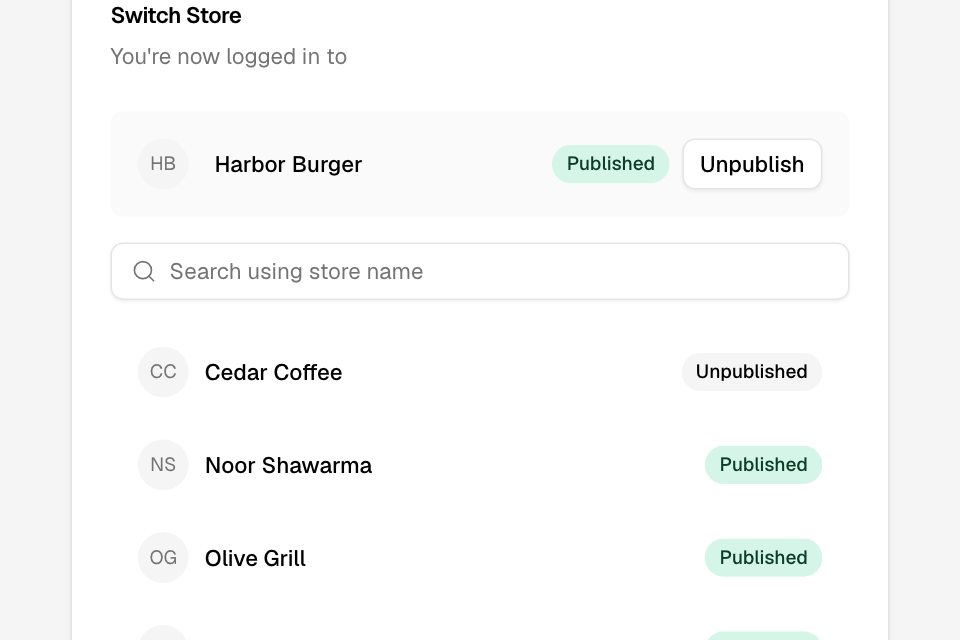
Open the page
- Select the name of your brand in the top bar.
- Select All brands, at the end of the menu.
You can also press Ctrl K (⌘ K on a Mac), type "All brands" and select it.
Find and open a brand
- Type part of the brand's name in Search using store name. English and Arabic names both work.
- Select the brand's row.
You see that brand's start page. Zyda shows each name in the page language.
If nothing matches, you see No matching stores and "Try another name."
Go back
Select Back, or press Esc. You return to Past Orders of the brand you were in.
In the Zyda phone app
Tap the brand's name at the top of the screen. The Switch Store screen has the same parts. It shows the brand you are in, a search box, and your other brands with their badges. It is in the new look of the Android app. See Switch between your brands.
Rules and limits
- The page lists every brand where you have a role. It has no limit.
- It shows 40 brands first, and adds 40 more as you scroll.
- The brand you are in is at the top. It is not in the list below.
- Other brands are in order of their English names.
- Search works from the first brand. The top bar menu shows a search box only from six brands.
- A person with the right role also sees Publish or Unpublish next to the brand they are in. See Take a brand offline or publish it again.
Common questions
The page says "store". The top bar says "brand". Are they different?
No. Zyda uses both words for the same thing: one online store with its own menu and orders.
Why does Back open Past Orders?
Back always opens Past Orders of the brand you are in. It does not return you to the page you left.
What does Unpublished mean?
Customers who open that brand's store link cannot order. See Customers see your store as closed.