For: Owners, Operations, Branch staff
Where: Zyda app > More > Settings > Notifications > Push > Orders
Available: Web dashboard and Zyda phone app (Android) · All countries
Needs: The new look of the Zyda app (Android) to hear other brands.
You take orders in two brands in the same shift. You need to know which brand each new order is for, and which screens ring for which brand.
How it works
| Where you are | Which brands ring |
|---|---|
| The web dashboard | The brand that is open. |
| The Zyda phone app, open | Every brand where your role gets new orders. The open brand rings at once. The other brands ring when their message arrives. |
| The Zyda phone app, closed | The same brands, as phone notifications. |
On the web, the page hears new orders for the open brand only. When you switch to another brand, the rings and the waiting-order alerts of the brand you leave end. The other brand's orders come to its own page when you open it.
In the phone app, you see which brand an order is for. If you have more than one brand, the card shows the brand's name after the order number.
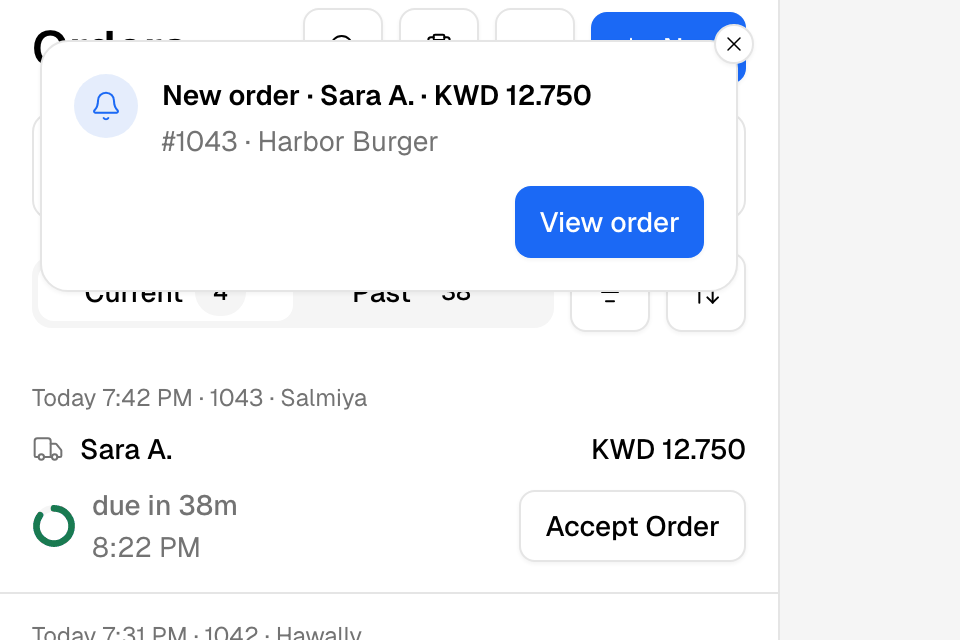
Tap the card, or View order, to open the order. The app switches to that brand first.
Hear every brand on your phone
- Open the Zyda app and go to More > Settings > Notifications.
- Under Push, turn Orders on.
- Under In the app, set Order alerts to On if you want the card.
- Allow notifications for Zyda in your phone's settings.
See Set order alerts and sounds in the app for the sounds.
Rules and limits
- The Orders switch is for the whole phone, not for one brand. With it off, the phone gets no order messages from any brand. The brand that is open still rings.
- With Order alerts off, a message for another brand shows as the phone's own notification. The app does not ring for it. Tap the notification to open the order.
- Several orders at once show "3 new orders", with no brand name. Open Orders to see them.
- The web dashboard rings only for the open brand. For all brands, use the phone app.
- This works in the new look of the Android app. The iPhone app does not have it yet.
Common questions
My computer does not ring for my second brand. Why?
The page follows the brand that is open. Switch to the second brand to hear it. Or use the phone app, which rings for all your brands.
How do I know which brand an order is for?
In the app, the new-order card shows the brand's name when you have more than one brand. On the web, the brand in the top bar is the brand you are looking at.
Do I get alerts for brands where I have no role?
No. You get alerts for the branches your role covers, in each brand where you have a role.
Can my team choose which brand rings for them?
Each person gets alerts for the brands where they have a role. To choose which alerts go by email, SMS and WhatsApp, see Choose which alerts your team gets.